WooCommerce stores with large catalogs slow down because of a single architectural reality: WordPress stores every product attribute as a separate row in the wp_postmeta table. White-label agencies that don't account for this structure ship stores that work at 500 products and crawl at 5,000.
TL;DR: High-SKU WooCommerce performance problems trace back to five mechanical failures: unbounded postmeta queries, plugin-driven query multiplication, variation table explosion, misconfigured WP-Cron, and handoff briefs that never specify speed targets. Fix the architecture at each layer, not the symptoms on the surface.
Every WooCommerce product stores its data across two tables. wp_posts holds the product title and description, while wp_postmeta holds everything else: price, stock status, weight, dimensions, custom attributes, and the SKU itself. Each piece of data occupies its own row. A single product with 15 attributes generates 15+ rows in wp_postmeta. Scale that to 10,000 products and you're looking at 150,000 or more meta rows that MySQL must search through on every product query.
The problem compounds because wp_postmeta uses an Entity-Attribute-Value (EAV) schema. As documented by Performant Code's analysis of high-SKU database optimization, "queries must search through large volumes of meta records to retrieve relevant data. As your catalog grows, these queries become heavier and slower."
White-label agencies building for clients with 3,000+ products need to understand this isn't a hosting problem you can throw RAM at. The bottleneck is structural. WooCommerce query optimization starts with how data is stored and indexed, and the default schema was designed for blogs with a few hundred posts, not product catalogs with tens of thousands of metadata rows.
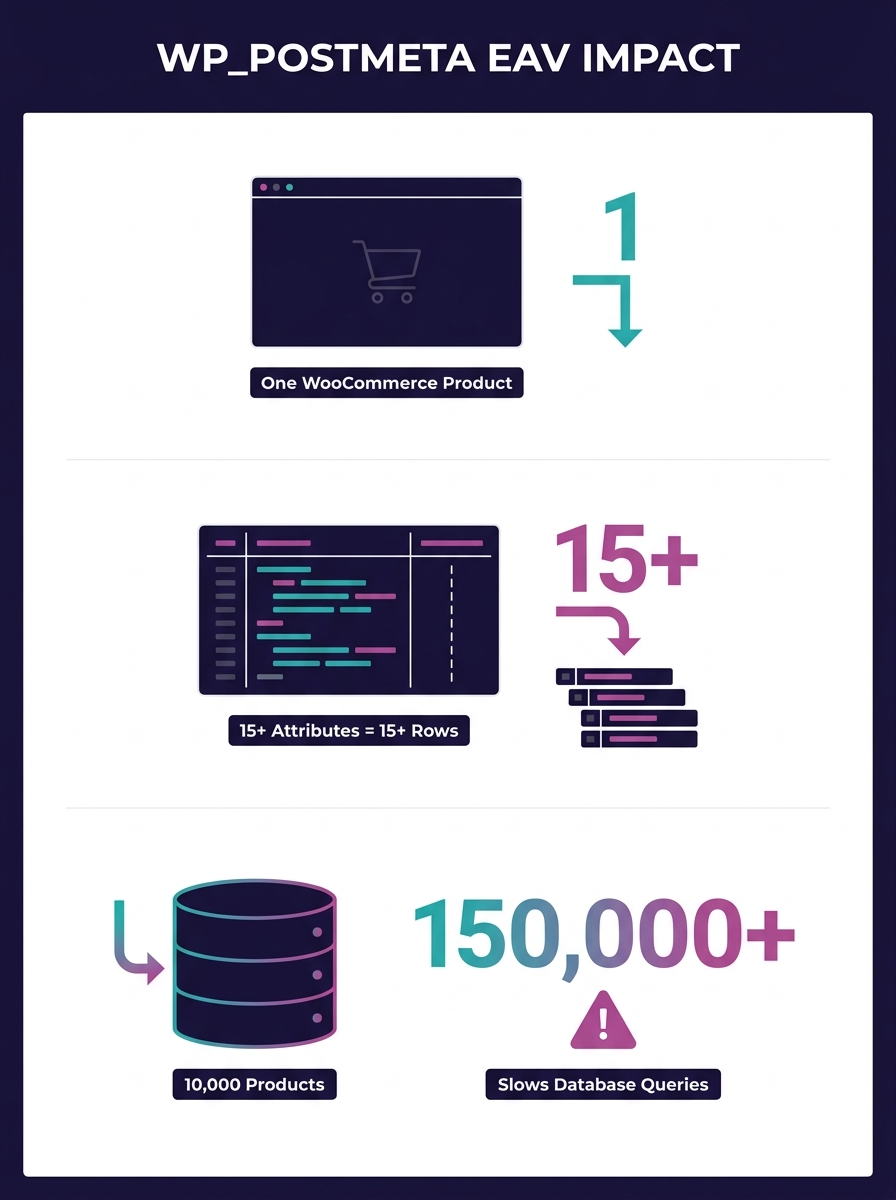
The fix: Add composite indexes on the meta_key and meta_value columns for your most-queried attributes. But be precise about it. As White Label Coders explains, "it's important to use indexes judiciously, as they can increase the time it takes to insert, update, or delete data." Too many indexes on a store processing 200+ orders per day will slow write operations, trading one bottleneck for another. Index the columns your shop page actually filters on (price, stock status, product category) and leave the rest alone.
Every plugin that touches WooCommerce product data adds its own database queries to every page load. A wishlist plugin queries postmeta. A product comparison plugin queries postmeta. A dynamic pricing plugin queries postmeta. On a 500-product store, the overhead is invisible. On a 10,000-SKU catalog, you've multiplied your already-heavy meta queries by the number of plugins reading from the same table.
Brave's aggregated analysis of agency WooCommerce failures found that 96% of WordPress security issues stem from plugins, but the performance cost runs parallel. Each plugin adds conflicting CSS and JavaScript files to the front end on top of the database overhead.
Warning: Installing a new WooCommerce plugin on a high-SKU store without running Query Monitor first is a recipe for invisible degradation. Use Pressable's [guide to WooCommerce database diagnostics with Query Monitor](https://pressable.com/blog/woocommerce-database-optimization-with-query-monitor/) as your baseline for identifying which plugins are generating the heaviest queries.
The fix isn't "use fewer plugins." That advice is too vague to act on. The fix is to audit query count per plugin per page load. Install Query Monitor, load your shop page, and sort by query time. On a store with 8,000 products, a single product feed plugin can generate 340+ queries on the admin products page alone. One WordPress.org forum user with nearly 5,000 products reported that "the performance has gotten to the point where I am wondering if I don't need to check into using a different shopping cart system." The answer wasn't switching platforms. It was identifying which plugins were making unnecessary queries against a table that already held 75,000 rows.
This connects directly to the technical debt that compounds across client portfolios when agencies skip these audits at handoff.
Product variations are the most underestimated performance killer in large catalog WordPress stores. A t-shirt with 5 sizes and 8 colors creates 40 variations. Each variation is stored as its own post in wp_posts with its own set of meta rows in wp_postmeta. That single product now occupies 41 rows in wp_posts and potentially 600+ rows in wp_postmeta.
Multiply that across a catalog of 2,000 variable products and you're looking at database tables with millions of rows. Cart operations slow because WooCommerce must validate stock and pricing for each variation at checkout. The checkout page makes round-trip queries to confirm that every item in the cart is still available at the displayed price.
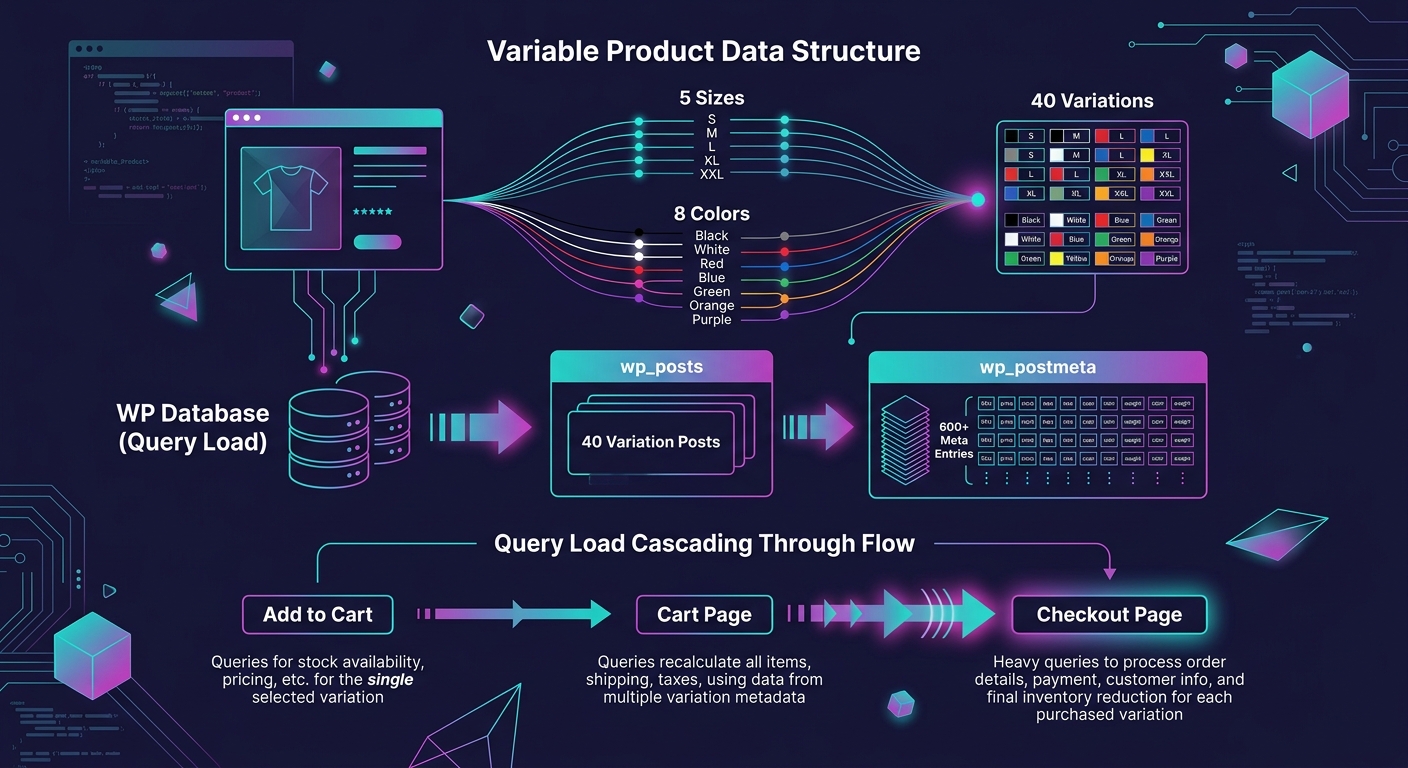
Pantheon's analysis of slow WooCommerce checkout identifies resource isolation as critical: "Shared hosting might be tempting for its affordability, but it often struggles to deliver the performance needed for a WooCommerce site, especially during high-traffic times or complex checkout processes."
The fix involves two layers. First, cap variation counts where possible. If a product has 200+ combinations, consider using a product add-ons approach instead of generating every permutation as a separate WooCommerce variation. Second, enable persistent object caching (Redis or Memcached) to store variation data in memory rather than hitting MySQL on every page load. This is where your hosting architecture decisions have outsized impact. A $30/month shared plan physically cannot run Redis.
Understanding how WooCommerce handles checkout block customizations becomes essential here too, since the block-based checkout interacts differently with variation data than the legacy shortcode checkout.
WP-Cron is WordPress's built-in task scheduler. It handles sending emails, syncing inventory, processing scheduled sales, and running plugin background tasks. The catch is that WP-Cron is triggered by page visits. On a high-traffic store, it fires on every request. On a low-traffic admin session editing products, it might not fire for hours.
For high-SKU WooCommerce stores, this creates two distinct problems. During peak traffic, cron tasks pile up and execute simultaneously, competing with customer-facing queries for database connections. During off-peak admin work, scheduled imports and inventory syncs stall because nobody is visiting the front end to trigger them.
Too many scheduled events, or stuck ones, can significantly affect admin performance on WooCommerce stores with thousands of products.
As Wooninjas documents in their analysis of slow WooCommerce admin performance, the recommendation is clear: "Consider switching to a real server cron job for better control and performance. This is especially useful for stores with high traffic or multiple plugins relying on automated tasks."
The fix: Disable WP-Cron's page-visit trigger by adding the DISABLE_WP_CRON constant to wp-config.php, then set up a real server-side cron job that runs on a fixed schedule (every 5 or 15 minutes depending on how time-sensitive your inventory syncs are). This single change eliminates the resource spikes that happen when 12 cron tasks try to execute during a traffic burst.
Batch processing matters here too. Product feed plugins that try to export all 10,000+ SKUs in a single operation will timeout. WP Marketing Robot's performance testing confirmed that "the most critical feature for handling large catalogs is batch processing. Instead of trying to process all 10,000+ SKUs at once (which inevitably leads to timeouts), a well-built plugin breaks the export into smaller, manageable chunks."
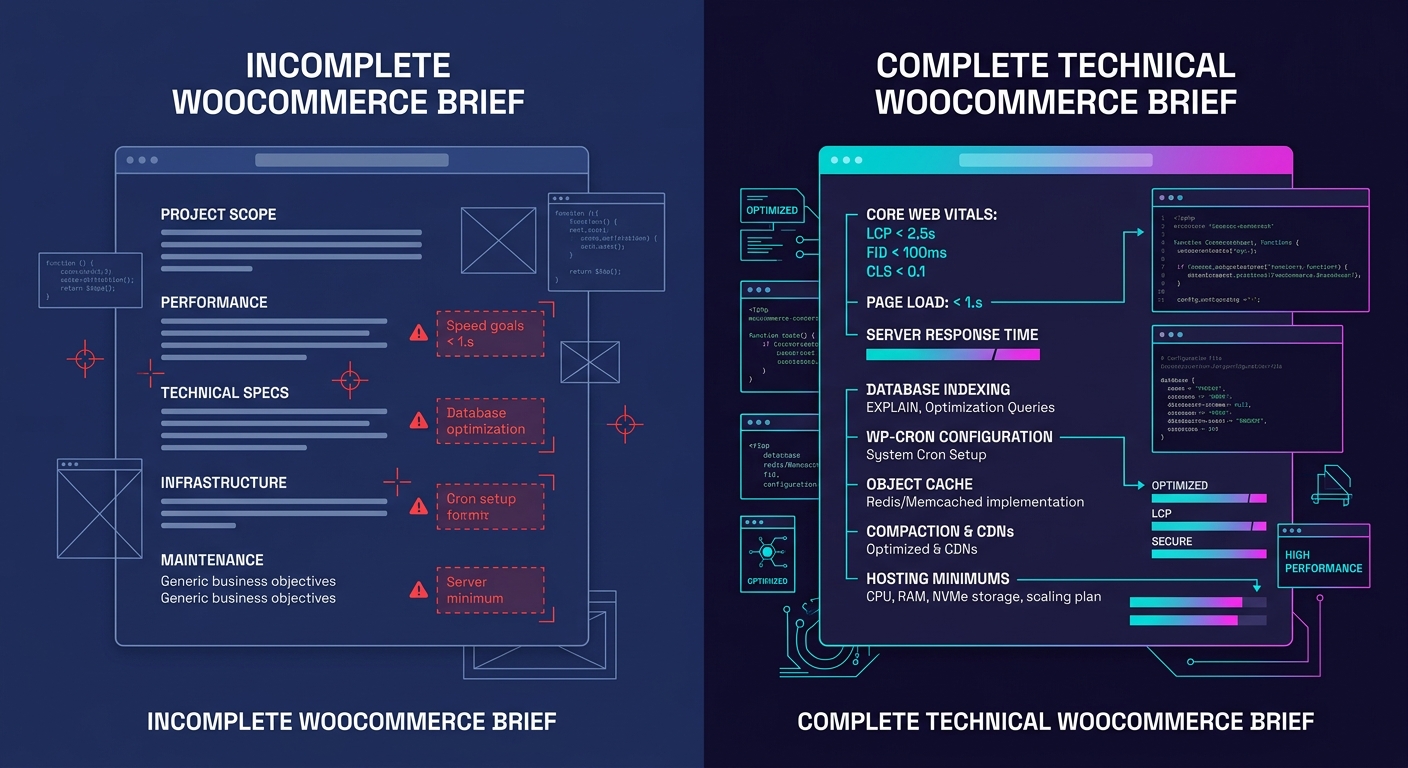
Why do the four technical failures above keep recurring across agency portfolios? Because the agency handoff brief never mentioned performance. White-label WooCommerce performance doesn't degrade because developers lack skill. It degrades because the scope document specified "build a WooCommerce store with 8,000 products" without defining what acceptable speed looks like.
Web Help Agency's guide to white-label WooCommerce development puts it directly: "If your brief doesn't specify Core Web Vitals targets, your partner will optimize for functional completeness, not speed. The store will work. It will also load in 5–7 seconds on mobile because no one told them otherwise."
The numbers to include in every high-SKU WooCommerce brief: LCP under 2.5 seconds on mobile, CLS under 0.1, PageSpeed score above 75 on mobile. These aren't aspirational targets. They're the thresholds where Google stops penalizing you in search rankings. And a single second of additional load time can reduce ecommerce conversions by 7%.
This is the same pattern that drives budget overruns in white-label WordPress projects: when the brief leaves a dimension undefined, the partner makes their own assumptions, and those assumptions almost never favor performance over feature completeness.
Everything above assumes your store's performance problems originate in the database layer and the WordPress application stack. For stores above 50,000 SKUs, the bottleneck often shifts to search and filtering. MySQL full-text search becomes unusable at that scale regardless of how well you've indexed postmeta, and you'll need an external search engine like Elasticsearch or Algolia to handle faceted filtering. Object caching helps with repeated queries but does nothing for the first cold-load query that still hits the database directly.
The EAV architecture itself has a ceiling. WooCommerce's High-Performance Order Storage (HPOS) addressed part of the problem by moving order data into dedicated tables, but product data still lives in the same postmeta structure it always has. Agencies managing stores with catalogs in the tens of thousands of SKUs should evaluate whether the speed penalties inherent to WordPress's architecture warrant a headless approach, where WooCommerce serves as the backend engine while a faster front-end framework handles product display and filtering.
The five fixes outlined here solve the problems white-label agencies encounter between 2,000 and 25,000 SKUs, the range where most agency-built stores actually live. Beyond that range, the conversation shifts from WooCommerce performance optimization to full re-architecture. Knowing exactly where the model stops working is as valuable as knowing how to keep it running well within its limits.
Swapping a core inner block inside WooCommerce's checkout with a custom third-party replacement is architecturally impossible. The parent block structure is explicitly non-decoupled, which means every white-label WooCommerce customization strategy built on replacing inner blocks starts from a false assumption and ends in wasted billable hours.
TL;DR: WooCommerce checkout blocks cannot be modified by replacing core inner blocks or relying on legacy PHP hooks. Agencies must use the Block Extensibility API — JavaScript filters, Slot and Fill, and REST API integration — or risk building customizations that break silently on every update. With 87% of stores still on classic checkout and a documented 27% conversion lift from blocks, the migration pressure is real.
Why does this constraint matter so much for checkout customization WordPress workflows? Because agencies trained on classic WooCommerce assume they can decompose the checkout into modular parts and swap pieces at will. The WooCommerce developer blog states this directly: "the architecture of the parent blocks is not decoupled, and it won't be possible to take a core inner block and replace it with a third-party block." That sentence, published in a September 2023 architecture overview, defines the entire constraint surface for block-based checkout work.
Inner blocks handle rendering for individual sections — billing fields, shipping options, payment methods, order summary — and they communicate changes upward to the parent Checkout block through a strict data contract. You can't rip one out and drop in your own React component that renders the same section differently. The parent expects specific data shapes from each of its 6+ child blocks. Break that contract, and the checkout fails silently or throws errors that don't surface until a real customer hits the payment button in production.
For agencies running white-label WooCommerce builds across 10, 20, or 40 client stores, this constraint compounds fast. Every custom checkout modification that ignores the architecture creates a maintenance liability that multiplies across your portfolio. We've written about how technical debt spreads through client portfolios in agency contexts, and checkout blocks are one of the fastest-growing sources of that debt. A single incompatible customization copied across 15 stores produces 15 separate breakage points on the next WooCommerce update.
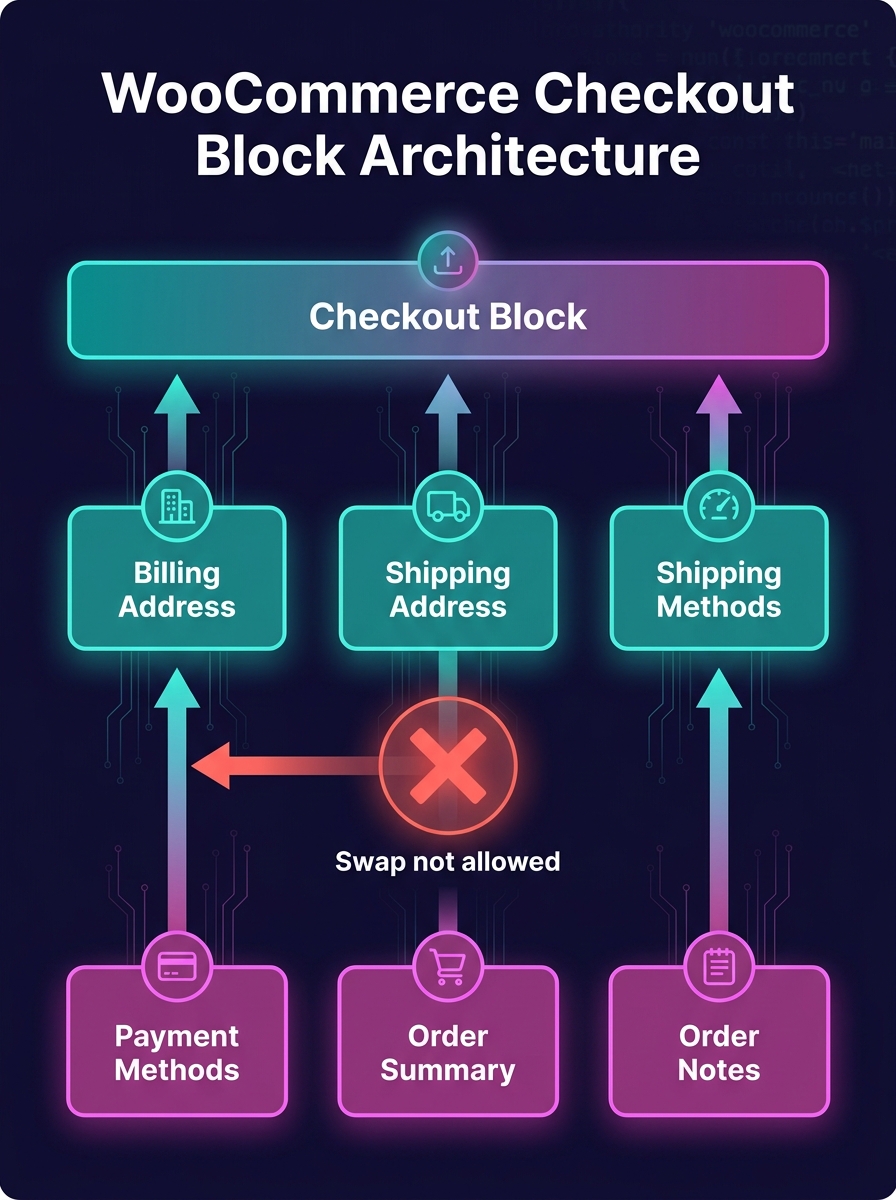
The WooCommerce block extensibility model abandons the PHP hook system that agencies have relied on for over a decade. If your developers are still writing functions hooked into woocommerce_checkout_fields or woocommerce_before_checkout_form and expecting them to modify block-based checkouts, those functions execute on the server but produce zero visible effect on the React-rendered frontend. The block checkout renders through React, processes through the Store API (introduced in WooCommerce 6.9), and exposes a completely separate set of JavaScript-based WooCommerce block hooks.
WooCommerce's own documentation on hook alternatives maps the old PHP filters to their block-based replacements. Changing existing core fields, removing billing or shipping address sections, applying quantity limits on cart items — all of these previously relied on PHP filters and actions. The block equivalents use 3 primary extension mechanisms: the Slot and Fill system for injecting custom UI components, JavaScript filters imported from @woocommerce/blocks-components for data modification, and checkout-specific Store API endpoints for server-side validation.
A Studio Wombat survey of 10,000 WooCommerce sites found that 87% still run the classic checkout shortcode, with only 13% having migrated to blocks. For sites launched after November 2023, when blocks became the default for new installations, adoption climbs to 18%. Those numbers tell you two things: your existing client portfolio almost certainly runs classic checkout, and your team's muscle memory is built entirely around PHP hooks. But every new WooCommerce install ships with block checkout active out of the box, and the migration pressure increases with each quarterly release.
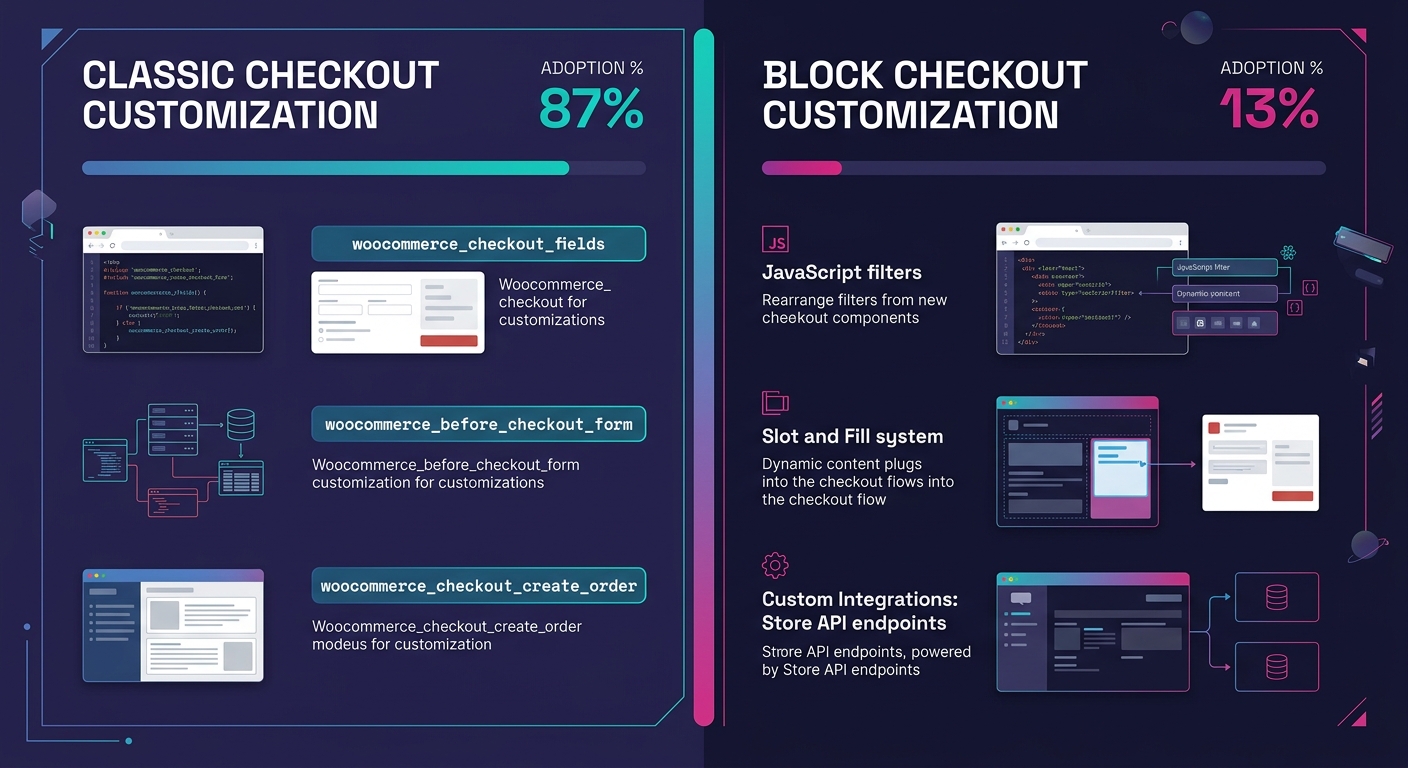
The practical gap shows up in 3 specific places:
Agencies mapping out a WooCommerce migration path for client stores need to categorize every active customization against these 3 categories before switching. Over 60% of e-commerce transactions now happen on mobile, and the block checkout's dynamic update behavior — shipping calculations, promo code application, payment selection without page reloads — directly affects mobile conversion rates and Core Web Vitals scores like INP and LCP.
A field change that took 15 minutes in PHP takes 2-4 hours in the block system the first time your team builds it. The second time, it takes 30 minutes. The investment is front-loaded.
WooCommerce's internal testing data reports a 27% increase in checkout conversions for block-based checkout compared to classic layouts. That figure reflects the cumulative effect of eliminating full page reloads during the checkout flow: shipping recalculations, coupon applications, and payment method switches all resolve dynamically within the same page context. Block checkout also ships WCAG-compliant by default, supporting screen readers and full keyboard navigation — something classic checkout required custom development to achieve.
For white-label WooCommerce agencies, this creates an uncomfortable tension. Your team's PHP expertise and existing customization codebase push you toward keeping clients on classic checkout. The 27% conversion data pushes clients toward blocks. And that 87% classic-adoption figure tells you most of the market hasn't resolved this tension either, which means agencies that build real competency in WooCommerce block extensibility and the JavaScript filter system now have a genuine competitive window before the rest of the market catches up.
The WooCommerce team has also been migrating blocks toward the WordPress Interactivity API, which their developer blog detailed in an October 2025 roadmap post. This API standardizes how blocks handle dynamic frontend behavior, replacing the ad-hoc JavaScript patterns that earlier block implementations used. For agencies building checkout customizations today, the extension points will shift again as the Interactivity API becomes the standard runtime.
Warning: If you build custom checkout extensions tightly coupled to current JavaScript filter patterns without awareness of the Interactivity API transition, you'll face a second migration within 12-18 months. Design extensions with loose coupling to the rendering layer from day one.
The practical path forward for agencies doing checkout customization WordPress work at scale involves 3 concrete decisions:
If your team doesn't have deep experience building React-based WordPress block extensions, bringing in WooCommerce developers with block architecture experience for the initial setup prevents the false-start customizations that eat margins. The learning curve from PHP hooks to block extensibility is steeper than the documentation suggests, and the cost of getting the architecture wrong lands squarely on the client's checkout conversion rate.
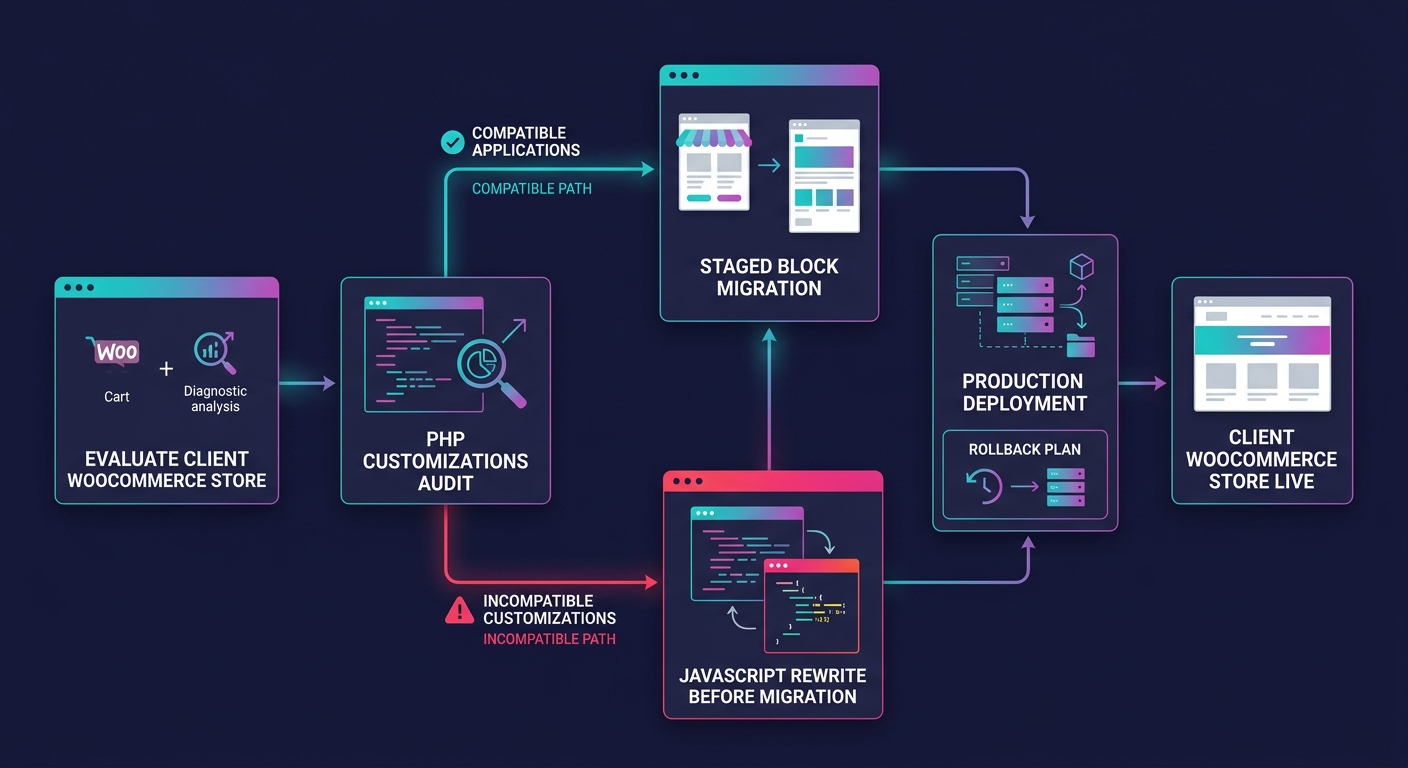
The non-decoupled architecture of WooCommerce checkout blocks remains the governing constraint for every customization decision an agency makes. You cannot replace inner blocks. You cannot rely on PHP hooks for frontend behavior. You can extend through designated JavaScript extension points, Slot and Fill injection, and Store API integrations. Everything outside those 3 mechanisms is a workaround with an expiration date printed on the next WooCommerce release.
Agencies holding the feature-toggle line on block adoption are buying time, and the 87% classic-checkout figure shows that most of the market is doing the same thing. But the combination of 27% higher conversions, default-on status for new installs, and the Interactivity API transition means that timeline is compressing quarter by quarter. The agencies that invest in WooCommerce block extensibility now will own checkout work for the next product cycle. The ones writing PHP hooks for block checkouts will keep discovering, store by store and client by client, that their code produces nothing visible on the page.
A good-looking website isn’t enough to make a Shopify store successful. Agencies and businesses today need fast-loading pages, clean code, reliable support, and developers who understand how e-commerce impacts SEO, conversions, and long-term scalability. That’s one reason many agencies now work with Shopify web developers in the Philippines to support growing client demand without overstretching internal teams.
The Philippines has become one of the top outsourcing destinations for Shopify development, particularly for agencies in the U.S., U.K., and Australia. Beyond lower operational costs, Filipino developers are known for their technical skills, strong communication skills, and the ability to work as long-term collaborative partners.
For agencies managing multiple Shopify projects, outsourcing is no longer simply a cost-saving move. It has become a strategic advantage. Here’s why businesses choose the country for outsourcing Shopify development.

Hiring in-house developers comes with long recruitment cycles, onboarding costs, software expenses, and ongoing operational overhead. For agencies juggling multiple client timelines, building a large internal Shopify team may not always be practical.
Working with a Shopify developer in the Philippines gives businesses immediate access to experienced developers who already understand Shopify’s ecosystem, including:
According to Shopify’s own eCommerce trends report, speed and user experience directly affect conversion rates and customer retention. Slow or poorly optimized stores often lead to lost revenue.
This makes experienced Shopify development support critical for agencies handling e-commerce clients.
For agencies looking to scale quickly, partnering with a team with specialized Shopify expertise often makes more operational sense than hiring from scratch.
If you’re planning to expand your Shopify service offerings, it helps to hire experienced Shopify developers who can integrate smoothly into your existing workflows.

One of the biggest reasons businesses outsource Shopify work to the Philippines is cost efficiency. Labor costs in the Philippines remain significantly lower compared to North America, Australia, and parts of Europe, allowing agencies to improve margins while still delivering high-quality work.
However, lower costs do not automatically mean lower standards.
The Philippines has a large and highly competitive tech workforce. Many developers have years of experience working with international clients and agencies. The country’s outsourcing industry continues to grow because of its skilled English-speaking workforce and strong digital capabilities.
For agencies, this creates an opportunity to:
Instead of spending heavily on recruitment and infrastructure, agencies can focus resources on sales, strategy, and client management.
Communication issues are among the biggest concerns agencies face when outsourcing development work. Delays, misunderstandings, and inconsistent updates can quickly affect client relationships.
This is another area where Shopify web developers in the Philippines stand out.
The Philippines consistently ranks among the top English-speaking countries in Asia. According to the EF English Proficiency Index, the country maintains high levels of English proficiency across its professional workforce.
For agencies, this translates into smoother collaboration across:
Filipino developers also tend to adapt well to Western business communication styles, making them easier to integrate into agency workflows.
This matters even more for white-label partnerships where developers may work closely with account managers, designers, SEO teams, and project coordinators.
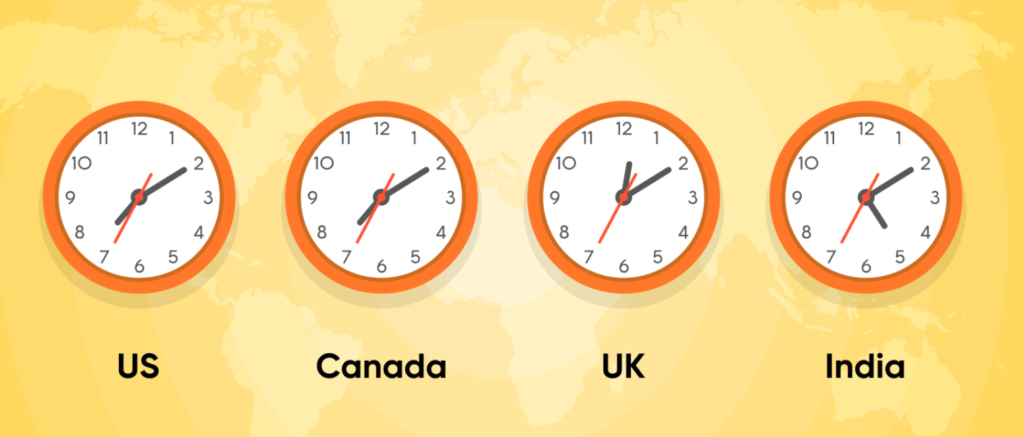
Many agencies worry that outsourcing overseas will create scheduling difficulties. In practice, Philippine-based development teams often operate with flexible schedules that align with U.S., U.K., or Australian business hours.
This overlapping availability helps agencies maintain:
For Shopify projects with aggressive launch schedules, responsiveness can make a major difference.
A reliable Shopify web developer partner in the Philippines can become an extension of your internal team rather than an isolated offshore resource.
The rapid growth of e-commerce globally has increased demand for Shopify specialists. As more businesses migrate to Shopify and Shopify Plus, developers in the Philippines have continued building specialized expertise around the platform.
Many Filipino Shopify developers now work extensively with:
The demand for Shopify experts has also encouraged developers to stay up to date on platform changes and evolving best practices. And, as competition grows, businesses increasingly need developers who understand both technical implementation and e-commerce performance optimization.
Scaling an agency can become difficult when development capacity cannot keep up with client acquisition.
Outsourcing gives agencies the flexibility to scale development resources based on demand. Instead of hiring full-time employees for every growth phase, agencies can adjust support levels depending on active projects.
This flexibility is particularly useful for:
A dependable Shopify developer in the Philippines allows agencies to grow sustainably without constantly restructuring internal teams. This model also reduces burnout among in-house staff by distributing overflow work more efficiently.
For agencies exploring long-term outsourcing partnerships, understanding the role of an outsourced Shopify web developer can help clarify how white-label support fits into agency operations.
Successful outsourcing relationships are built on consistency, trust, and reliability.
Many agencies continue working with Filipino development teams for years because of the collaborative approach many providers offer. Rather than acting like disconnected freelancers, experienced teams often function as embedded partners that understand agency processes, quality standards, and client expectations.
If your agency wants to improve delivery capacity without compromising quality, working with an experienced Shopify web developer partner can provide long-term operational advantages.

The Philippines has positioned itself as one of the strongest outsourcing hubs for Shopify development because it combines several advantages agencies value most:
For agencies managing multiple client accounts, these advantages help create smoother operations and stronger client retention.
More importantly, outsourcing today is no longer about finding the cheapest solution. Agencies are looking for dependable technical partners who can consistently deliver better Shopify experiences.
That’s where Webmastered stands out.
Webmastered helps agencies scale Shopify development through reliable white-label support, experienced developers, and streamlined communication built specifically for agency workflows. Whether you need ongoing Shopify support, overflow development capacity, or full-scale Shopify builds, our team is designed to work as a seamless extension of your agency.
Connect with us today to see how we can help you with your next Shopify project.
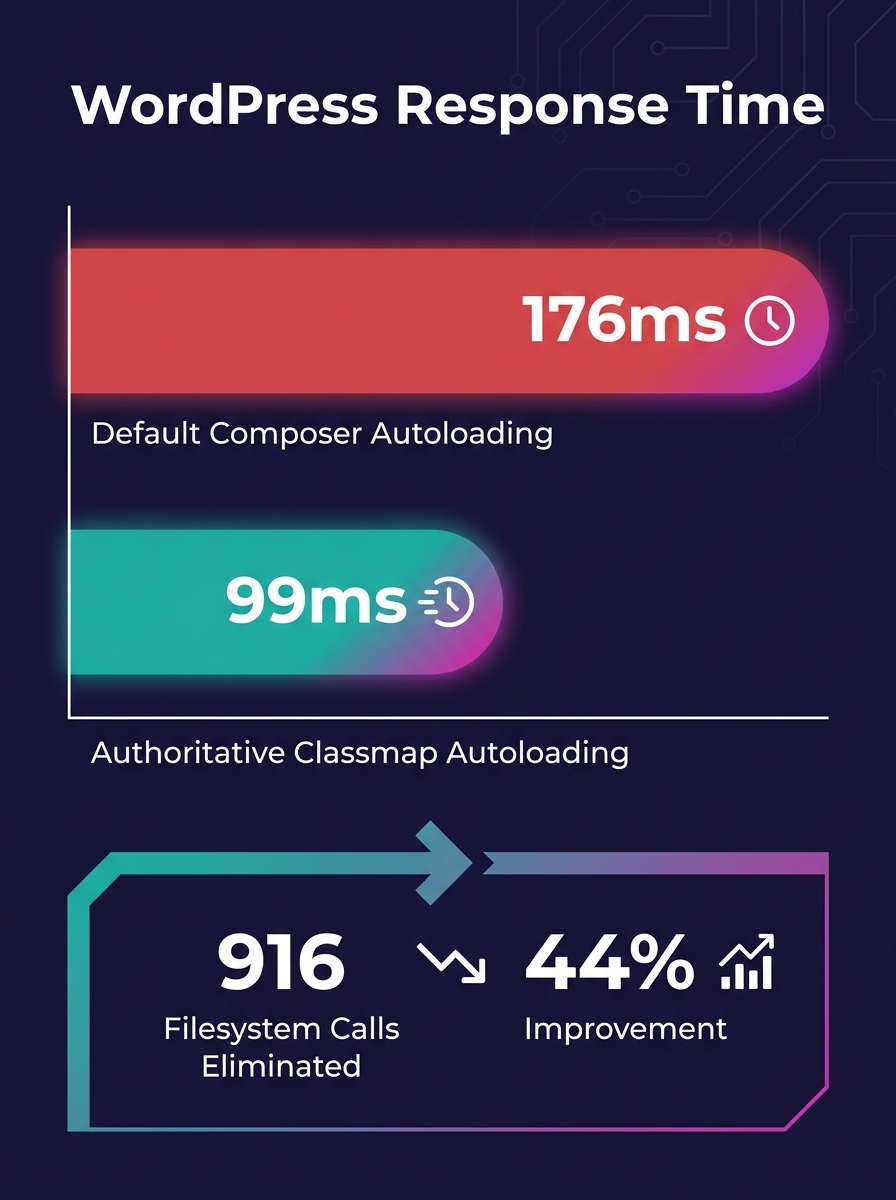
Switching a 14-plugin WooCommerce site to authoritative Composer autoloading dropped response time from 176 ms to 99 ms, eliminating 916 unnecessary filesystem calls per request. For white-label agencies shipping e-commerce builds, that gap between a managed WordPress Composer workflow and manual plugin installs hits checkout completion rates directly.
TL;DR: Composer-based dependency management gives white-label teams reproducible WordPress builds across every environment. Authoritative autoloading alone cuts WooCommerce response time by 44%. Committing the lock file, scoping dependencies, and automating updates through CI/CD are the three operational pillars that prevent client-site breakage at scale.
Only 349 out of 6,331 WordPress plugins using Composer (5.5%) have adopted authoritative classmaps as of April 2026. The remaining 94.5% rely on default autoloading behavior that triggers filesystem lookups for every class resolution. On a WooCommerce store running 14 plugins including WooCommerce itself and Yoast SEO, those lookups compound into 916 extra filesystem calls per page load.
Jordi Boggiano, the creator of Composer, endorsed the authoritative autoloading flag as "the best solution" for production deployments, while acknowledging the challenge of widespread adoption across the plugin ecosystem. The WordPress Developer Blog has approved a forthcoming article promoting this as a standard practice, following successful pull requests merged into plugins like ACF and EWWW Image Optimizer.
For agencies delivering white-label WordPress development to e-commerce clients, this matters because every millisecond of server response time affects conversion. A store responding in 99 ms instead of 176 ms loads its above-the-fold content faster, and that speed compounds across every page in a checkout funnel. When you're managing 15 or 20 client stores, the performance difference between a properly configured Composer build and a default one determines whether clients renew or churn.
Composer's composer.lock file records the exact version of every installed dependency. When you run an install command on staging, production, or a colleague's local machine, Composer reads the lock file and pulls those precise versions. Without it, each environment resolves dependencies independently, and the versions drift.
This is where white-label e-commerce delivery gets dangerous. A WooCommerce store with Stripe payment gateway 8.2.1, a shipping calculator, and a tax compliance plugin forms a tested combination. If a developer runs a fresh install without the lock file and Stripe resolves to 8.3.0, the checkout flow that passed QA breaks in production. A discussion on the Seravo WordPress repository documents this exact scenario: without the lock file in version control, production deployments require a manual step that developers forget, leading to version mismatches between environments.
The strategy for reproducible WordPress builds is straightforward. Commit composer.lock to Git. Exclude the vendor/ directory and wp-content/plugins/ via .gitignore. Run the install command (which reads the lock file) in CI/CD pipelines, never the update command (which ignores it). As Codeboxr's analysis of Composer package sources confirms, this approach ensures version control, reproducibility, automated updates, and cleaner deployments without manual ZIP downloads or FTP uploads.
If your agency has struggled with parity between staging and production environments, the lock file is the single most impactful fix. It guarantees that the plugin versions your QA team tested are the plugin versions the client's live store runs.
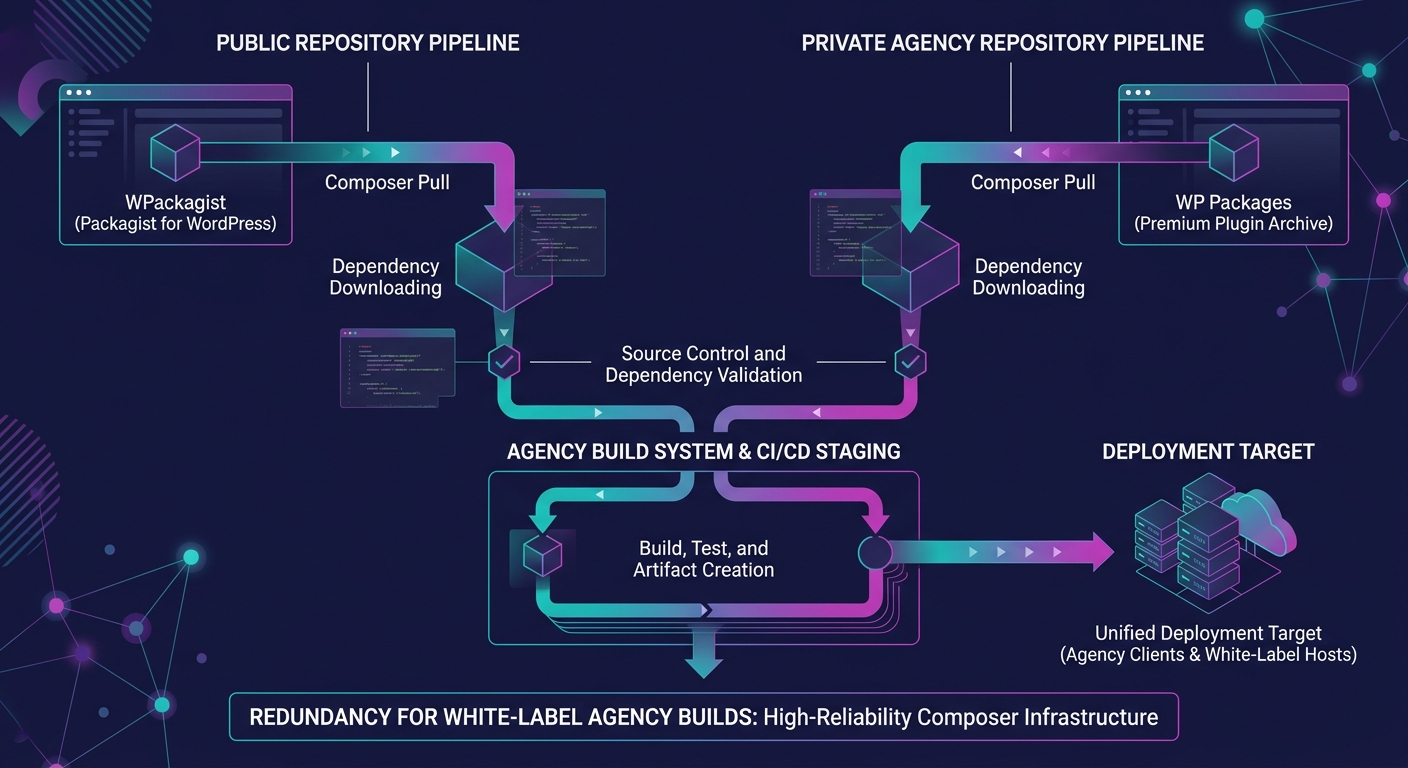
Why does repository choice matter for a white-label Composer workflow? Because your build pipeline depends on whichever mirror it pulls from, and downtime during a deploy stalls every client project in your queue.
WPackagist has served as the primary Composer mirror for WordPress.org plugins and themes since its creation. In March 2026, WP Engine acquired WPackagist, solidifying its infrastructure but concentrating the ecosystem's Composer dependency on a single corporate owner. Roots.io responded by launching WP Packages as an independent alternative, giving agencies a second option for WPackagist automation in their build pipelines.
Both repositories let you require plugins using familiar prefixes. WPackagist uses wpackagist-plugin/ and wpackagist-theme/, while WP Packages provides its own namespace. For an e-commerce build, your project file might declare WooCommerce, a payment gateway, a shipping plugin, and a handful of marketing integrations as dependencies, all pulled from one of these repositories during the install step.
| Attribute | WPackagist | WP Packages |
|---|---|---|
| Operator | WP Engine (acquired March 2026) | Roots.io |
| Plugin prefix | wpackagist-plugin/ | wp-packages namespace |
| Theme prefix | wpackagist-theme/ | wp-packages namespace |
| Cost | Free | Free |
| Independence | Corporate-owned | Community-driven |
| Bedrock integration | Native | Native |
Bedrock by Roots.io released v1.29.0 in March 2026 with a PHP 8.3+ requirement. It enforces environment-based configuration through .env files and treats WordPress core itself as a Composer dependency. For agencies building WooCommerce stores at scale, Bedrock provides the structural foundation that makes dependency management white-label workflows possible. Mohan Raj, writing about News UK's white-label WordPress infrastructure, described how his team uses Composer to install plugins and themes hosted within their GitHub organization, keeping dependency declarations centralized rather than scattered across individual servers.
WordPress loads all active plugins into a single global namespace. If Plugin A bundles Monolog v2 and Plugin B bundles Monolog v3, the first plugin loaded wins. Plugin B crashes silently, and if Plugin B handles payment processing, your client's checkout page returns a white screen.
Tools like PHP-Scoper and Mozart automatically wrap all Composer vendor packages in a custom namespace, preventing these collisions. The scoping process rewrites class references so that Plugin A's Monolog and Plugin B's Monolog coexist without interference.
A store running WooCommerce, a payment gateway, a subscription manager, and an analytics plugin could easily load four different versions of the same underlying library into a single PHP process.
For white-label agencies, the risk is especially acute. You're integrating plugins from multiple vendors into a single WooCommerce installation, and you don't control the internal dependency choices those vendors made. Without scoping, the conflict remains invisible until a customer hits the checkout button. Including dependency scoping in your build process adds 30-60 seconds to CI/CD pipeline execution. The alternative is debugging production checkout failures while your agency partner's client loses revenue per minute of downtime.
When you're auditing technical debt across white-label projects, unscoped dependencies should sit near the top of the risk list, especially on stores processing transactions.
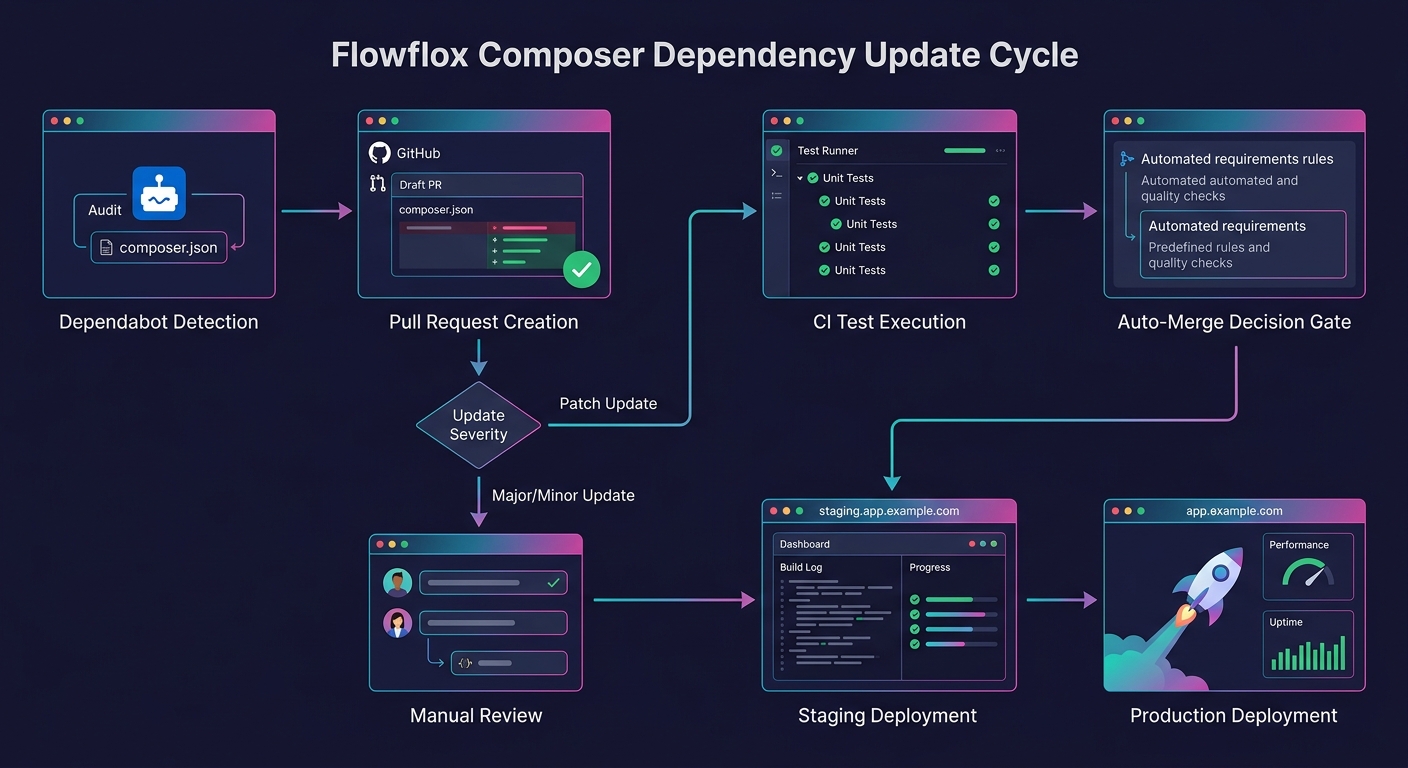
Dependabot and similar tools run daily checks against your dependency declarations, opening pull requests when newer versions of WordPress core, WooCommerce, or any declared plugin become available. Pairing Dependabot with an auto-merge tool like Mergify lets low-risk updates (patch versions, security fixes) flow through automatically while holding major version bumps for manual review.
The workflow for a white-label e-commerce build follows a predictable sequence:
This pipeline ensures plugin version control without manual intervention for routine updates. Major version changes (WooCommerce 9.x to 10.x, for example) still require human review because they carry breaking-change risk that automated QA pipelines alone can't catch.
Warning: Never run the Composer update command directly on a production server. Always update the lock file in a development or CI environment, test the result, and deploy the verified lock file to production.
Hosting platforms including Kinsta and WP Engine now support Composer-based deployments natively, meaning your install step runs as part of the deployment hook rather than requiring SSH access. This removes another failure point from the white-label delivery chain.
The 44% response-time improvement from authoritative autoloading was measured on a controlled benchmark with 14 specific plugins. Your client's WooCommerce store might run 25 plugins or 8. The improvement scales with plugin count, but the exact numbers differ per site, per hosting environment, per PHP version.
The 94.5% adoption gap tells us that the WordPress plugin ecosystem hasn't caught up with Composer best practices, but it doesn't tell us how many of those 6,331 plugins are actively maintained, how many run on e-commerce sites specifically, or how many would break under authoritative autoloading because they generate classes dynamically at runtime (those plugins are incompatible with static classmaps).
And the long-term effect of WP Engine's WPackagist acquisition on ecosystem independence remains an open question. WP Packages exists as an alternative, but its adoption numbers aren't public. If WPackagist's terms change or its availability degrades, agencies with hard-coded repository dependencies in their build files will need to migrate under pressure.
The numbers support adopting a Composer-managed WordPress workflow for white-label e-commerce delivery. The lock file eliminates environment drift. Dependency scoping prevents checkout-killing conflicts. Automated updates keep stores secure without manual overhead. Where the data falls short is in quantifying the transition cost: migrating an existing portfolio of manually-managed WooCommerce sites to Composer takes meaningful engineering time, and no published benchmark measures that investment against the ongoing savings. That calculation depends on your client count, your plugin complexity, and how many 2 AM checkout emergencies you're willing to absorb before the math becomes obvious.
Running Shopify projects sounds straightforward until the requests start piling up.
One client needs a custom product page by Friday. Another wants a speed optimization audit. Then, a long-term retainer client suddenly decides to migrate from WooCommerce to Shopify Plus. For agencies, this is usually the point at which the conversation about hiring begins.
Do you build an internal dev team? Or do you work with an outsourced Shopify developer instead?
There’s no universal answer here. The better option depends on your agency’s workload, budget, timelines, and growth plans. Some agencies thrive with an in-house setup. Others scale faster by outsourcing development work to white-label partners.
If you’re weighing the pros and cons of in-house vs. outsourced Shopify developer models, this guide breaks down the real differences without the usual fluff.

A Shopify developer is usually responsible for the technical side of building and maintaining an e-commerce store. That includes:
And depending on the project, they may also work closely with designers, SEO teams, and account managers.
Shopify itself has repeatedly emphasized the importance of fast-loading e-commerce stores and optimized user experiences for conversion rates. For agencies handling multiple clients, having reliable development support quickly becomes less of a luxury and more of a necessity.
The discussion around insourcing vs. outsourcing usually comes down to two things: control and flexibility. Both setups can work well, but each comes with trade-offs agencies need to consider before scaling Shopify services.
An in-house Shopify developer is a full-time member of your internal team who works exclusively on your agency’s projects and client accounts. They typically collaborate closely with designers, SEO specialists, account managers, and project leads in your daily operations.
For agencies with a steady stream of e-commerce work throughout the year, an in-house setup can create stronger internal alignment and more hands-on collaboration. However, building an internal Shopify team also requires long-term investment in hiring, training, and resource management.
An outsourced Shopify developer works externally through a freelancer, white-label partner, or specialized development agency. Instead of expanding internal headcount, agencies can bring in outside support when workloads increase or when specific Shopify expertise is needed.
This setup has become increasingly popular among growing agencies because it allows them to scale development support without the overhead tied to full-time hiring. Many agencies choose to hire experienced Shopify developers externally to handle more Shopify projects while keeping operations lean and flexible.
Outsourcing also gives agencies access to a broader range of technical expertise. Established development partners and dedicated Shopify experts often work on multiple e-commerce builds, migrations, and performance optimization projects, helping agencies move faster and solve technical challenges more efficiently.
Honestly, it depends on how your agency operates. Some teams benefit from having developers fully integrated into daily operations, while others need the flexibility to scale quickly without increasing internal overhead.
Here’s a simpler way to look at it:
| In-House Shopify Developers May Be Better If... | Outsourced Shopify Developers May Be Better If... |
| You have consistent Shopify work year-round Daily collaboration is critical Development is one of your agency’s core services You have the budget for long-term hiring You want complete internal oversight You prefer managing projects entirely in-house | Your workload fluctuates throughout the year You want to scale without hiring aggressively You need specialized Shopify expertise Faster turnaround times are a priority You want lower operational overhead Your team needs overflow support during busy periods |
For many agencies, outsourcing isn’t about replacing an internal team. It’s about adding flexibility when workloads increase. Some keep a lean in-house team and outsource overflow work as needed, while others rely more heavily on white-label development partners. Both approaches can work well with the right processes in place.
The conversation around in-house vs. outsourced Shopify developer setups isn’t really about which option is universally better. It’s about which option makes more sense for your current stage of growth.
Internal teams offer consistency and direct oversight. Outsourcing offers flexibility, scalability, and broader technical support.
For agencies trying to grow e-commerce services without adding unnecessary operational strain, outsourcing often creates a more efficient path forward.
That’s where Webmastered comes in.
We help agencies scale Shopify development services through reliable white-label support, experienced developers, and clear communication. Whether you need ongoing development help, overflow support, or full Shopify builds, our team works behind the scenes so your agency can deliver projects confidently and on time.If you’re looking for a smarter way to scale Shopify development without stretching your internal team too thin, Webmastered is worth exploring. Contact us today for more information.
If you’re running an agency and taking on e-commerce work, chances are you’ve either worked with a Shopify web developer or thought about bringing one in.
But here’s the thing. A lot of people still aren’t fully clear on what that role actually covers.
It’s easy to assume they just “build Shopify stores.” In reality, they sit right at the intersection of design, performance, integrations, and revenue. And if you’re managing client expectations or outsourcing builds, understanding this properly saves you a lot of back-and-forth later on.
Let’s walk through it in a way that reflects how projects actually run.

A Shopify web developer is a Shopify expert responsible for building and customizing Shopify stores beyond what you get out of the box.
That includes:
Shopify itself makes this clear in its developer documentation. The platform is flexible, but real customization still requires technical work. So while anyone can launch a basic store, a developer is what turns it into something polished, scalable, and actually effective.
Most agency projects start with a design file. Figma, Adobe XD, something like that.
A Shopify developer takes that and builds it into a live store.
That means:
This is where things can go right or wrong. If the build isn’t clean, small changes later become a headache.
Themes are a starting point. Rarely is the final product.
A Shopify web developer adjusts and extends themes to fit what the client actually needs.
That could mean:
This is also where agencies can stand out. Two stores can use the same theme and look completely different depending on how it’s customized.
This is where things get more technical.
Clients almost always need something that isn’t built into Shopify.
Examples:
This kind of work is where a developer really earns their keep.
No store runs on Shopify alone. There’s usually a stack behind it, like email platforms, CRMs, inventory systems, and analytics tools.
A Shopify developer connects all of these.
Common integrations include:
All of this runs through Shopify’s APIs. If integrations are done poorly, you end up with broken data, manual workarounds, and frustrated clients.
Site speed directly affects conversions. A Shopify developer works on things like the following:
It’s not flashy work, but it has a real impact on revenue.
A good developer also helps improve the store’s performance.
That might involve:
Small technical changes can make a noticeable difference here.
Launch is not the end of the job. A Shopify web developer usually stays involved with:
For agencies, this ongoing support is where long-term value comes from.

Understanding what a Shopify developer does is useful, but timing matters just as much.
Here’s when it makes sense to bring one in.
Hiring in-house sounds like the obvious next step until you’re dealing with fluctuating workloads and tighter timelines. For most agencies, it’s not always the most efficient move.
That’s where white-label support comes in. Not as a fallback, but as a smarter way to scale.
With the right partner, you can:
Many agencies already work this way. The difference is in who you partner with.
If you’ve outsourced before, you’ve likely run into the same frustrations. At Webmastered, we’ve built our process specifically to avoid that.
We don’t operate like a distant vendor. We work as an extension of your team. That means clear communication, realistic timelines, and output you can confidently deliver to your clients.
When you work with a Shopify web developer through us, here’s what you can expect:
No chasing for progress, and no unnecessary back-and-forth. Just reliable execution that supports your workflow. It’s a more dependable way to grow your output while keeping your standards exactly where they should be.

A Shopify store can look good on the surface and still underperform where it matters. That’s usually where the gap shows. Not in design, but in how everything is built, connected, and optimized behind the scenes.
That’s the real value of a Shopify web developer.
They’re the ones making sure your client’s store doesn’t just launch, but actually works the way it should. Fast, stable, flexible, and scalable. And for agencies, that kind of reliability makes a difference in how confidently you can take on new projects and deliver results.
Once you have the right development support in place, projects run more smoothly, timelines become more predictable, and your team can focus on higher-value work instead of putting out fires.
If you’re looking to grow your Shopify services without adding pressure to your internal team, it might be time to hire experienced Shopify developers who already understand how agencies operate.
At Webmastered, we work alongside you as a true extension of your team. You get dependable builds, clear communication, and turnaround times you can actually plan around. Whether you need support for a single project or ongoing Shopify work, we’re here to help you scale with confidence.
Contact us today for more information.
Hiring the right Shopify experts is less about finding someone who can code and more about choosing a partner who can consistently deliver results your clients will notice.
Your clients trust you to deliver results. And when e-commerce is part of the equation, the pressure to get everything right—fast—is real. Whether you’re an agency taking on a new Shopify project or a project manager trying to scale your team’s bandwidth, finding qualified Shopify experts who can actually deliver is one of the most critical decisions you’ll make. Hire the wrong person, and you’re looking at missed deadlines, technical debt, and unhappy clients. Hire the right one, and you’ve got a reliable partner who helps your agency grow.
This guide walks you through exactly what to look for, what questions to ask, and how to structure your vetting process so you consistently bring on the right Shopify talent for the job.

When you’re evaluating candidates or agencies, there’s a baseline set of technical competencies that every capable Shopify developer should bring to the table.
Liquid is Shopify’s templating language, and it’s the foundation of almost every front-end customization. A developer who doesn’t know Liquid well will struggle with even basic theme modifications. During your screening process, ask candidates to walk you through how they’ve used Liquid in past projects. Their answer will tell you a lot about their actual experience level.
Modern Shopify development relies heavily on front-end skills. Whether it’s building dynamic cart experiences, creating custom section settings, or working with Shopify’s Section Rendering API, strong JavaScript fundamentals are non-negotiable. Look for developers who are comfortable with vanilla JS as well as frameworks like React or Vue if your project calls for it.
For headless builds or custom integrations, your developer needs to be fluent in both the Admin API and Storefront API. This is particularly relevant if you’re working on a Shopify Plus project where performance and scalability are front-of-mind.
Any developer worth hiring should be using Git. If they’re not, that’s a red flag. Proper version control practices protect your projects from accidental changes and make collaboration far smoother, especially in multi-developer environments.
Shopify developers who understand Core Web Vitals, structured data, and page speed optimization add real business value. Lower bounce rates and higher conversion rates directly correlate with improving Core Web Vitals scores. This is something your clients will notice and appreciate.
Technical skills are essential. What separates a good developer from a great one is their track record. Here’s how to evaluate it.
Ask for links to actual Shopify stores they’ve built or significantly contributed to. Poke around on desktop and mobile. Check the load speed using Google PageSpeed Insights. Inspect the UX. A polished portfolio that includes real, working stores is a much stronger signal than a deck of design mockups.
Not all Shopify projects are created equal. A developer who’s only built simple stores using out-of-the-box themes may not be ready for a complex Shopify Plus migration with custom checkout flows and ERP integrations. Make sure their past work aligns with the complexity of what you need.
Shopify offers a Shopify Partner Academy with certifications in development and business fundamentals. While certifications alone don’t guarantee quality, they do indicate that a developer has committed time to understanding the platform deeply. It’s a useful filter, especially when evaluating candidates you haven’t worked with before.
The interview stage is your best opportunity to separate Shopify experts who can talk the talk from those who can walk the walk. Here are some pointed questions that reveal real competency:
Look for a structured answer that covers discovery, wireframing, setting up the development environment, using Shopify CLI, and testing across devices. Vague answers are a warning sign.
Problem-solving ability matters. Every Shopify project hits constraints. How a developer responds under pressure tells you more than any technical test.
A competent Shopify expert should mention lazy loading images, minimizing render-blocking scripts, reducing app bloat, leveraging Shopify’s CDN, and auditing third-party scripts.
Shopify releases major updates regularly. Developers who follow the Shopify Changelog and participate in the developer community demonstrate a commitment to staying sharp.
Shopify Plus unlocks features like Launchpad, Shopify Flow, and custom checkout scripts. If your clients are enterprise-level, this experience matters.

This is a question many agencies wrestle with. Both options have their place, and the right answer depends on your project volume and the level of ongoing support you need.
Freelancers can be a good fit for well-defined, one-off projects where budget is a constraint. However, freelancers come with real risks: availability issues, limited accountability, and gaps in coverage when things go sideways.
White-label development agencies, on the other hand, are a better fit for companies that need reliable, scalable capacity. Rather than managing individual contractor relationships, you get a team with complementary skill sets, built-in quality controls, and consistent communication. This model is especially powerful when your business is growing and you need to take on more projects without hiring full-time staff.
If you’re looking to hire experienced Shopify developers who can integrate seamlessly into your existing workflow, working with a dedicated white-label partner gives you far more predictability than the freelance market.
The hiring process isn’t just about finding positives. Knowing what to avoid is equally important.
Vague communication. If a developer can’t clearly explain their process or past work during the interview, that communication style won’t improve once the project starts. Clear, proactive communication is essential in client-facing agency work.
No live portfolio. A developer who can’t point you to real, active stores they’ve built should raise questions. Even junior developers should have something to show, whether it’s a test store, a personal project, or contributions to open-source Shopify themes.
Overpromising on timelines. Experienced Shopify developers know that things take longer than expected. If a candidate quotes you unrealistically fast turnaround times without understanding your project requirements, that’s a sign they’re either inexperienced or not being straight with you.
Lack of process. Solid developers have a defined workflow: discovery, planning, development, QA, staging, and launch. If a candidate’s process is "I just start building," your project will likely reflect that chaos.
No questions about the project. Good developers ask good questions before committing to anything. If a candidate never asks about your goals, your client’s audience, or the technical stack, they’re not thinking critically about the work.
A structured approach saves time and leads to better decisions. Here’s a simple framework you can use:
Step 1: Define the scope clearly. Before reaching out to any candidates, document what you actually need. Project type, timeline, budget range, tech requirements. The clearer your brief, the easier it is to filter candidates fast.
Step 2: Screen based on portfolio and relevant experience. Use the portfolio review criteria above to narrow your list before you spend time on interviews.
Step 3: Use a technical assessment. Give shortlisted candidates a small paid task relevant to your work. This could be debugging a Liquid snippet, optimizing a theme element, or walking through a code review. Real work reveals real ability.
Step 4: Assess communication in the process itself. How quickly does the candidate respond? How clearly do they ask for information? Are they proactive? Communication during the hiring process is a preview of how they’ll communicate on the project.
Step 5: Check references. Speak to past clients or employers. Ask specifically about reliability, communication, and how they handled problems. Most reference calls are valuable even if they’re brief.

For agencies managing multiple clients, the hiring process itself can quietly eat into your time and margins. Vetting freelancers, onboarding contractors, reviewing code quality, and dealing with turnover all add up. Even if those costs are not always visible, they affect delivery speed, consistency, and client satisfaction.
This is where a white-label partner for Shopify development changes the dynamic.
Instead of assembling a group of individual freelancers, you collaborate with a pre-vetted, trained team that aligns with agency workflows. You get consistency, accountability, and a smoother delivery process without the ongoing management overhead.
At Webmastered, we partner exclusively with agencies like yours. Our Shopify team is built around structured project management, clear timelines, and SEO-ready development from day one. You stay client-facing and in control of the relationship, while we handle the technical execution behind the scenes.
Hiring the right Shopify developer has never been just about technical skills. It is about finding a partner who understands your projects, communicates clearly, solves problems proactively, and delivers work your clients are genuinely happy with.
Whether you are testing a freelancer or looking for a long-term solution, the fundamentals stay the same. Look at real work, ask the right questions, run a trial, and pay close attention to how they communicate.
Your clients rely on you to deliver. You deserve an expert partner for Shopify development that helps you do that with less friction.
Ready to spend less time hiring and more time growing your agency? Partner with Webmastered and get a white-label team built for scale. Reach out today and see how we can support your next Shopify project.
Shopify experts typically refer to experienced professionals or agencies with proven Shopify track records, while a Shopify developer focuses more specifically on building and customizing stores. In practice, the best Shopify experts combine both technical skills and strategic insight.
Costs vary depending on experience and project scope. Freelancers may charge hourly or per project, while agencies or white-label partners often offer retainer or package-based pricing. It’s better to focus on value and reliability rather than choosing the lowest rate.
Freelancers can be well-suited to small, one-off tasks. However, agencies that handle multiple clients usually benefit more from a white-label partner, which offers consistent quality, better scalability, and less management overhead.
Three broken checkout flows, two mismatched shipping calculators, and a contact form that silently drops submissions. That was the Monday morning support queue for one agency partner we onboarded after their previous white-label team scaled from five concurrent builds to fifteen. The builds themselves looked fine in staging. The code was clean enough. But nobody had tested the actual paths real customers walk through after launch, and the result was predictable: client trust evaporated overnight. This is the QA collapse pattern, and it follows a disturbingly consistent trajectory across white-label e-commerce operations.
When a white-label team is running three or four WooCommerce builds at a time, somebody clicks through the checkout, somebody eyeballs the contact form, somebody spot-checks responsive layouts on their phone. QA is informal but present. Then the team picks up a seventh build, then a tenth, and the informal process doesn't scale. Nobody announces they're skipping testing. It just stops fitting into the timeline, and because it was never a documented step with assigned ownership, nobody notices the gap until production defects pile up.
This is the outsourcing quality control breakdown that most agencies don't recognize until clients start reporting issues that should have been caught internally. As one analysis of outsourced QA failures documented, outsourcing fails when communication, documentation, and expectations break down. In white-label work, the communication gap is structural. Your client doesn't talk to your dev team. Your dev team doesn't talk to the end users. Testing becomes the thing everybody assumes somebody else is handling.
The financial math accelerates the problem. When you're pricing white-label WordPress work to protect margins, QA time is the first thing that gets compressed because it's the hardest to justify on an estimate. A client sees "development: 20 hours" and nods. They see "testing: 8 hours" and ask why. So teams absorb QA into dev estimates, and when timelines get tight, testing is what gives. The work that gets skipped is the work that was never explicitly scoped, and testing is almost always that work. The consequence is quiet at first: a coupon code that applies twice, a shipping calculator that returns zero for Canadian addresses, a form confirmation email that never fires. Each one feels like a one-off bug. Taken together, they're a system failing.
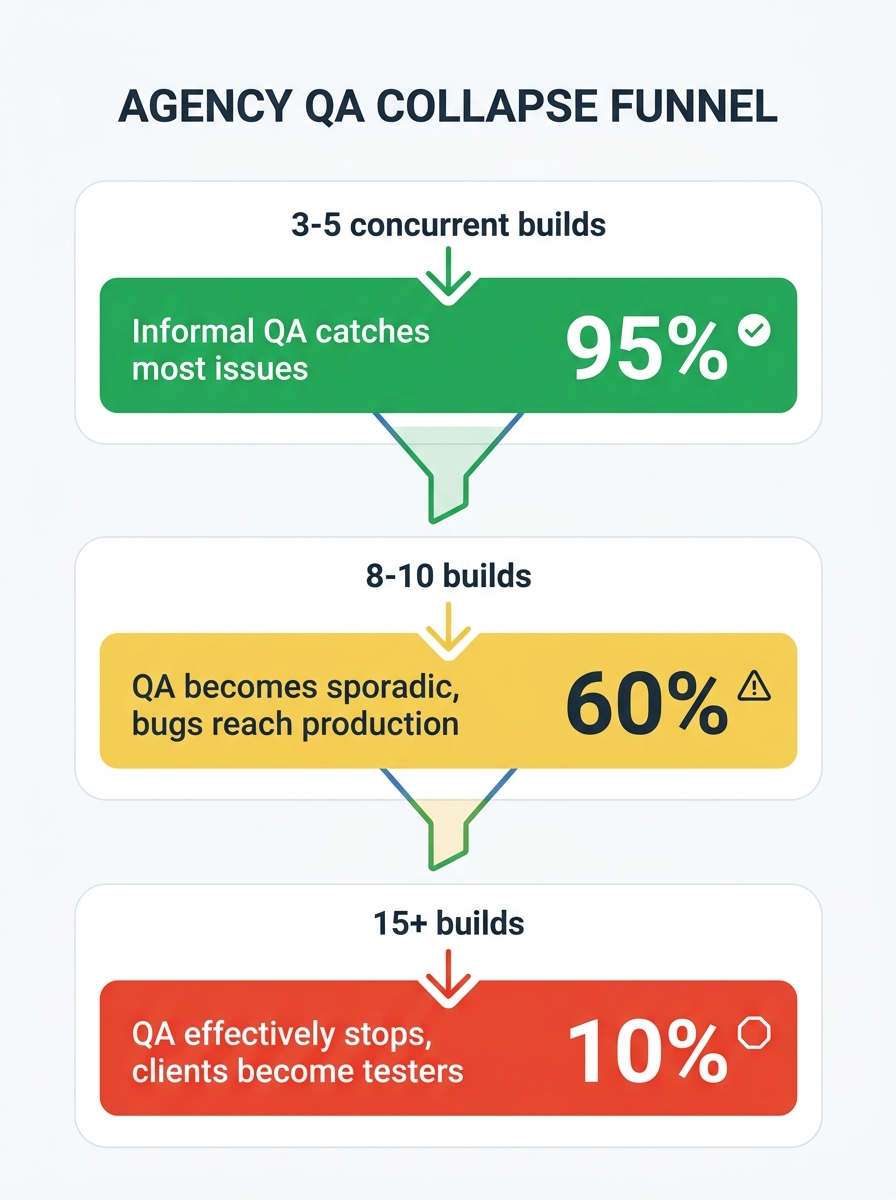
Where this pattern causes the most acute damage is in WooCommerce and Shopify stores, because e-commerce has an unusual property: the critical user path involves real money. A broken hero section is embarrassing. A broken checkout is revenue loss your client can measure to the penny, and they will.
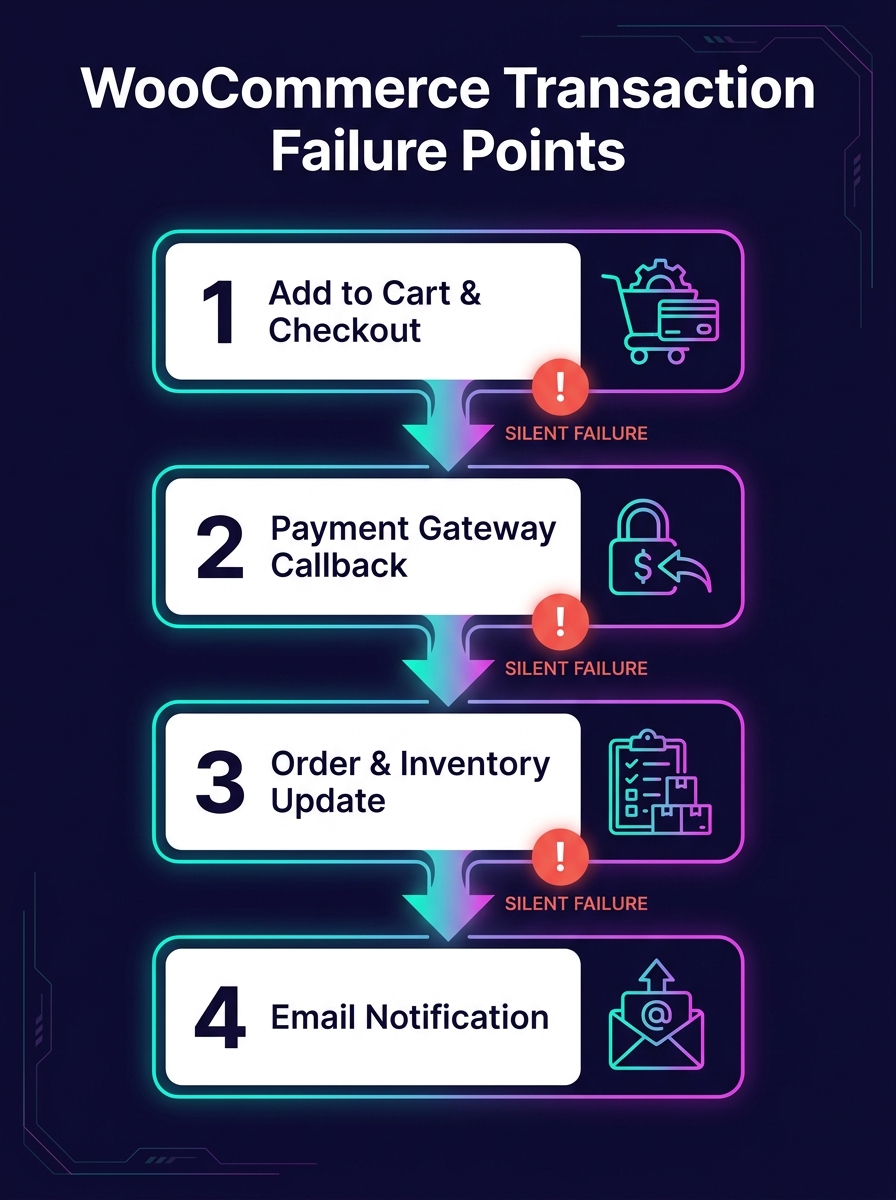
Checkout flow validation requires testing across payment gateways, shipping method combinations, tax calculation edge cases, coupon stacking behavior, and guest versus registered user paths. Manual testing of all those permutations on a single store takes hours. When a white-label team is managing fifteen stores simultaneously, the math is impossible without automation. And the problem compounds: WooCommerce plugin updates ship weekly, each one potentially altering checkout behavior in ways that don't surface until a real customer tries to pay.
CheckView, a WordPress plugin built specifically for this problem, automatically generates test flows for standard WooCommerce product, cart, and checkout pages. It runs real browser sessions on a schedule, verifying that submissions complete and emails send correctly. For agencies handling WordPress testing at scale, a tool like this eliminates the most dangerous category of "we assumed it worked" failures. If your team also handles Shopify store development, similar automated checkout monitoring exists on that platform through tools like Ghost Inspector and Testim, though the WordPress-native tooling has matured faster in this specific area.
The pattern extends beyond checkout. Form submissions, login flows, cart persistence across sessions, and cross-browser rendering all need verification. When agencies dig into why their white-label partnership is actually breaking down, testing gaps are often the root cause. They're obscured by symptoms that look like "the dev team is sloppy" or "communication is bad," but the underlying issue is that nobody verified the deliverable before it shipped.
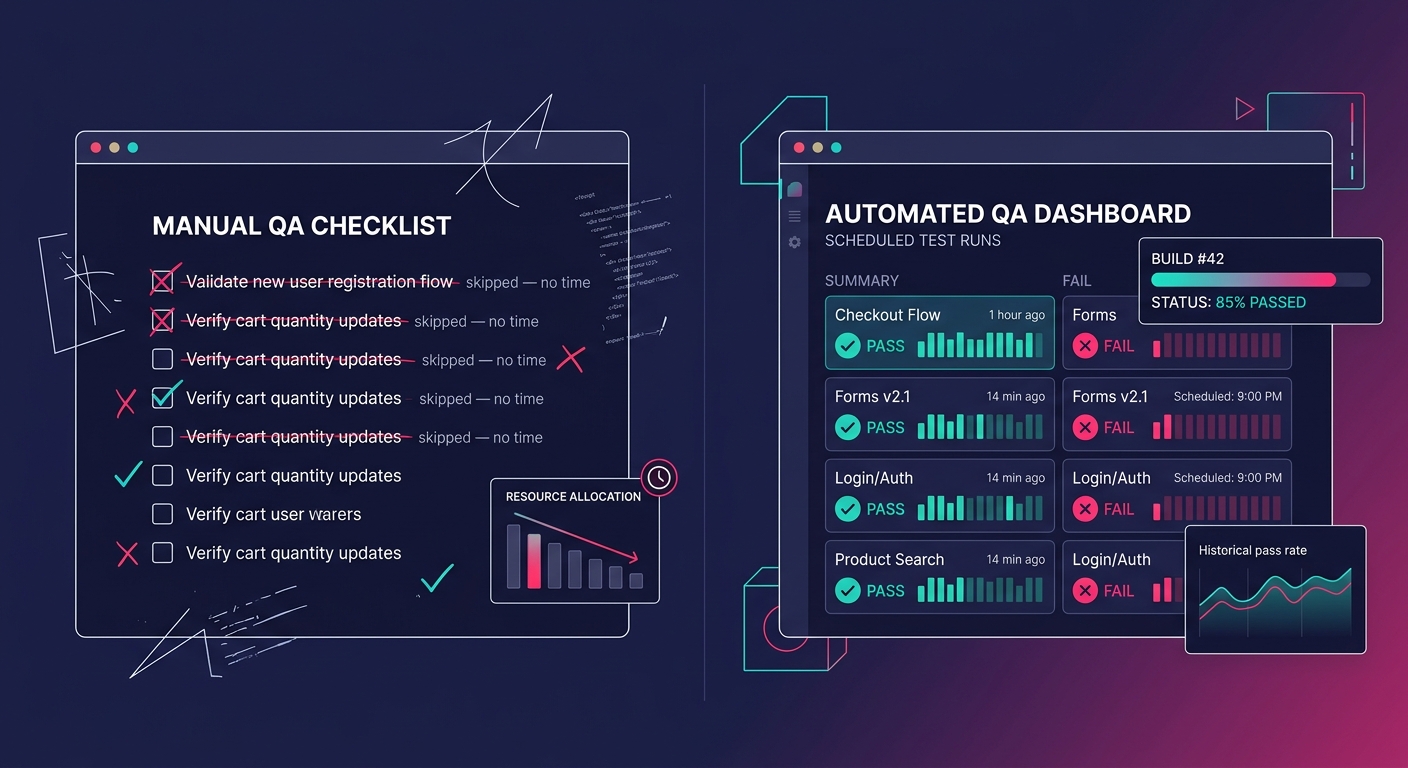
White-label QA automation sounds like the obvious answer, and in many cases it is the right direction, but implementation matters enormously. The teams that succeed with automation treat it as a safety net for predictable paths and keep human attention focused on unpredictable ones.
For predictable paths, scheduled automated testing is the right tool. Platforms like QA Wolf offer end-to-end test automation using Playwright, with deterministic code-based tests that execute as fast as the environment allows. For WordPress-specific work, CheckView handles form and checkout validation with minimal configuration. The goal is catching regressions automatically so your team doesn't need to re-test the same flows manually after every plugin update or theme change. When you're hiring WooCommerce experts for builds, baking these automated checks into the developer onboarding process matters as much as the tooling itself. If a new developer doesn't know that nightly tests run against every active store, they won't understand why the Monday Slack channel is full of failure notifications.
Automated tests that fail silently are arguably worse than no automation at all. They create the illusion of coverage.
The unpredictable paths still need human eyes. How the site feels on a slow mobile connection, whether the product filtering UX makes sense with 200 products instead of 10, whether a specific WooCommerce extension conflicts with the theme's JavaScript: these require exploratory testing that no script can replicate. The best approach is to automate the repetitive validation and redirect your freed-up QA time toward the judgment-dependent work that actually differentiates a good build from a mediocre one.
Automated client approval workflows solve the other half of the QA problem: getting sign-off without endless email threads. Power Automate supports multi-stage approval flows where a staging link routes to the right stakeholder, they approve or request changes within the workflow, and the status updates automatically in your project management tool. Approveit does something similar directly inside Slack, which works well for agencies that already live there. The point is removing the ambiguity around who has approved what, because in white-label work, "the client said it looked fine" over a Zoom call is not a defensible QA record when something breaks in production. And this connects to a broader systems issue: when your outsourcing model starts breaking at scale, QA collapse is often the first visible symptom because it's the step with the least explicit ownership. Dev owns the code. Design owns the mockups. Project management owns the timeline. QA ownership, in many white-label setups, belongs to everybody and therefore nobody.
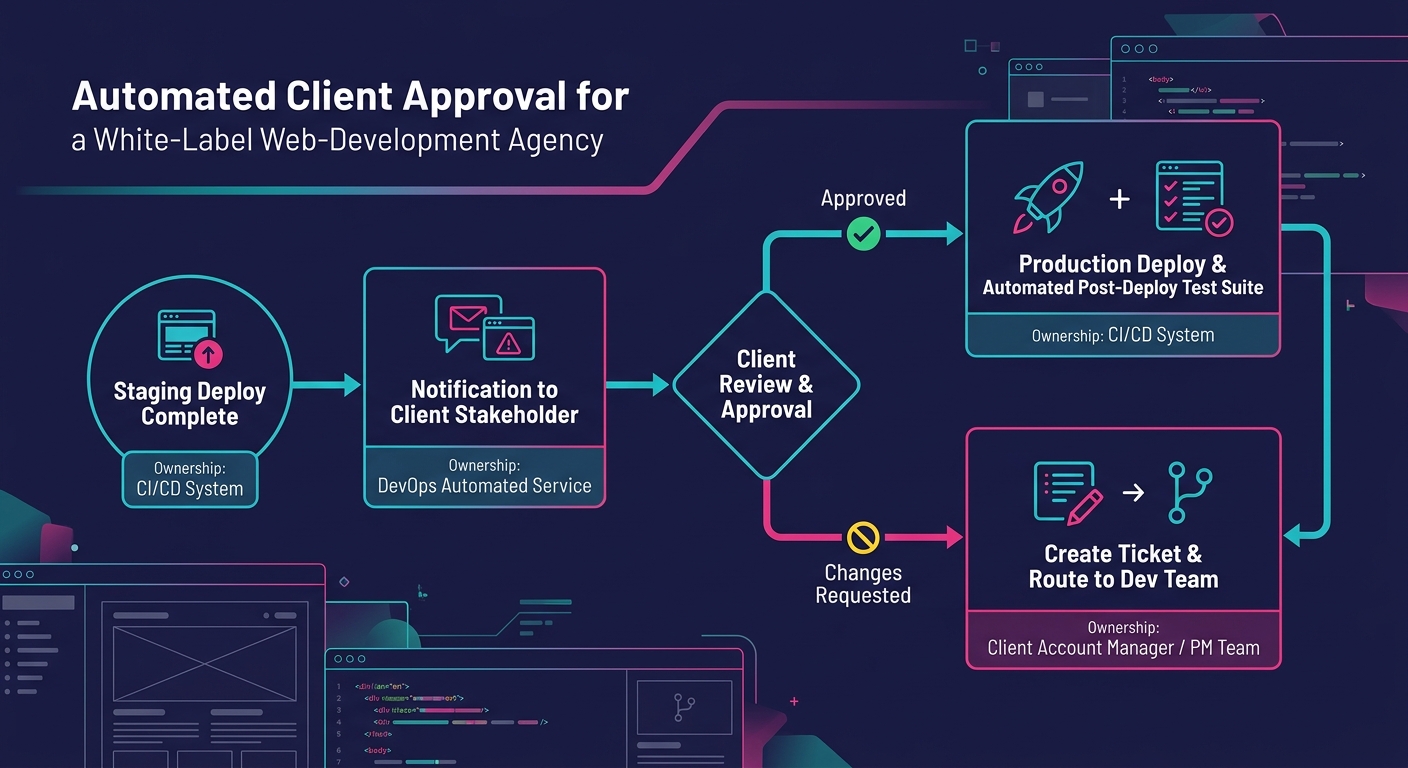
The honest version of this story is that automation solves the mechanical problem while leaving the structural one intact. You can set up CheckView, configure nightly Playwright runs, build approval workflows in Power Automate, and still have a QA collapse if nobody is accountable for reviewing the results. Automated tests that fail silently, because the notification goes to a shared Slack channel nobody monitors or because the dashboard exists but nobody checks it, are arguably worse than no automation at all. They create the illusion of coverage.
The teams that actually escape the QA collapse pattern share one trait: they've made a specific person responsible for triaging automated test results every day. That person isn't a "QA lead" in any formal sense at most agencies. It's typically a senior developer or project manager who spends fifteen minutes each morning reviewing overnight test runs and escalating failures before they reach the client. The tooling makes this possible. The habit makes it work. The environments need to be trustworthy enough that test results mean something, which is its own challenge that many agencies underestimate.
There's also an unresolved tension between thoroughness and speed that automation doesn't eliminate. Running a full checkout flow validation suite across three payment gateways, two shipping plugins, and four browser configurations takes real time, even automated. When a client wants a hotfix deployed in two hours, the pressure to skip the automated suite is identical to the old pressure to skip manual testing. The technology changed. The incentive structure didn't. Every workaround — parallel test execution, risk-based test selection, smoke-test-only pipelines for hotfixes — involves a judgment call about acceptable risk that no tool can make for you. White-label agencies treating QA as a line item to compress are building a predictable failure mode into their operations. The collapse is gradual, quiet, and deniable right up until a client's checkout stops processing orders on a Saturday night and nobody finds out until Monday. Automation gives you the infrastructure to prevent that. Whether your team actually uses it remains a management problem, and management problems don't have a plugin.
OpenObserve, an open-source observability platform, advertises 140x lower storage costs than Elasticsearch for log, metric, and trace ingestion. That ratio matters when you manage 20, 40, or 80 white-label WooCommerce stores, each generating PHP warnings, slow-query logs, payment gateway timeouts, and cron failures that pile up unread until a client reports lost orders. The storage cost of observability has historically been the reason agencies skip it entirely. But the cost of skipping it compounds faster than any hosting bill.
This article breaks down what production debugging WordPress looks like when you're running white-label e-commerce at scale, where the bugs actually live, and why the WordPress ecosystem's default tools leave critical gaps in your ability to diagnose problems on live stores.
A marketing site with five pages and a contact form generates a narrow range of errors. A WooCommerce store with variable products, conditional shipping rules, payment gateways, tax calculations, and third-party fulfillment integrations generates an order of magnitude more failure modes. And the failures carry direct revenue consequences: a fatal error on a checkout page costs money in real time.
The debugging challenge multiplies in white-label arrangements. Your team built the store, but the end client's marketing agency might install plugins you've never tested. Their hosting environment might differ from your staging setup. Their traffic patterns might trigger race conditions that never appear in development.
When you're debugging production WordPress issues your team can't replicate locally, the variables multiply further. WooCommerce adds payment webhook timing, inventory sync conflicts, session handling under load, and cart fragment AJAX calls that behave differently on cached vs. uncached pages.
The WordPress Advanced Administration Handbook documents a debugging system built around four constants: WP_DEBUG, WP_DEBUG_LOG, WP_DEBUG_DISPLAY, and SCRIPT_DEBUG. Setting WP_DEBUG to true in wp-config.php activates PHP error reporting. WP_DEBUG_LOG writes those errors to a debug.log file in wp-content. WP_DEBUG_DISPLAY controls whether errors render on screen.
This system works on a local machine while you're building a theme. It falls apart on a production WooCommerce store for three reasons.
First, the debug.log file grows without rotation. On a busy store processing hundreds of orders daily, that file can balloon to gigabytes within weeks. Nobody monitors its size. Nobody reads its contents until something breaks badly enough to investigate.
Second, there's no structured format. Every entry is a flat text string with a timestamp. You can't filter by severity, by plugin origin, by request URL, or by user session. Grep is your only tool, and grep against an unstructured 2GB log file on a production server is a miserable experience.
Third, there's no alerting. The log file sits on disk, silently accumulating. BugSnag's WordPress plugin changes this by automatically detecting errors and crashes on your site and routing notifications to email, Slack, or issue trackers. But most white-label agencies don't install error monitoring on client stores because the per-site setup cost feels prohibitive when you're managing dozens of them.
The gap between WordPress's debug.log and a proper observability white-label development setup is where agencies lose the most time and the most money. Bridging that gap doesn't require a six-figure infrastructure investment. It requires a deliberate stack choice and consistent deployment across all client stores.
WP Debug Toolkit, as reviewed by Oxygen and Breakdance, writes query logs to JSON files on disk rather than the WordPress database. This design matters for WooCommerce stores because it avoids adding write load to a database that's already handling order transactions. JSON-structured logs can be parsed programmatically, filtered by plugin, and shipped to a centralized platform.
The pattern you want: every white-label store writes structured logs locally, and an agent (Fluentd, Filebeat, or Grafana Alloy) ships those logs to a central system. Each log entry should include the site identifier, the request URI, the PHP error level, and a timestamp in ISO 8601 format.
For agency log management at scale, you need a central platform where logs from all client stores converge. OpenObserve, Grafana Loki, and Papertrail all serve this function at different price points. The choice depends on your volume and your team's comfort with self-hosted vs. managed infrastructure.
Papertrail handles database logs, PHP debug logs, and slow query logs from WordPress installations and lets you set alerts based on patterns. If a WooCommerce payment gateway starts throwing 500-level errors at 2 AM, your on-call developer gets a Slack notification before the client's customers start tweeting about it.
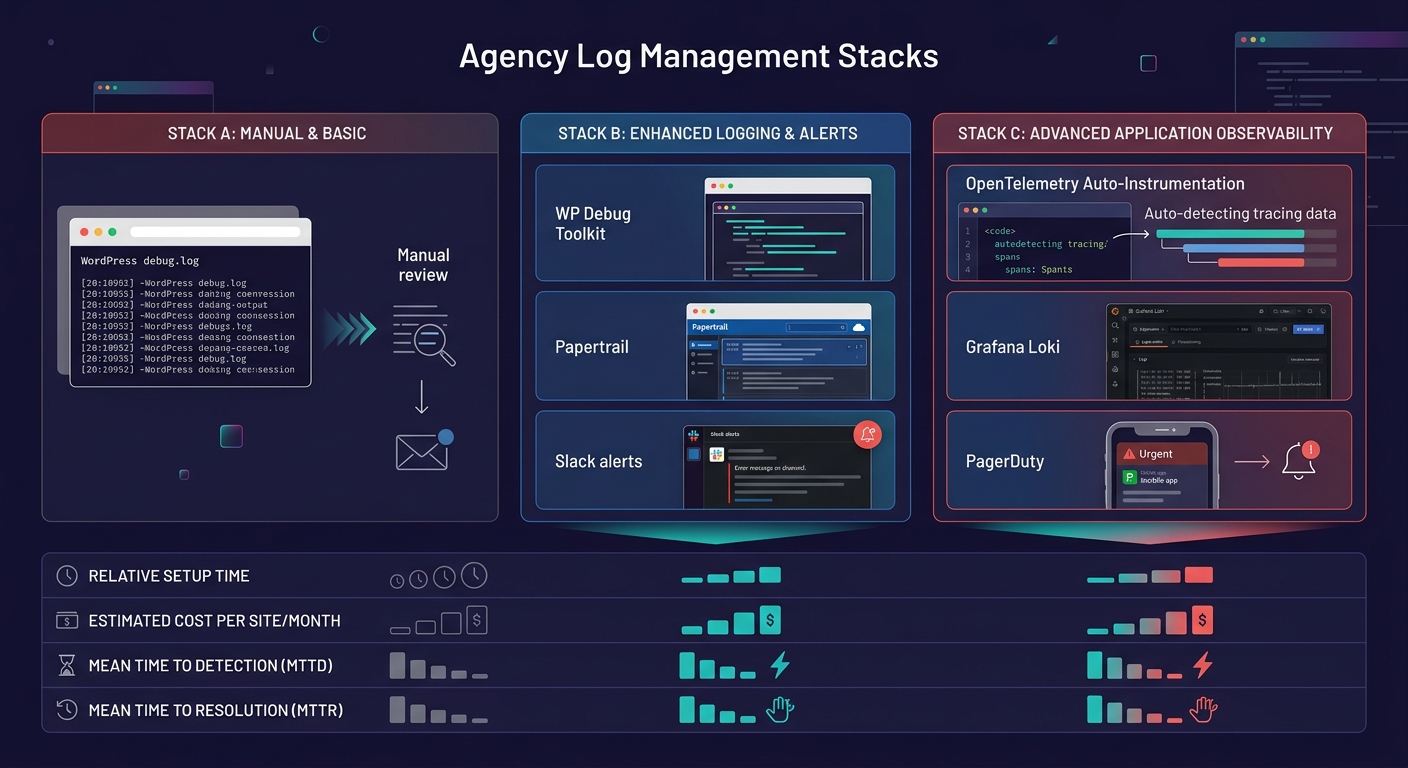
Logtivity offers a white-label mode for agencies that lets you rebrand the activity logging interface. DoHost's research on log aggregation for resellers frames error monitoring as a premium add-on, suggesting agencies can offer white-labeled logging dashboards as a paid service tier for clients who want visibility into their store's health.
This reframes WordPress runtime monitoring from a cost center into a revenue stream. If you're already running the infrastructure, charging clients $50–150/month for access to a branded uptime and error dashboard is straightforward. When you're calculating your white-label margins, the monitoring tier adds recurring revenue with near-zero marginal cost per additional site.
The gap between WordPress's debug.log and real observability is where agencies lose the most time and the most money.
Production debugging for WordPress agencies gets harder when your staging environment lies to you. We've written about why staging-production parity breaks down in detail, but e-commerce stores amplify every gap.
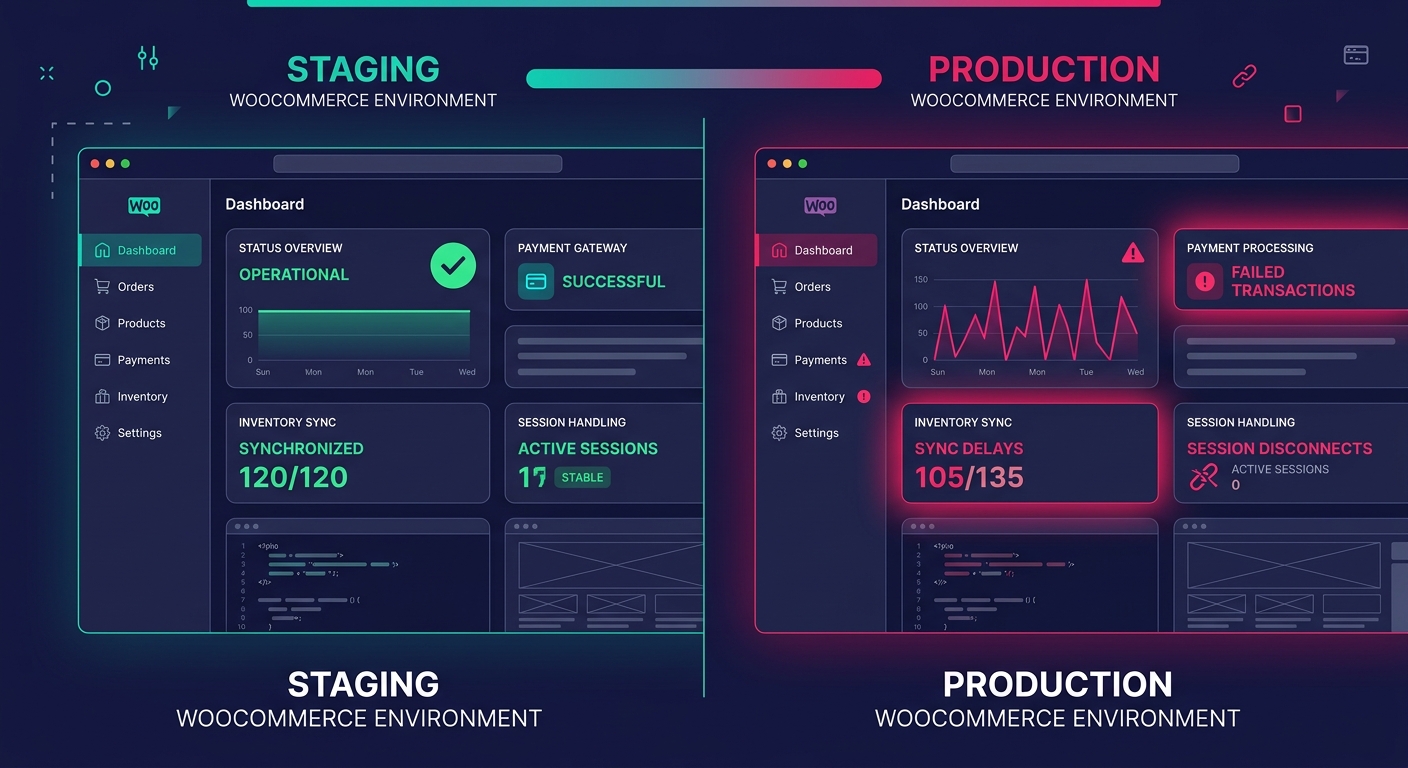
Staging environments rarely replicate real payment gateway sandbox behavior accurately. They don't carry the same volume of product data, order history, or customer sessions. Caching layers differ. CDN configurations differ. And WooCommerce's behavior under concurrent checkout sessions, where two customers try to buy the last item in stock at the same time, can't be tested meaningfully in staging.
This is precisely why production observability matters more for e-commerce than for any other WordPress vertical. You can't test your way out of production-only failures. You have to detect them with real traffic data, diagnose them with structured evidence, and fix them with confidence that your change addresses the actual root cause.
OpenTelemetry's auto-instrumentation for PHP, which has matured significantly, can capture request traces, database call durations, and external HTTP request latencies from a live WooCommerce store without modifying application code. The trace data shows you that a checkout request took 11 seconds because the shipping rate API timed out, which cascaded into a session lock that blocked three other customers. That's the kind of insight a debug.log file will never surface.
The phrase "observability without instrumentation" is aspirational, not literal. OpenTelemetry's PHP auto-instrumentation captures generic request and database telemetry, but it doesn't understand WooCommerce's domain-specific events. It won't tell you that an order status transition from "pending" to "processing" failed because a webhook payload from Stripe was malformed. That level of insight requires custom log statements at specific points in the WooCommerce lifecycle: order creation, payment confirmation, inventory adjustment, email dispatch.
For white-label teams managing dozens of stores, the practical approach is layered. Auto-instrumentation handles the infrastructure layer (PHP execution, MySQL queries, HTTP calls). A lightweight mu-plugin deployed across all sites handles the application layer (WooCommerce hooks for order events, cart mutations, and gateway responses). And centralized log aggregation ties both layers together with a shared site identifier.
The mu-plugin approach works well because mu-plugins load before regular plugins and can't be deactivated from the admin dashboard. When a client's marketing team installs a coupon plugin that conflicts with your checkout flow, your mu-plugin's logging captures the failure regardless of what caused it. We've written about building self-healing client infrastructure before, and the monitoring mu-plugin fits that same philosophy: agency-controlled code that protects the environment from client-side changes you can't predict.
Tip: Deploy your monitoring mu-plugin via Git or your deployment pipeline, not through the WordPress admin. This ensures consistent versions across all white-label stores and prevents clients from accidentally removing it.
The 140x storage cost reduction that OpenObserve advertises tells you something about the economics of log ingestion. It tells you nothing about whether your team will actually look at the dashboards. The most sophisticated observability stack in the world produces zero value if nobody configures meaningful alerts or reviews anomaly reports during weekly ops meetings.
Similarly, the tools for WordPress runtime monitoring have improved dramatically. BugSnag catches crashes. Papertrail aggregates logs. OpenTelemetry traces requests across services. But none of these tools can tell you whether the bug you're seeing on a client's WooCommerce store is a code defect, a hosting misconfiguration, a plugin conflict introduced by the client, or a data integrity issue caused by a failed migration. That judgment still requires a developer who understands WooCommerce internals, reads structured logs fluently, and can correlate timing data across multiple systems.
The data gives you speed and evidence. It narrows the search space from "something is wrong with the store" to "this specific function in this specific plugin threw this specific error during this specific request at this specific time." That narrowing is the entire value proposition of production debugging WordPress at scale. Whether your team can close the remaining distance, from evidence to fix to prevention, still depends on the people reading the data, not the tools collecting it.
The standard PrestaShop-to-WooCommerce migration toolkit assumes both platforms organize product data the same way, and that assumption is where every migration nightmare begins.
PrestaShop and WooCommerce share a surface-level similarity — they're both e-commerce platforms managing products, categories, customers, and orders. But underneath, they store and structure that data in fundamentally different ways. PrestaShop uses its own relational schema with specific tables for combinations, features, and multilingual fields. WooCommerce stores almost everything as WordPress post meta, taxonomies, and custom fields. Migration tools that promise a one-click transfer gloss over this structural mismatch, and agencies end up spending 3x the quoted hours fixing the wreckage.
This article defends a specific claim: WooCommerce migration failures aren't caused by bad tools or incompetent developers. They're caused by treating a structural translation problem as a simple data transfer. And the agencies that avoid disaster are the ones running these projects through white-label teams with dedicated WooCommerce migration protocols.
The single most documented failure point in PrestaShop-to-WooCommerce migrations is product category and attribute mapping. As multiple migration guides confirm, product categories and custom attributes from PrestaShop frequently don't map correctly in WooCommerce. This sounds like a minor data issue until you realize it can affect every product in the catalog.
PrestaShop handles product variations through a "combinations" system — a product can have multiple combinations of attributes (size, color, material), each with its own price, stock quantity, and reference number. WooCommerce uses "variable products" with "variations," which work differently at the database level. A PrestaShop combination with three attributes might import as a WooCommerce variation with only two, or might not import at all if the attribute mapping table wasn't configured before the migration ran.
The e-commerce data mapping risks multiply when you factor in custom fields. Many PrestaShop stores use modules that add custom product fields — things like estimated delivery dates, manufacturer-specific codes, or compliance certifications. These fields live in module-specific database tables that no generic migration tool knows about. They simply get left behind.
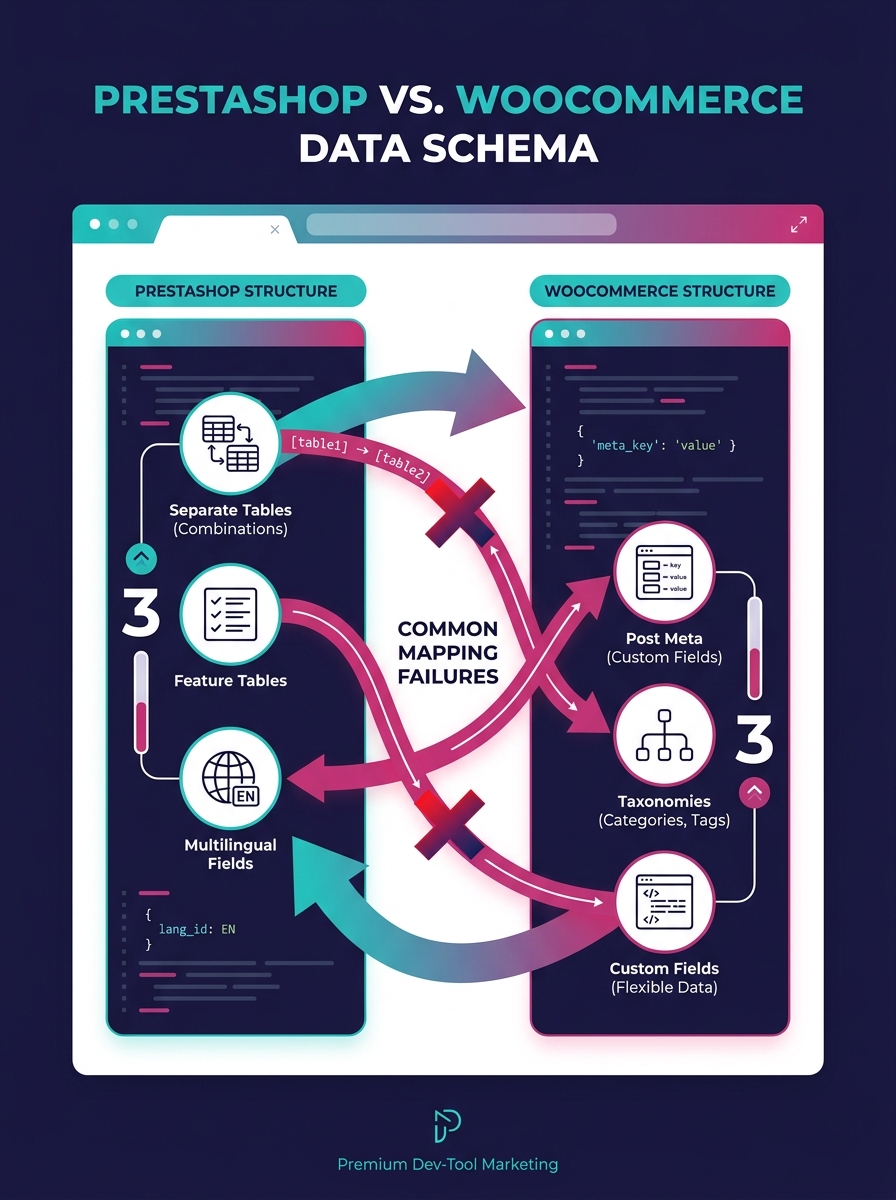
White-label teams that specialize in WooCommerce handle this by building a complete data map before any migration script runs. The map documents every PrestaShop table, every custom module field, and exactly where each piece of data should land in WooCommerce's schema. This process typically takes two to five days for a store with 500+ SKUs and saves weeks of post-migration cleanup.
Agencies trying to handle platform migration white-label without this mapping step are the ones posting in forums about broken imports and missing products. The mapping step is the actual work of migration. Everything else is moving files.
The mapping step is the actual work of migration. Everything else is moving files.
The second evidence point is SEO loss, and it's particularly insidious because the damage shows up weeks after the migration appears "done."
PrestaShop generates URLs in a specific pattern. WooCommerce generates them in a different one. Even when you set WooCommerce permalinks to match the old PrestaShop structure, there are edge cases — product URLs with language prefixes, category paths that nested three levels deep, manufacturer pages that don't have a WooCommerce equivalent. Every unmatched URL is a 404 error waiting to happen, and Google's crawler will find them all.
According to migration specialists, SEO drops rank among the most common post-migration issues, alongside broken imports and missing customer data. The guidance from experienced teams is pointed: keep your website's URL structure and design identical in the initial days after launch, and make changes incrementally. If you change the platform and the URL structure and the design simultaneously, Google Search Console triggers a full reindex, and traffic drops off a cliff.
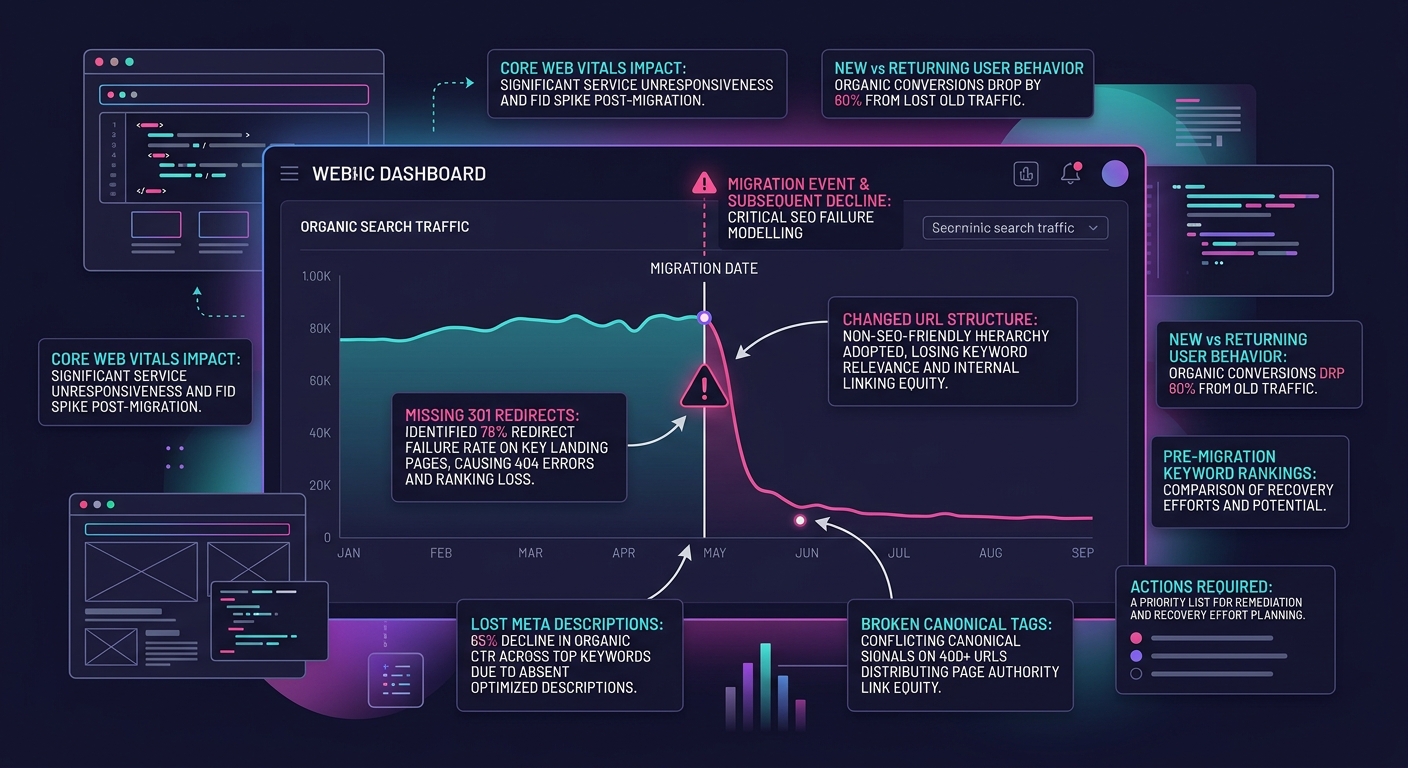
White-label WooCommerce teams build a redirect map as part of the pre-migration data mapping phase. Every PrestaShop URL gets a corresponding WooCommerce URL and a 301 redirect rule. Meta titles, meta descriptions, and canonical tags get migrated as structured data, not recreated from scratch. And there's a post-launch monitoring period — typically 30 days — where the team watches Google Search Console for crawl errors and fixes them before rankings slip.
This is the kind of discipline that agencies should expect from a white-label WordPress development partner, and it's the kind of discipline that disappears when migrations are treated as one-time projects rather than phased transitions.
Here's where agencies get blindsided. The migration finishes. Products are in place. Orders are flowing. And then the store starts running slowly — checkout pages take four seconds to load, product filtering lags, and the admin dashboard crawls.
Post-migration performance debugging is a distinct discipline from migration itself, and most teams don't staff for it. The performance problems after a PrestaShop-to-WooCommerce migration aren't the same ones you'd encounter on a fresh WooCommerce install. They're specific to migrated data.
The WooCommerce developer documentation covers general performance optimization techniques — caching, image optimization, database maintenance, CDN configuration. But migrated stores have additional issues that these general guides don't address. The database often contains orphaned meta rows from PrestaShop fields that didn't map to anything. The wp_postmeta table (already WooCommerce's biggest bottleneck) gets bloated with thousands of entries that serve no purpose. Autoloaded options from migration plugins stay in the database long after the plugin is deactivated.
Performance engineers recommend running integrity checks, adding necessary foreign keys, and tuning innodb_buffer_pool_size post-migration specifically to recover the performance that migrated data costs you. These aren't standard WooCommerce optimization steps — they're migration-specific remediation.
The challenge for agencies is that these problems often don't surface in staging. A staging environment with a subset of data performs fine. Production, with 15,000 products and 40,000 customer records and years of order history, behaves completely differently. We've written about debugging production WordPress issues that can't be replicated locally, and migration projects are one of the most common triggers for that exact frustration.
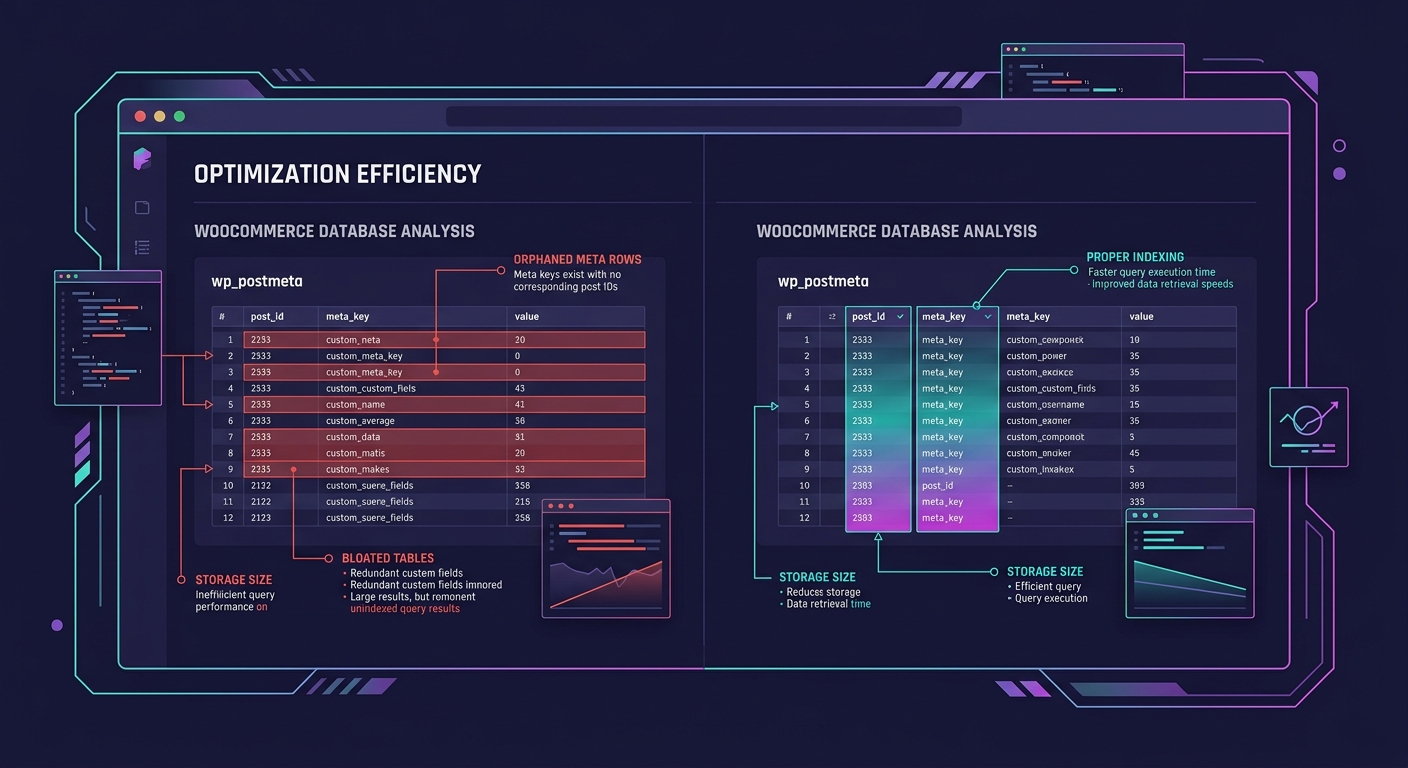
White-label teams that handle WooCommerce migrations routinely include a performance audit as a line item — not as an upsell, but as a required phase. The audit runs against production data (or a full production-size copy) and addresses migration-specific bloat before the client's customers ever see the new store.
Tip: If your post-migration WooCommerce store is slower than the PrestaShop store it replaced, the problem is almost certainly orphaned data and unindexed tables, not hosting or caching configuration. Audit the database before you throw money at infrastructure.
One structural approach that experienced platform migration white-label teams use is what the industry calls a trickle migration. Instead of a single big-bang cutover, data moves to WooCommerce in small, validated batches over days or weeks. As Versa Cloud ERP's migration guide explains, this method takes more time and resources but minimizes the possibility of failure because problems can be caught and repaired in small sections rather than discovered after the entire catalog is already broken.
Trickle migration works particularly well for stores with complex product catalogs — those with hundreds of configurable products, multiple price lists, or heavy use of PrestaShop's "features" system (which has no direct WooCommerce equivalent and requires custom taxonomy creation).
The tradeoff is coordination. A trickle migration means running two platforms simultaneously for a period, which means syncing orders and inventory across both systems. This is where the collaboration structure of your white-label team matters enormously — a siloed team where the migration developer doesn't talk to the person managing the live PrestaShop store will create data conflicts that are worse than the problems trickle migration was supposed to prevent.
Agencies considering this approach for a client project should be working with dedicated WordPress developers who have completed WooCommerce migrations before. This isn't a project for generalists, and it definitely isn't a project where you want to be discovering the process as you go.
WooCommerce migration failures trace back to a misunderstanding about what migration actually is. It's a translation project, not a transfer project. PrestaShop and WooCommerce speak different dialects of e-commerce data, and converting between them requires a mapping phase, a redirect phase, and a performance remediation phase that most project timelines don't account for.
The agencies that avoid migration nightmares aren't using better tools. They're using teams that understand the structural differences between platforms and build project plans around the three failure points above: data mapping gaps, SEO erosion, and post-migration performance degradation. White-label teams with repeatable migration protocols catch these problems in staging and pre-launch audits rather than in panicked Slack threads two weeks after go-live.
If your agency is planning a PrestaShop-to-WooCommerce migration for a client, budget for the translation work. Budget for the redirect map. Budget for the performance audit against production-size data. Those three line items are the difference between a migration that works and one that turns into the project your team talks about in cautionary terms for years afterward. Our 2026 WooCommerce development guide covers the broader landscape of building on WooCommerce, but for migrations specifically, the unglamorous planning work is where the project lives or dies.
