

Instagram's oEmbed endpoint deprecation, Twitter/X's embed widget overhaul, TikTok's shifting embed API, Facebook's Graph API version bumps — each social platform change ripples across every white-label WordPress site where that integration is toggled on. For agencies managing 20, 40, or 80 client sites with different combinations of social feeds, sharing widgets, tracking pixels, and login integrations, a single upstream API break doesn't hit one site. It hits every site where that particular feature flag is active. And nobody on the team can say with certainty which flags are active where.
This is the central tension in how agencies handle feature toggles WordPress sites rely on for social media functionality. The toggle starts as a convenience: turn on Instagram feeds for Client A, disable TikTok embeds for Client B, activate social login for Client C. Over time, the toggles accumulate without a retirement plan. According to research from DesignRevision, mature SaaS teams maintain fewer than 50 active flags at any time, and teams that adopt disciplined flag management report 40 to 60 percent reduction in flag-related technical debt. White-label WordPress shops rarely hit either benchmark.
Why Social Integrations Multiply Toggle Debt
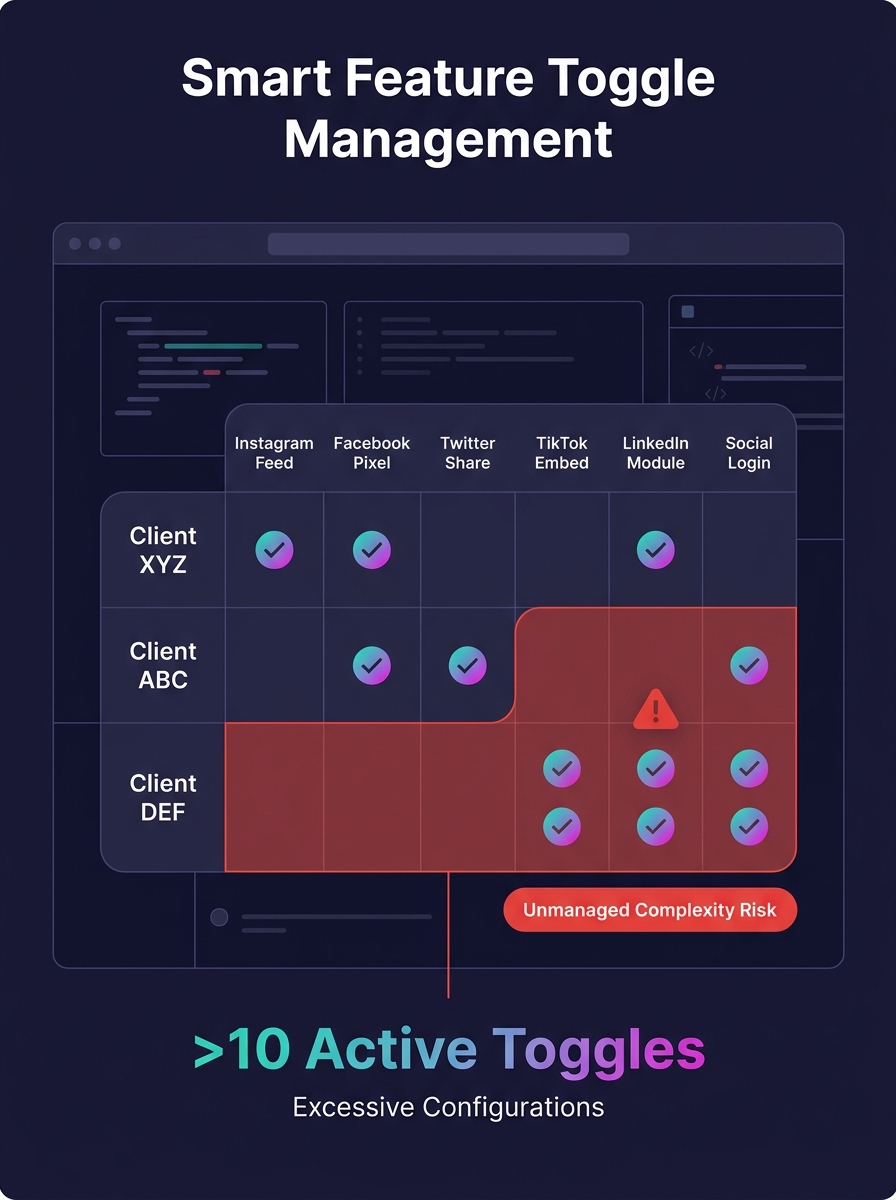
Social media features are uniquely prone to toggle sprawl because they sit at the intersection of three volatile forces: client preference, platform policy, and privacy regulation.
A typical white-label WordPress build for an agency client might include Open Graph meta tags, a Facebook pixel, an Instagram feed widget, Twitter/X share buttons, a LinkedIn sharing module, and maybe a TikTok embed block. Each of those features exists because the client asked for it during onboarding. But clients don't all want the same combination. One real estate agency wants Instagram and Facebook only. A SaaS startup wants LinkedIn and Twitter/X. A DTC brand wants everything plus TikTok plus Pinterest rich pins.
So your development team wraps each integration behind a feature flag. The WordPress Theme Customization API supports this pattern directly — you can add toggle settings to the admin that control which social features are active on a per-site basis. Dedicated plugins like James R. Williams' Feature Flags for WordPress offer a more structured approach, with admin pages where users can enable and disable features themselves.
The problem isn't creating the toggles. It's what happens six months later when you have 35 active social integration flags across your client portfolio, Meta changes its embed requirements, and your team has to figure out which 18 of those 35 flags touch Facebook functionality.
The Four Levels of Toggle Maturity
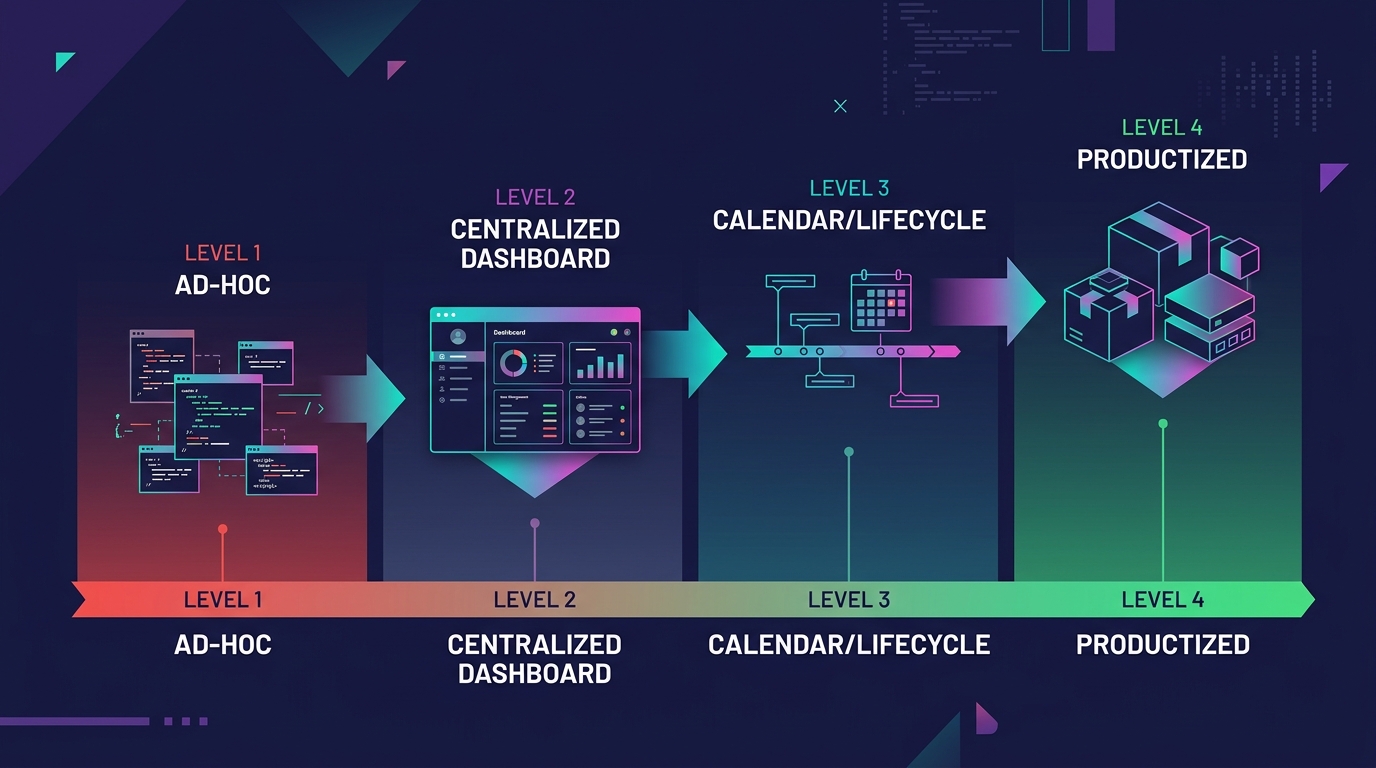
We've seen agencies operate at distinctly different levels of sophistication when managing social media feature toggles across their white-label WordPress portfolio. The progression looks something like this:
Level 1: Ad-Hoc Conditionals
Developers hardcode if/else checks in theme templates. Social sharing buttons appear or disappear based on a custom field or a constant defined in wp-config. There's no central registry of which toggles exist. When a developer leaves, their toggles become archaeological artifacts. If you've ever built a feature toggle architecture for white-label WordPress, you've probably inherited a codebase stuck at this level.
Level 2: Centralized Toggle Registry
All social feature flags live in a single options page or a dedicated plugin. Someone on the team can pull up a list of active flags per site. This is where most agencies plateau, and it's adequate for portfolios under 15 sites. But there's still no lifecycle management — flags are created and never retired.
Level 3: Lifecycle-Managed Flags
Each toggle has a creation date, an owner, and an expiration policy. When Twitter/X overhauled its embed widget, you could query your registry and know within minutes which sites needed updates. Old flags get reviewed quarterly and either promoted to permanent features or removed. The feature flag lifecycle best practices from CloudBees describe this level well: creation, deployment, activation, and — critically — retirement.
Level 4: Productized Social Feature Packages
You stop treating social integrations as per-client custom work and start offering standardized packages: a "Social Essentials" bundle (Open Graph, basic sharing, one feed widget) and a "Social Pro" bundle (full platform coverage, tracking pixels, social login). Clients choose a tier rather than requesting individual features. This is the point where you've adopted SaaS standardization patterns within a WordPress context. Your toggle count drops dramatically because you're managing packages, not individual flags.
Most agencies we've worked with sit somewhere between Level 1 and Level 2. The ones scaling custom development successfully have reached Level 3 at minimum.
The Liability Threshold
There's a moment — and every agency that's been through it recognizes the feeling — where your feature toggles stop serving you and start governing you. Developex's guide on white-label SaaS architecture captures the dynamic precisely: customization is your primary selling point, but it's also your greatest existential threat. Every time you create a hard fork or a custom code branch for a single client, you accumulate technical debt that compounds.
For social media integrations specifically, the liability threshold usually arrives through one of three doors:
Door one: A platform API breaks and you can't scope the blast radius. Instagram changes something, and your team spends two days auditing sites manually because nobody tagged which toggles depend on Instagram's API versus which ones use static embeds. We've written about how QA processes collapse under exactly this kind of pressure — the work isn't hard per individual site, but the multiplied effort across your portfolio overwhelms whatever testing capacity you have.
Door two: A privacy regulation change forces you to modify tracking behavior, and your toggles are too granular to update efficiently. GDPR consent requirements for Facebook pixels, for instance, don't care that you implemented the pixel slightly differently for each of your 12 European clients. You need to patch all 12, and each one has a unique toggle configuration that makes bulk updates impossible.
Door three: Client churn creates orphaned toggles. A client leaves, but their custom social login implementation — complete with three feature flags controlling OAuth scopes, profile picture syncing, and session persistence — stays in your codebase because removing it might break something adjacent. Over time, these orphaned toggles form a sediment layer of white-label customization debt that slows every future deployment.
The toggles that hurt you most aren't the ones you can see — they're the ones a former developer created for a client who left two years ago, still silently executing on every page load.
How Standardization Reduces Social Feature Toggle Counts
The agencies that navigate this well tend to converge on a similar approach, and it borrows heavily from how SaaS companies manage multi-tenant feature availability.
First, they audit every active social integration toggle and categorize it as either "universal" (every client gets this), "tier-based" (part of a package), or "truly custom" (one client needs this specific thing). The universal features get removed from the toggle system entirely — they're always on. The tier-based features get grouped into two or three bundles. And the truly custom features get evaluated honestly: is this worth maintaining, or should we negotiate with the client to move them to a standard package?
This is the same tension described in the productization paradox for white-label WordPress — knowing when to customize and when to standardize. For social media features, the answer tilts heavily toward standardization because the integrations themselves change so frequently. A custom Pinterest implementation you built for one client will need the same maintenance as a standard one, but you can't amortize that maintenance cost across your portfolio.
Second, they implement flag expiration. Every new social integration toggle gets a review date 90 days out. If the feature has been active and stable for 90 days, it either gets promoted to a permanent standard feature or gets a justification note for why it remains a toggle. Flags without justification get retired. This single practice — mandatory 90-day review — is the highest-impact change an agency can make when scaling custom development of social features.
Warning: If you can't produce a list of every active feature toggle in your WordPress portfolio within 15 minutes, you're already past the liability threshold. The audit should happen before the next platform API change forces it.
The Social Platform Volatility Factor
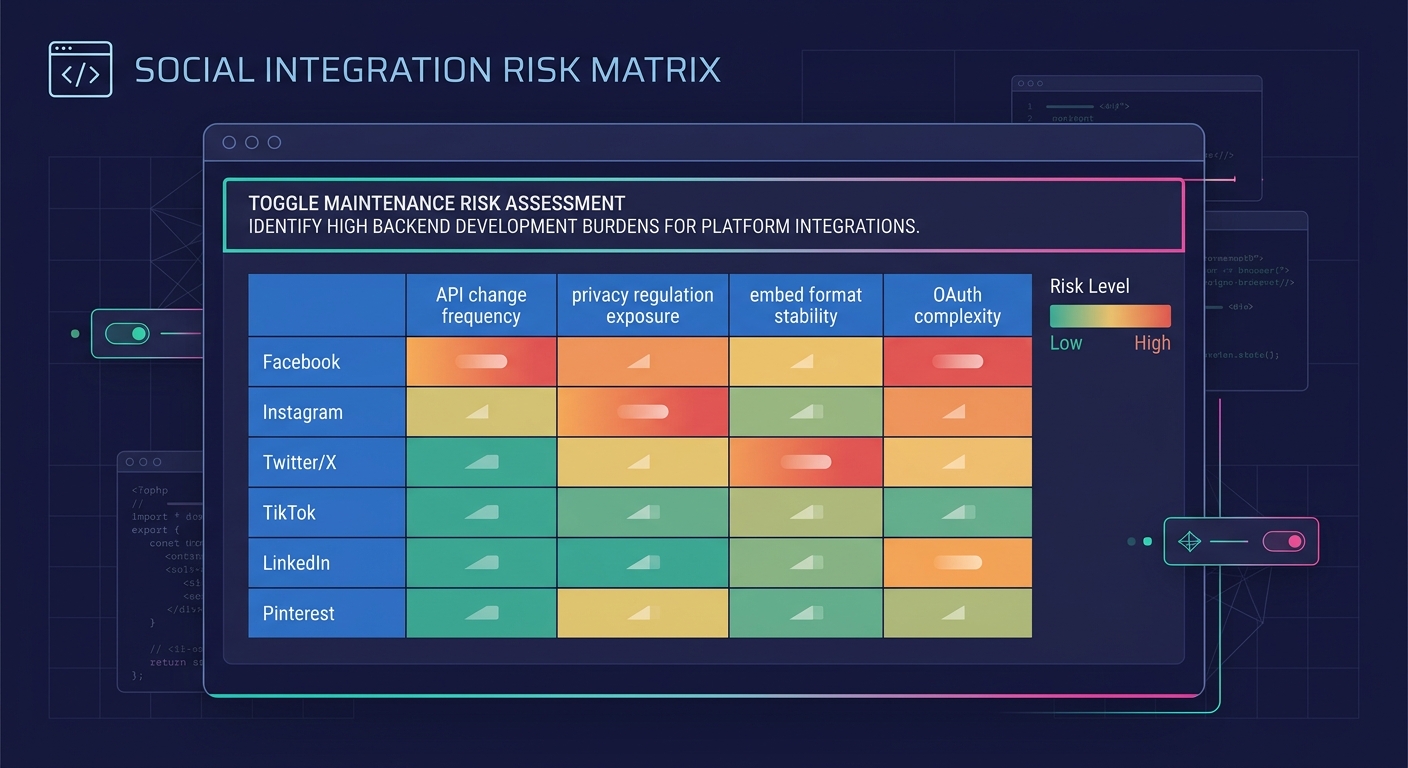
What makes social media integrations particularly dangerous in a feature toggle context is the update frequency. WordPress core updates on a predictable schedule. WooCommerce follows a release cadence you can plan around. But social platforms change embed formats, deprecate API endpoints, and modify OAuth flows on their own timelines, often with minimal advance notice.
Your feature toggles for social integrations need to account for this. A toggle that controls whether a TikTok feed appears on a client's homepage isn't like a toggle that controls whether a custom contact form uses reCAPTCHA v2 or v3. The reCAPTCHA toggle will likely remain stable for years. The TikTok toggle might need to reference a completely different embed method within six months.
Agencies that understand this difference treat social toggles as inherently higher-maintenance than other feature flags and price accordingly. If your white-label pricing model doesn't account for the ongoing maintenance cost of social integration toggles, you're subsidizing that work from other margins.
What Still Isn't Settled
The WordPress ecosystem doesn't have a consensus answer for multi-site feature flag management. The Theme Customization API works for individual sites. Plugins like Feature Flags for WordPress offer a better structure for single installations. But there's no widely adopted tool that gives you a portfolio-level view of all active toggles across 50 white-label WordPress sites with their social media integration status.
Some agencies are building internal dashboards using the WordPress REST API to pull option values from each site into a central registry. Others are moving social integrations entirely to managed third-party services like AddThis or ShareThis, trading away customization control for reduced toggle count. Neither approach has emerged as clearly superior.
The underlying question remains open: should WordPress agencies adopt formal feature flag platforms designed for SaaS products (LaunchDarkly, Flagsmith, Harness), or are those tools overkill for a CMS-based portfolio? The answer probably depends on your client count and how aggressively social media integrations figure into your standard deliverables. An agency building 5 sites a quarter with minimal social features can stay at Level 2 indefinitely. An agency managing 60 active sites with full social platform coverage will hit the liability threshold fast without Level 3 or 4 practices in place.
The agencies that figure out portfolio-wide toggle management for social integrations first will have a real operational advantage. Everyone else will keep discovering orphaned Instagram feed toggles during emergency audits, wondering which client they were built for and whether anything breaks if they're finally turned off.