

WordPress core's REST API responds 40% faster in 2026 than it did against 2024 benchmarks across managed hosting environments. That latency drop fundamentally changes the margin math for agencies running headless WordPress as a white-label service, and most haven't recalculated yet.
TL;DR: Headless WordPress's 40% API speed gain and WPGraphQL 2.x's 60–80% reduction in database queries make API-first white-label builds financially viable. But agencies need to control three distinct cost layers (API hosting, frontend deployment, integration maintenance) that traditional WordPress pricing never separates.
The 40% Speed Gain and What It Actually Costs
Why does a 40% improvement in API response latency matter for white-label margin control? Because the primary objection agencies had to headless WordPress, that the performance gains didn't justify the architectural complexity, no longer holds up against the numbers.
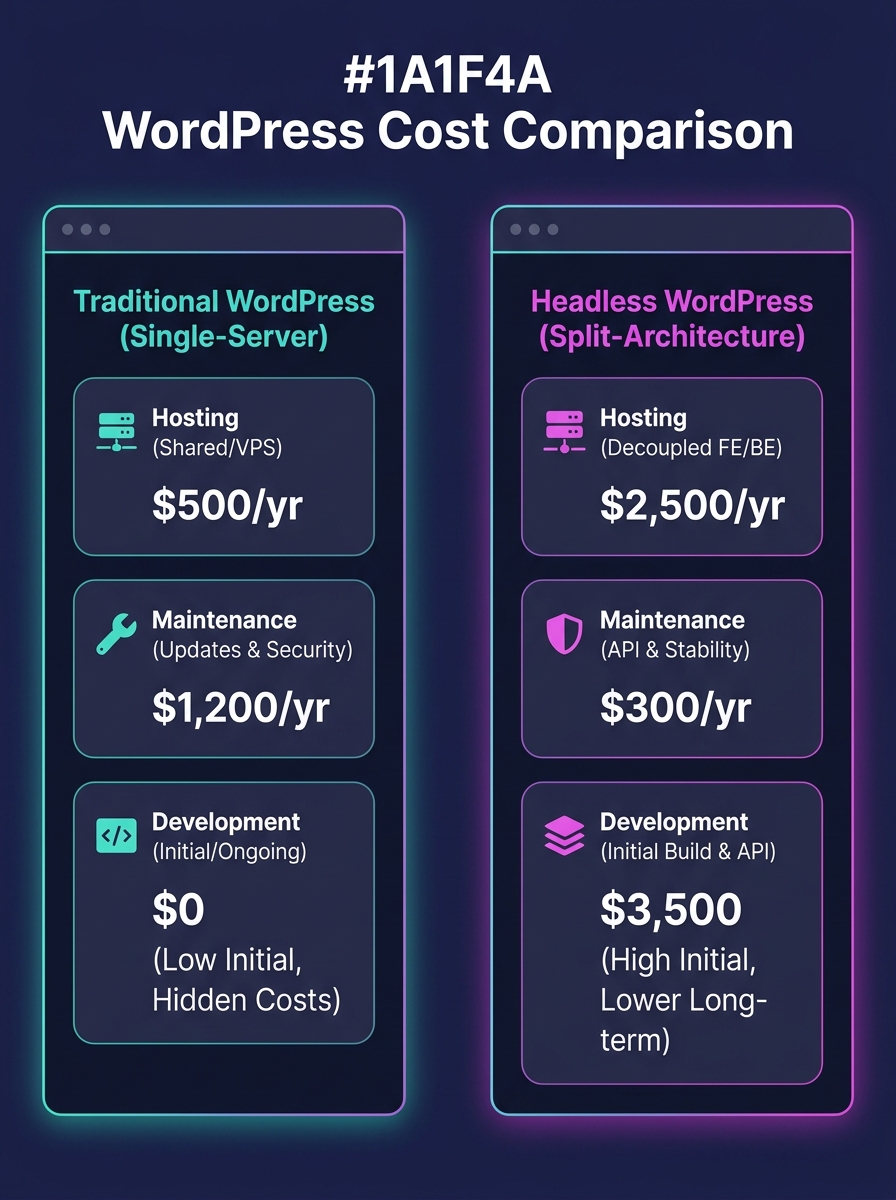
Traditional WordPress serves pages from a single server running PHP, MySQL, and the theme layer together. A headless WordPress architecture splits that into two independently hosted pieces: the WordPress backend serving JSON through its REST API, and a frontend application consuming that data. Each piece has its own hosting cost, its own scaling profile, and its own failure modes.
The cost split looks counterintuitive at first. You're paying for two hosting environments instead of one. But the frontend deployment layer, running on Vercel, Netlify, or Cloudflare Pages, often starts at $0/month for static and server-side rendered sites. Your WordPress backend, stripped of theme rendering responsibilities, runs lighter on a $30–50/month managed host. Combined, you're often spending less than a single $75–150/month managed WordPress plan that handles both backend and frontend rendering.
The margin improvement comes from what you're not doing: you're not debugging theme conflicts, not troubleshooting page builder rendering issues, not running into plugin conflicts that break the visual layer. If you've already worked through the technical debt implications of your current architecture, you know how much hidden cost lives in that coupling.
WPGraphQL 2.x Rewrote the Query Economics
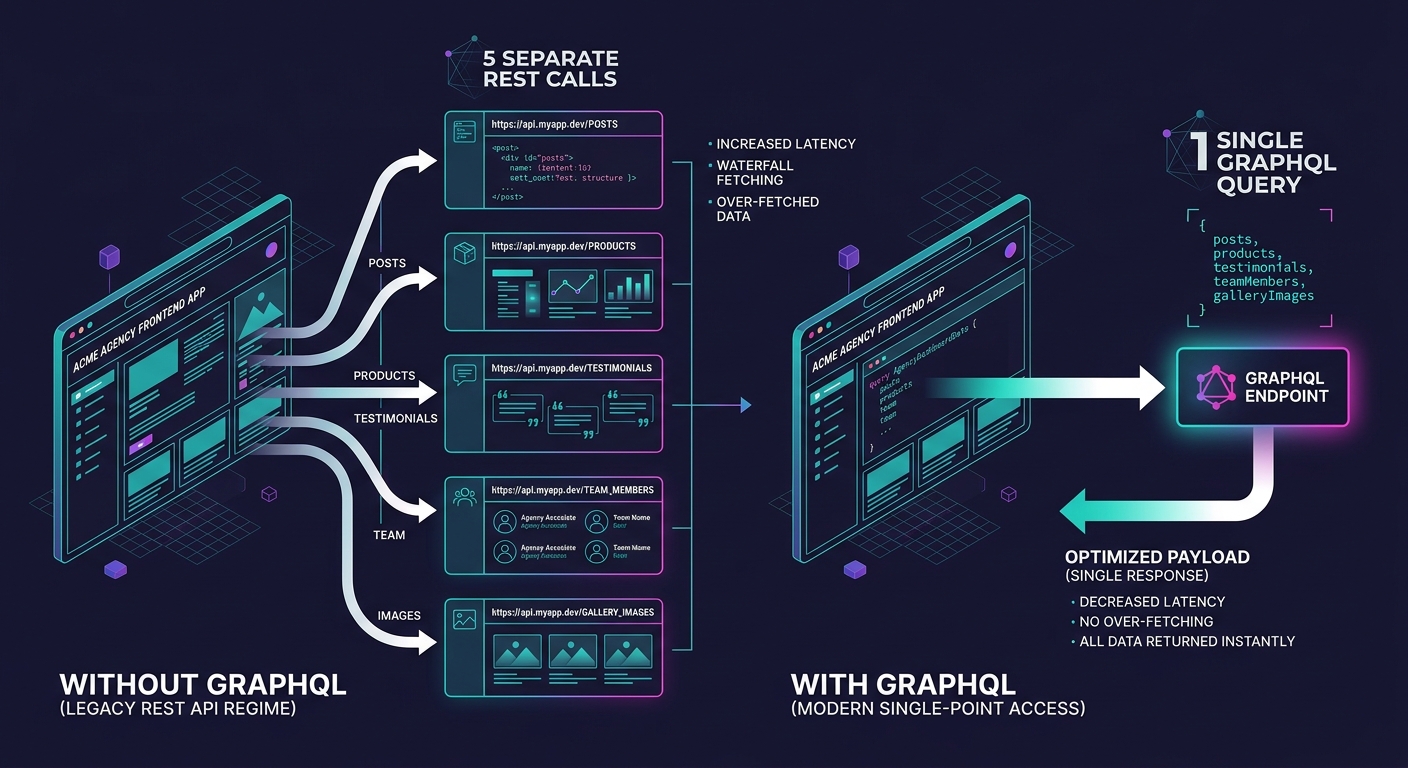
WPGraphQL 2.x's built-in dataloader batching reduces database queries by 60–80% compared to equivalent REST API calls fetching the same content. For a white-label operation serving 15–30 client sites from shared infrastructure, that reduction translates directly into lower server load and fewer scaling-related hosting upgrades.
The REST API ships with WordPress core and requires zero additional setup. WPGraphQL requires a plugin install. The tradeoff: REST returns fixed response shapes (you get everything or use the _fields parameter to trim), while GraphQL lets the frontend request exactly the fields it needs. On a client site with a homepage pulling posts, testimonials, team members, and a WooCommerce product feed, a single GraphQL query replaces 4–5 separate REST calls.
Jason Bahl, creator of WPGraphQL, has described the current state plainly: "Headless WordPress in 2026 is not about abandoning WordPress. It is about unleashing it. The CMS handles what it does best, content management, while modern frontends deliver experiences that were architecturally impossible with monolithic PHP rendering."
Version 2.x adds automatic persisted queries for CDN-friendly caching, per-field cache control directives, and federation support for composing multiple WordPress backends into a single schema. That federation feature matters for agencies managing 10+ client sites. You can build a unified internal dashboard querying content across all of them without custom middleware.
| Feature | REST API (Core) | WPGraphQL 2.x |
|---|---|---|
| Setup required | None (ships with WP) | Plugin install |
| Query flexibility | Fixed endpoints, _fields param | Client-specified field selection |
| Database query reduction | Baseline | 60–80% fewer queries |
| Caching | Standard HTTP caching | Persisted queries + per-field TTL |
| Multi-site federation | Not supported | Built-in schema composition |
| Frontend type generation | Manual | Introspection-based auto-generation |
If your agency handles WooCommerce builds, the performance difference is even more pronounced. Product catalog queries with nested variant data, pricing tiers, and image galleries generate dozens of database queries through REST. GraphQL's batching collapses those into single round-trips. Agencies that hire WooCommerce experts specifically for headless commerce builds see the payoff in reduced API hosting costs per store.
Authentication Decisions That Affect Per-Client Cost
Every headless WordPress build requires an authentication strategy for REST API white-label access, and the choice directly affects how much time you spend per client on setup and maintenance.
WordPress offers three production-grade options. Application Passwords, available since WP 5.6, provide the simplest path: generate a password per application in the WordPress admin, pass it as a Basic Auth header over HTTPS. Setup time runs under 5 minutes per client. The downside is that these passwords grant the full permission scope of the associated user account, making granular access control difficult.
JWT (JSON Web Tokens) offer token-based authentication with expiration windows and the ability to encode user data within the token itself. As detailed in White Label Coders' API integration guide, JWT is the preferred approach when your frontend needs to make authenticated requests without storing permanent credentials. WordPress developer Tom McFarlin has noted that "MailHog, Insomnia, and JWT Auth are the tools I've found useful when building headless WordPress applications with a REST API."
OAuth 1.0a adds redirect-based authentication flows, common when integrating with third-party services like social media APIs or cloud storage. It's the most complex to implement and the slowest to debug. For white-label client sites where API integration outsourcing needs to stay within budget, OAuth adds 2–4 hours of setup and testing per integration compared to JWT's typical 30–60 minutes.
Warning: WordPress 7.0's Abilities API introduces capability-based access control for API consumers, replacing older role-based systems. If you're building new headless sites in 2026, implement Abilities API from the start rather than retrofitting later. The migration path from legacy role-based auth adds 3–6 hours per site.
The Three-Layer Headless Margin Stack
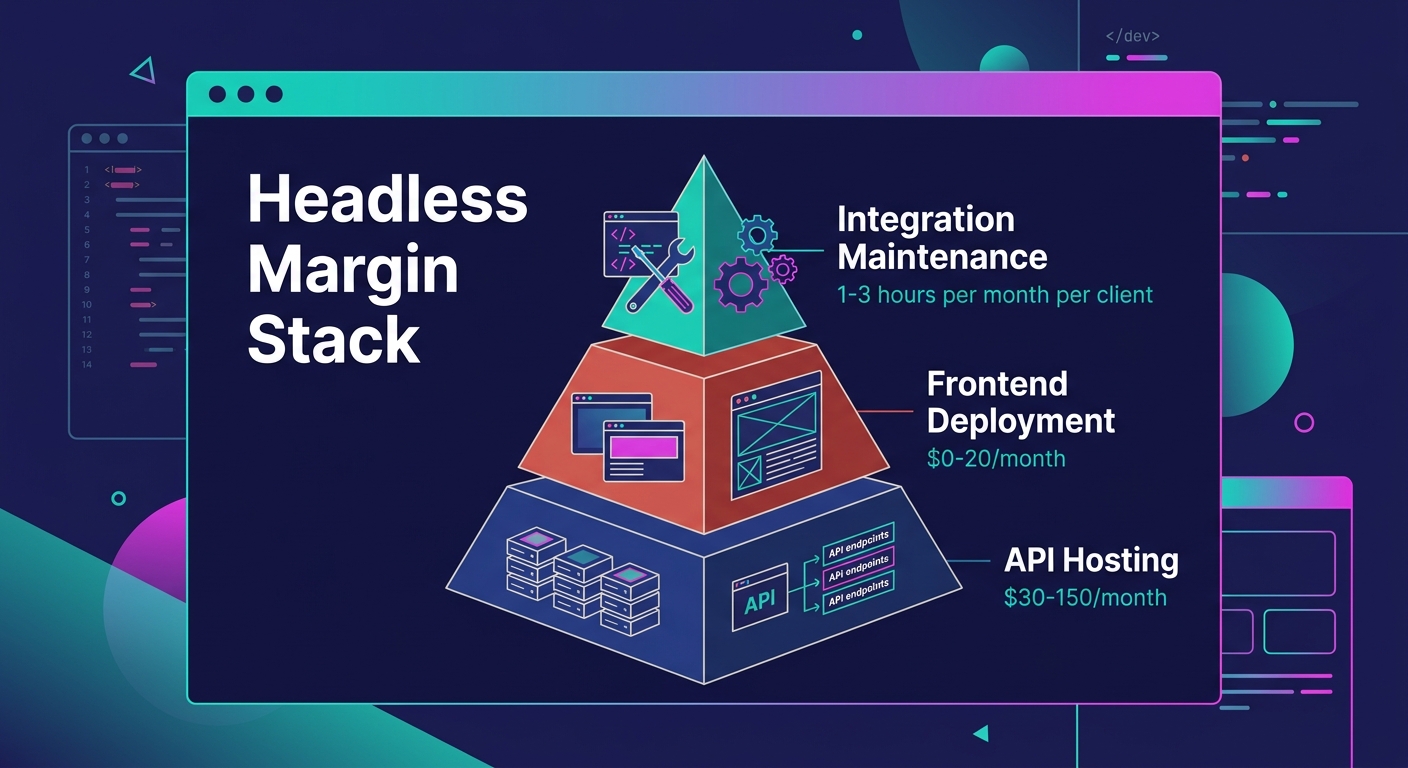
Agencies accustomed to pricing traditional WordPress builds as a single line item will lose margin on headless projects unless they separate costs into three distinct layers. Call it the Three-Layer Headless Margin Stack: API hosting, frontend deployment, and integration maintenance.
Layer 1: API Hosting. This is your WordPress backend, covering content management, database, and user authentication. Managed hosting from Kinsta, WP Engine, or Cloudways runs $30–150/month depending on traffic and storage. Because the backend isn't rendering pages, you can often run it on a lower tier than you'd need for a traditional WordPress site handling the same traffic volume.
Layer 2: Frontend Deployment. Your Next.js 15, Astro 5, or SvelteKit application deployed to an edge platform. Vercel's free tier handles surprising traffic volumes. Paid tiers start at $20/month. Cloudflare Workers and Pages offer 100,000 requests/day free. For most white-label client sites, frontend hosting costs between $0 and $20/month, with sub-50ms Time to First Byte across 300+ global edge locations.
Layer 3: Integration Maintenance. This is the layer agencies forget to price. Cache invalidation webhooks, ISR rebuild triggers, content schema updates when the client adds custom fields, GraphQL schema changes when new content types appear. Budget 1–3 hours per month per client for ongoing integration work. Multiply that by your blended hourly rate. That's your real margin floor.
As CrafterCMS noted in their headless agency analysis, cost models based on user licenses, number of websites, content assets, and API calls can increase the price "surprisingly high." The Three-Layer Margin Stack gives you a framework to quote headless projects accurately before those surprises eat your profit.
Budget 1–3 hours per month per client for ongoing integration maintenance. Multiply that by your blended rate. That's your real margin floor.
If you're still working through how to price your white-label WordPress services sustainably, adding headless to your offering without this cost separation is how agencies end up doing more sophisticated work for worse money.
Where the Block Editor Fits and Where It Doesn't
WordPress 7.0's Block Bindings API lets Gutenberg blocks connect to custom data sources, meaning editors can build rich layouts that get consumed as structured JSON through the API. The editorial experience stays familiar. The output stays machine-readable.
Here's the friction point: WordPress serializes block content as HTML by default. Your frontend has to parse that HTML into components, which adds complexity and potential rendering inconsistencies. Agencies using ACF or Meta Box to enforce structured content models avoid this parsing step entirely, because their content comes through the API as clean JSON fields. The architecture decision between blocks and ACF has real cost implications in a headless context that it doesn't have in traditional WordPress.
For white-label operations where you need to hand clients an editor they already understand, Gutenberg with Block Bindings is the pragmatic choice. For API-first builds where the content feeds multiple frontends (web, mobile app, digital signage), structured fields through ACF or Meta Box save 15–25% on frontend development time by eliminating HTML parsing logic entirely.
Decoupled Security in Concrete Numbers
Decoupling frontend and backend creates a measurable security improvement. As Vipe Studio's enterprise analysis documents, headless WordPress makes integration easier through its REST and GraphQL APIs while ensuring that potential security vulnerabilities in one component don't directly impact the other.
In practical terms: your WordPress admin lives on a subdomain or internal URL that the public never sees. The attack surface shrinks to the API endpoints you expose. No theme files to exploit. No frontend plugin vulnerabilities accessible from the public-facing application. For agencies managing dozens of client sites, this architectural separation reduces the time spent on security patches and incident response across the entire portfolio.
Questions The Numbers Still Can't Answer
The 40% latency improvement and 60–80% query reduction numbers are compelling, but they describe best-case scenarios on well-configured infrastructure. Several gaps remain in the available data.
Nobody has published reliable benchmarks comparing total cost of ownership for headless versus traditional WordPress across a portfolio of 20+ white-label client sites over 24 months. The individual component costs are clear. The aggregate, including developer context-switching between two deployment pipelines, client training on a decoupled editing experience, and the debugging overhead when something breaks in the gap between backend and frontend, remains anecdotal at best.
The Abilities API in WordPress 7.0 is too new for production-scale data on how it affects API integration outsourcing workflows. Agencies outsourcing headless builds to partners need to verify those partners understand capability-based auth, and the partner vetting process for headless specialists is thinner than it is for traditional WordPress developers.
And the assumption that clients will accept a decoupled editorial workflow hasn't been validated at scale for non-technical users. Gutenberg with Block Bindings helps, but the preview experience in headless, where "preview" means triggering a frontend rebuild rather than seeing a live page, still adds friction that traditional WordPress handles more gracefully. Until those friction points produce hard churn data, the margin projections for headless white-label remain promising estimates rather than proven outcomes.