

One component update to a shared button module can trigger Cumulative Layout Shift failures across every client site in a single deployment. White-label design system versioning, built on semantic versioning principles, is the structural safeguard that prevents a single breaking change from cascading into portfolio-wide SEO regressions and rendering errors.
TL;DR: Use semantic versioning (MAJOR.MINOR.PATCH) for every shared WordPress component. Deprecate before you remove, enforce migration windows before major releases, and decouple brand-specific tokens from structural code. Synchronizing design and code versions reduces engineering time by roughly 50%, and the SEO payoff (stable Core Web Vitals, consistent structured data) compounds across every client in your portfolio.
When you run a white-label WordPress operation serving 50+ brands from a shared component library, every update carries multi-tenant risk. A single unversioned change to a card component, a heading module, or a footer layout can silently break structured data, CLS scores, and page speed metrics across dozens of live sites. The result is ranking volatility that's nearly impossible to diagnose because the root cause is a design system change, not an SEO change.
These seven rules govern how we handle design system breaking changes without tanking client search performance.
Always version components with semantic numbering
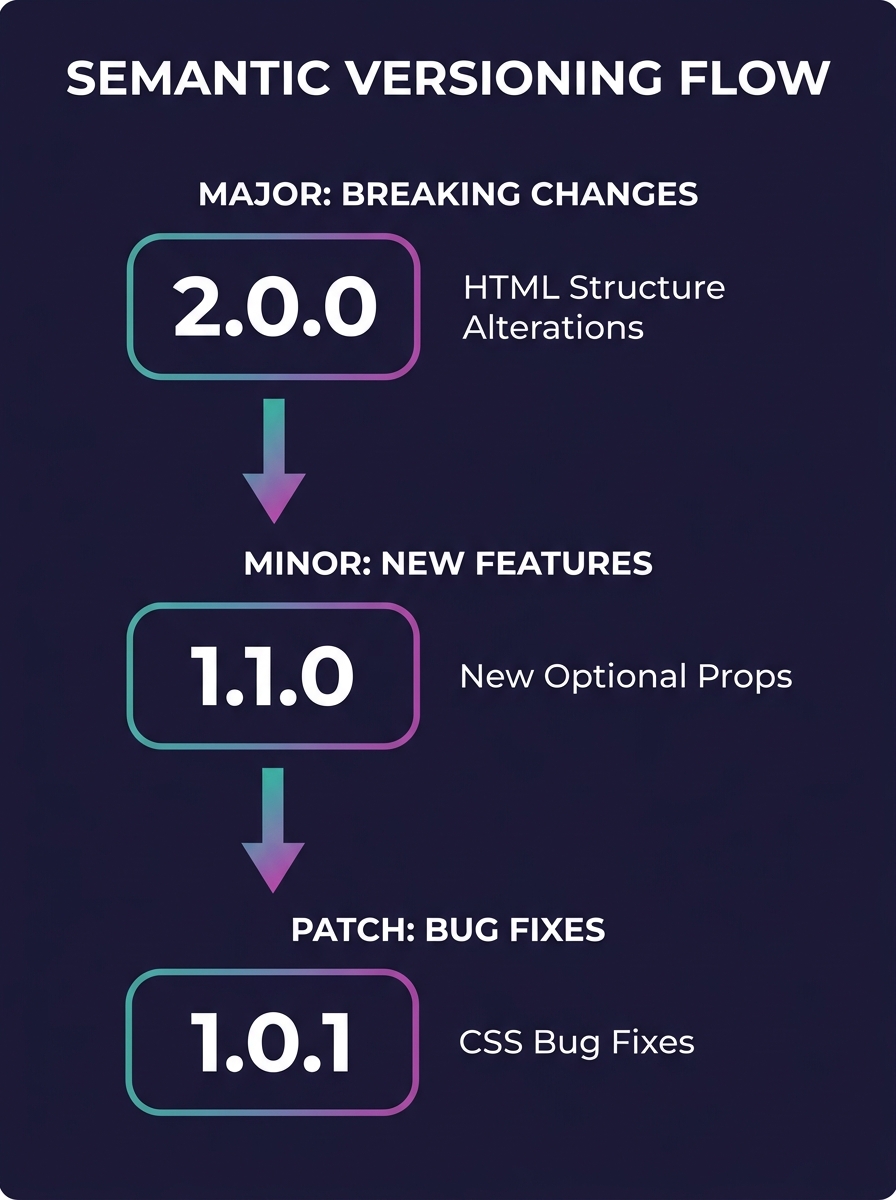
Every component in your shared library needs a version number following the MAJOR.MINOR.PATCH convention defined by the Semantic Versioning 2.0.0 specification. MAJOR increments signal breaking changes. MINOR increments add backward-compatible features. PATCH increments fix bugs without altering the component's interface or output.
The SemVer spec is explicit: "Minor version Y (x.Y.z | x > 0) MUST be incremented if new, backward compatible functionality is introduced to the public API. It MUST be incremented if any public API functionality is marked as deprecated."
For WordPress components, "breaking" means any change that alters rendered HTML structure, CSS class names, or data attribute output. Why does this matter for SEO? Google's CLS threshold sits at 0.1 for a "good" score, and a structural change to a hero component that shifts layout by even 15 pixels during load can push that metric past the threshold across every site consuming that component. If you've already built your reusable component library for white-label WordPress, semantic versioning WordPress components is what keeps that library from becoming a liability at scale.
Deprecate before you remove anything
A component deprecation strategy is the difference between a controlled transition and a 3 a.m. emergency across 50 client sites. UXPin's component versioning guidance puts the principle directly: "Deprecate old versions gradually. Mark components as deprecated in both design libraries and code repositories, and provide clear warnings."
The practical implementation: when you identify a component for retirement, mark it deprecated in your codebase with a target removal date no sooner than 2 release cycles (or 90 days, whichever is longer). Log a console warning in development environments. Update your internal docs. And most critically, run a search across all 50+ client themes to produce an exact count of active usage instances before you touch anything.
This rule bends when security is involved. If a component contains a vulnerability, and WordPress security flaws are overwhelmingly concentrated in plugin and theme code, the deprecation window compresses to whatever your patch timeline requires. But the communication protocol stays identical: notify, document, migrate.
Never ship a major version without a migration window
Multi-client design system updates fail when agencies treat version bumps like internal code pushes. Your clients' sites are live. Their SEO equity is real. A forced migration with zero buffer destroys both trust and rankings simultaneously.
Nordic APIs' lifecycle management guide recommends a parallel approach for handling design system breaking changes: "sending an email to registered users, updating the knowledge base...and even offering live support for premium clients" to mitigate disruption. Translated to white-label agency work, that means maintaining the old major version for a minimum of 30 days after the new one ships, running both versions in parallel across your deployment infrastructure.
Google's crawlers don't re-index on your schedule. A site using your v2.x card component has indexed HTML structure matching specific rich result schemas. Force-migrating to v3.x before Google has re-crawled the affected pages creates a window where structured data validation fails, rich results drop, and Core Web Vitals regress. The engineering time investment in parallel versioning pays for itself: research from UXPin's design system practitioners shows that synchronizing design and code versions reduces engineering time by approximately 50%, a figure that gets more impressive the larger your client portfolio grows.
A forced migration with zero buffer destroys both trust and rankings simultaneously. Run both major versions in parallel for at least 30 days.
Decouple brand tokens from structural components
The fastest path to design system debt is embedding brand-specific values (colors, fonts, spacing scales) directly into component logic. When your agency serves 50+ brands, every client customization layered into the component itself becomes a regression risk during updates. Practitioners who've observed scaled design systems warn this approach produces "20 slightly different design systems wearing one system's name," where updates to base components require regression testing across every single variant.
The fix is a strict token architecture. Define brand tokens as separate configuration layers (JSON files, CSS custom properties, or WordPress theme.json) that feed into brand-agnostic structural components. A button component should accept a token for background-color, border-radius, and font-family. It should never hard-code hex values or brand-specific typography.
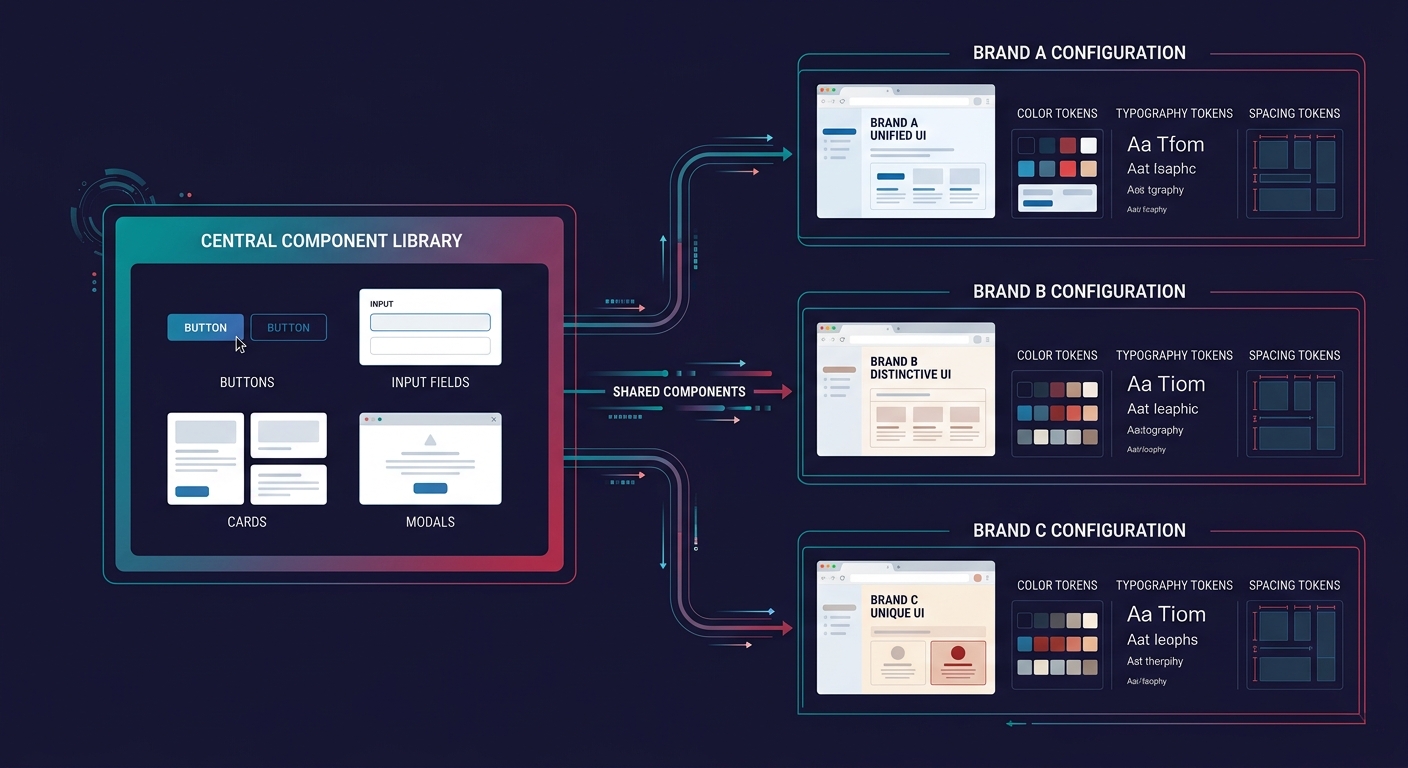
For WCAG compliance (the research emphasizes that every theme variation must pass accessibility testing for each customization), token separation means you validate color contrast ratios at the token level: 4.5:1 minimum for AA compliance on normal text, 3:1 for large text. You validate once per token set instead of re-testing every component across every brand. When white-label WordPress development teams work on your component library, token separation means they can modify structure without accidentally breaking 12 different brand palettes.
Tip: Store brand tokens in WordPress theme.json files. This gives you a single source of truth per client that you can version-control independently from the component library. When you ship component v3.0, each client's theme.json continues to feed its brand values into the new structure without manual re-theming.
Test breaking changes against your highest-traffic client first
When you push a major version, your instinct will be to test on the smallest, least-visible client site. This thinking is backwards. Your highest-traffic client site has the most indexed pages, the most structured data, the deepest Core Web Vitals history in Google Search Console, and the most to lose from a rendering regression.
Deploy to a staging clone of your highest-traffic client. Run Lighthouse across 10 representative page templates. Compare CLS, LCP (target under 2.5 seconds), and INP scores against the pre-update baseline. Check structured data validation with Google's Rich Results Test on at least 5 page types. Only after this client's staging environment passes without regression should the update roll to the broader portfolio.
If you've built isolated staging environments for white-label WordPress at scale, this process takes hours, not days. Without isolated staging, you're testing in production, and all 50+ clients are sharing that risk. The multi-tenant architecture Wikipedia entry makes this trade-off explicit: "an update on this instance may cause downtime for all tenants even if the update is requested and useful for only one tenant."
Automate breaking change detection in your deployment pipeline
Manual review catches roughly 60% of breaking changes in component libraries. The structural shifts that human reviewers miss, changed HTML element hierarchies, removed CSS classes, altered data-attribute schemas that structured data depends on, are exactly the ones that cause silent SEO damage.
GitHub Actions workflows can run automated breaking change detection by comparing the rendered output of the current component version against the proposed update. The comparison flags any change to element structure, attribute names, or class hierarchies. This pairs well with scope lock protocols that prevent revision cycle bloat, because automated detection catches scope-expanding changes before they ever reach QA.
For SEO specifically, add a structured data validation step. If your header component outputs schema.org Organization markup, your pipeline should validate that the v3.0 output still passes schema validation. A broken itemtype or missing property won't cause a visual regression (nobody sees structured data), but it will cost you rich results across every site using that component.
Warning: Don't skip visual regression testing alongside structural checks. A component can pass every automated validation and still render 8 pixels taller than its predecessor, pushing below-the-fold content down and triggering CLS failures. Tools like Percy or BackstopJS catch what DOM-level checks miss.
When These Rules Break
These rules assume you control the full deployment pipeline and every client site runs on your infrastructure. They fracture in three scenarios.
First, when client sites run on hosting environments you don't manage, you lose the ability to enforce parallel versioning. In that case, pin each client to an explicit major version and make upgrades opt-in rather than automatic, even if it means maintaining 3 major versions simultaneously across your support load.
Second, when web designers or third-party contractors customize components beyond your token architecture, they create forks that live outside your versioning scheme entirely. The answer is governance: define which component properties are customizable and which are locked, then enforce this through code review, not documentation alone.
Third, when WordPress core itself ships a breaking change (as it periodically does with block editor updates), your component versioning has to absorb the upstream disruption. Your design system version responds to upstream WordPress versions, and your migration windows must account for both timelines.
The underlying principle holds across all three cases: version everything, deprecate before removing, communicate before deploying. The mechanics flex based on how much of the stack you control. The discipline stays constant regardless.