

WooCommerce powers over 28% of global e-commerce sites while PrestaShop holds roughly 0.6%. Agencies handling a PrestaShop to WordPress migration face three distinct paths: automated SaaS tools, free WordPress plugins, and custom scripts. Each delivers dramatically different accuracy rates, timelines, and costs for customer data transfer.
TL;DR: Automated SaaS tools like Cart2Cart offer speed and zero downtime but charge per entity transferred. Free plugins like FG PrestaShop to WooCommerce handle products and categories but skip customer passwords and order history. Custom migration scripts hit 98% accuracy on complex stores but take 2–6 weeks and cost $3K–$25K+.
The choice between these three approaches comes down to store complexity, budget, and how much historical data needs to survive intact on the WooCommerce side. A 200-product catalog with standard pricing is a different animal from a 15,000-SKU store running custom pricing rules, multi-currency support, and five years of order history tied to customer accounts.
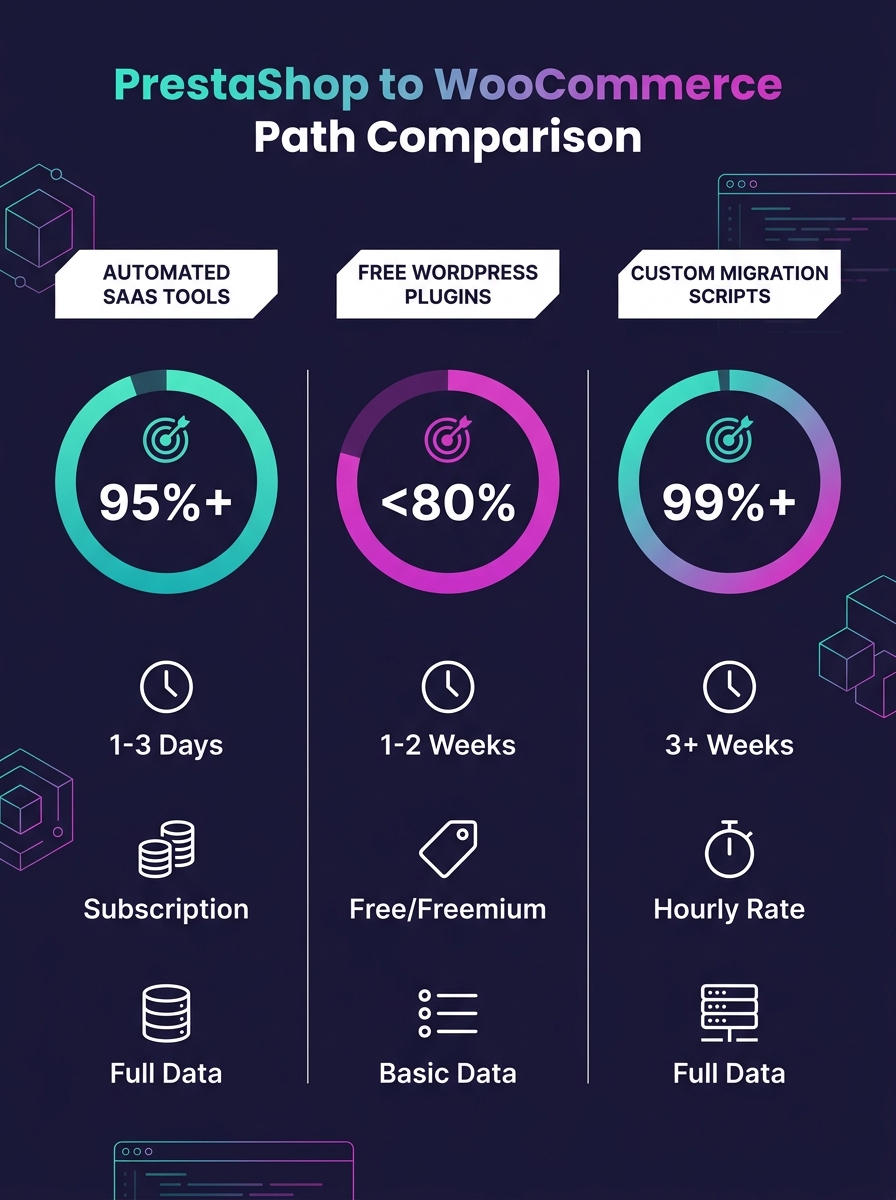
Before digging into each path, here's where they land across the criteria that actually determine project success:
| Criteria | Automated SaaS (Cart2Cart / LitExtension) | Free Plugin (FG PrestaShop to WooCommerce) | Custom Scripts |
|---|---|---|---|
| Accuracy on complex stores | 85–95% | 70–85% | ~98% |
| Customer passwords | Supported with add-on modules | Not supported | Fully supported |
| Order history | Yes (paid) | No | Yes |
| SEO URL migration | Partial (manual redirect setup needed) | No | Full control |
| Downtime | Zero (runs on external servers) | Minimal (runs on your server) | Zero (parallel environment) |
| Timeline | Hours to days | Hours | 2–6 weeks |
| Cost model | Pay-per-entity | Free (premium tier available) | Project-based ($3K–$25K+) |
Automated SaaS Migration Tools: Cart2Cart and LitExtension
Cart2Cart and LitExtension dominate the automated e-commerce platform migration market, and for solid reason. Both run migration processes on their own servers, which means your live PrestaShop store stays 100% operational during the transfer. Customers keep buying, orders keep processing, and the WooCommerce store takes shape in the background.
The workflow on both platforms follows the same pattern. You connect your PrestaShop source by providing database access or installing a connection bridge module. You point the tool at your target WooCommerce installation. You select which entities to migrate (products, categories, customers, orders, CMS pages, reviews), and the tool handles the field mapping between PrestaShop's database schema and WooCommerce's post-based architecture.
Both offer free demo migrations that transfer a sample of your data so you can verify accuracy before committing. Run the demo every single time, on every project. A demo catches broken image links, incorrect pricing, and malformed product descriptions before they reach production. Skipping it to save 20 minutes is how agencies end up with a panicked client discovering their $149.99 product now shows as $14.99.
The tradeoff is cost and completeness. Pricing follows a pay-per-entity model that scales with data volume. A store with 5,000 products, 10,000 customers, and 30,000 orders can run several hundred dollars. And here's the gap agencies need to watch: these tools don't migrate automated workflows. Email marketing integrations with Klaviyo or Mailchimp, tax calculation rules, custom shipping logic, and payment gateway configurations all need manual rebuilding on the WooCommerce side, which adds 2–4 weeks for complex setups.
Customer password migration is technically possible through add-on modules, but the implementation varies by PrestaShop version. Stores running PrestaShop 1.6 with modified encryption may need a custom password bridge even when using automated tools.
When automated SaaS tools fit the project
Straightforward product catalogs under 10,000 SKUs with standard attributes. Stores where preserving complete order history matters but the business doesn't rely on heavily customized PrestaShop modules. Agencies that need the WooCommerce migration done in days rather than weeks and can budget for per-entity pricing plus post-migration integration work.
The Free WordPress Plugin Path
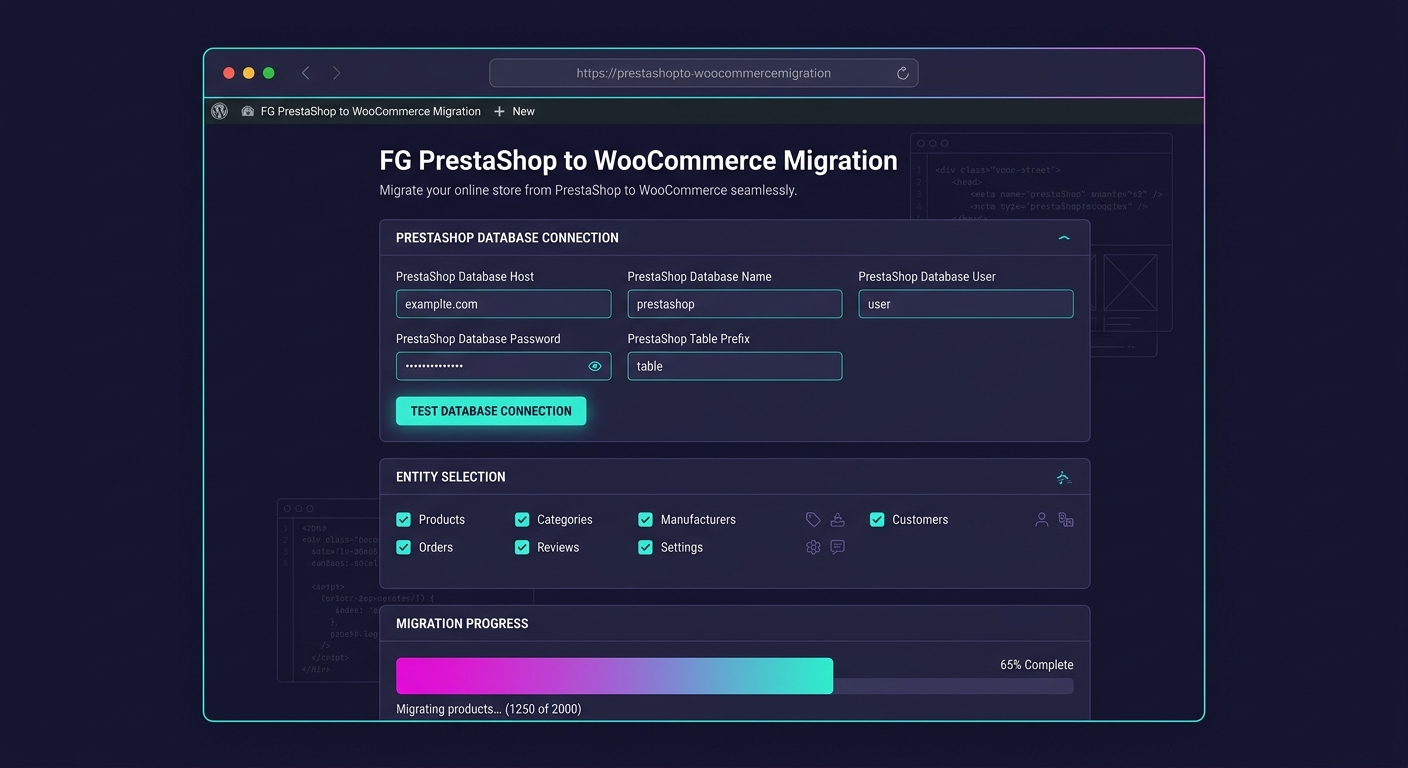
The FG PrestaShop to WooCommerce plugin takes a fundamentally different approach. It runs directly on your WordPress installation and connects to your PrestaShop database via MySQL credentials. The free version migrates products, categories, tags, images, and CMS pages, which is a solid foundation for content-heavy stores where the product catalog matters more than historical transaction data.
Because the plugin reads PrestaShop's database tables directly, it handles the structural translation between PrestaShop's relational data model and WooCommerce's WordPress-native architecture. Products become WooCommerce products. Categories map to product categories. Images get downloaded and re-attached to the correct items.
What the free tier doesn't touch: customers, orders, customer reviews, product attributes and combinations, manufacturer data, and employee accounts. The premium version unlocks most of these, but even the paid tier doesn't handle customer password migration. Every migrated customer will need to reset their password on the new WooCommerce store, creating friction that directly impacts your client's revenue during the transition period. If your client has 8,000 active customers who reorder monthly, that password reset wall translates to measurable cart abandonment in the first two weeks post-launch.
SEO URL migration is another blind spot. The plugin moves content but doesn't create the 301 redirects needed to ensure PrestaShop URLs point to their WooCommerce equivalents. You'll need to handle that separately with a redirect plugin or server-level rewrite rules, and doing it wrong means losing organic rankings that took years to build.
If you're setting up the target WooCommerce environment from scratch, making sure the hosting infrastructure can handle your store's traffic patterns is as important as the migration itself. A sluggish WooCommerce installation makes every post-migration issue look worse than it is.
When the free plugin fits the project
Small to medium stores under 2,000 products where the primary goal is moving the catalog and content to WooCommerce. Projects where customer accounts can start fresh, such as store rebrands or market pivots. Tight budgets where the agency can invest developer time in post-migration cleanup instead of tool licensing fees.
Custom Migration Scripts
Custom migration scripts involve writing PHP, Python, or Node.js code that reads from PrestaShop's database, transforms the data, and writes to WooCommerce through its REST API or direct database insertion. This is the approach where an experienced developer controls every field mapping, every data transformation, every edge case that generic tools gloss over.
The accuracy difference on complex stores is substantial. Automated plugins hit 85–95% accuracy on stores with custom fields, complex pricing tiers, or unique attribute structures. Custom scripts push to roughly 98% because a developer writes specific logic for every data quirk the store has accumulated over years of customization. That remaining 2% gap usually sits in truly malformed legacy data that requires manual intervention regardless of approach.
Customer passwords migrate cleanly because you can replicate PrestaShop's hashing algorithm in a WordPress authentication filter. Order IDs stay consistent by pre-seeding WooCommerce's sequential order numbering. Product relationships, cross-sells, and custom metadata all transfer intact because nothing is opaque to a developer with direct database access.
The timeline is the obvious cost. Plan on 3–5 days for schema analysis and mapping, 2–3 weeks for development and iterative testing, and 3–5 days for migration execution against staging followed by the production cutover. Total: 2–6 weeks depending on store complexity. Budget ranges from $3,000 for a smaller store to $25,000+ for enterprise PrestaShop installations with ERP integrations.
Agencies doing this work for clients should treat the migration staging environment with the same discipline they'd apply to any production-staging parity setup. Data discrepancies between what you tested and what goes live are how customers end up seeing wrong prices or missing order histories.
When custom scripts fit the project
Stores exceeding 10,000 SKUs with custom pricing logic, multi-warehouse inventory, or complex product relationships. Businesses where losing even 2% of historical data creates compliance or accounting problems. Migrations from heavily modified PrestaShop installations where automated tools can't parse the custom modules bolted onto the original platform.
Payment Gateway Integration After the Cutover
Regardless of which migration path you choose, payment gateway integration requires manual configuration on the WooCommerce side. PrestaShop payment modules don't translate to WooCommerce extensions. You're reinstalling from scratch.
WooCommerce's payment gateway ecosystem supports Stripe, PayPal, Square, Authorize.Net, Mollie, and dozens of regional processors. The setup process for most gateways follows the same pattern: install the gateway plugin, enter your API credentials, configure checkout behavior, and test with sandbox transactions before going live.
The revenue risk sits in the gap between turning off PrestaShop's payment processing and confirming WooCommerce's gateway is accepting live transactions. Minimize this window by running both stores in parallel during cutover day, with PrestaShop handling live orders until you've confirmed at least three successful test transactions through WooCommerce's live payment gateway.
Warning: Don't reuse API keys from your PrestaShop payment modules in WooCommerce without verifying the key permissions match. Some gateways scope API access by platform integration, and a key generated for PrestaShop may lack the WooCommerce-specific webhook permissions needed for order status updates. Recent [credential-related plugin vulnerabilities](/blog/gravity-smtp-vulnerability-aws-google-api-keys) are a reminder that API key management during migrations deserves careful attention.
Subscription-based stores face an additional challenge. Active subscription data, including billing cycles, next payment dates, and customer payment tokens, requires gateway-specific migration procedures. Stripe's customer objects and payment methods can be reattached to WooCommerce Subscriptions, but the mapping is manual and error-prone without thorough staging tests.
The migration tool moves data. The redirect map protects revenue. Skip the redirects and you'll spend months rebuilding the organic traffic your client already had.
SEO Preservation Across All Three Paths
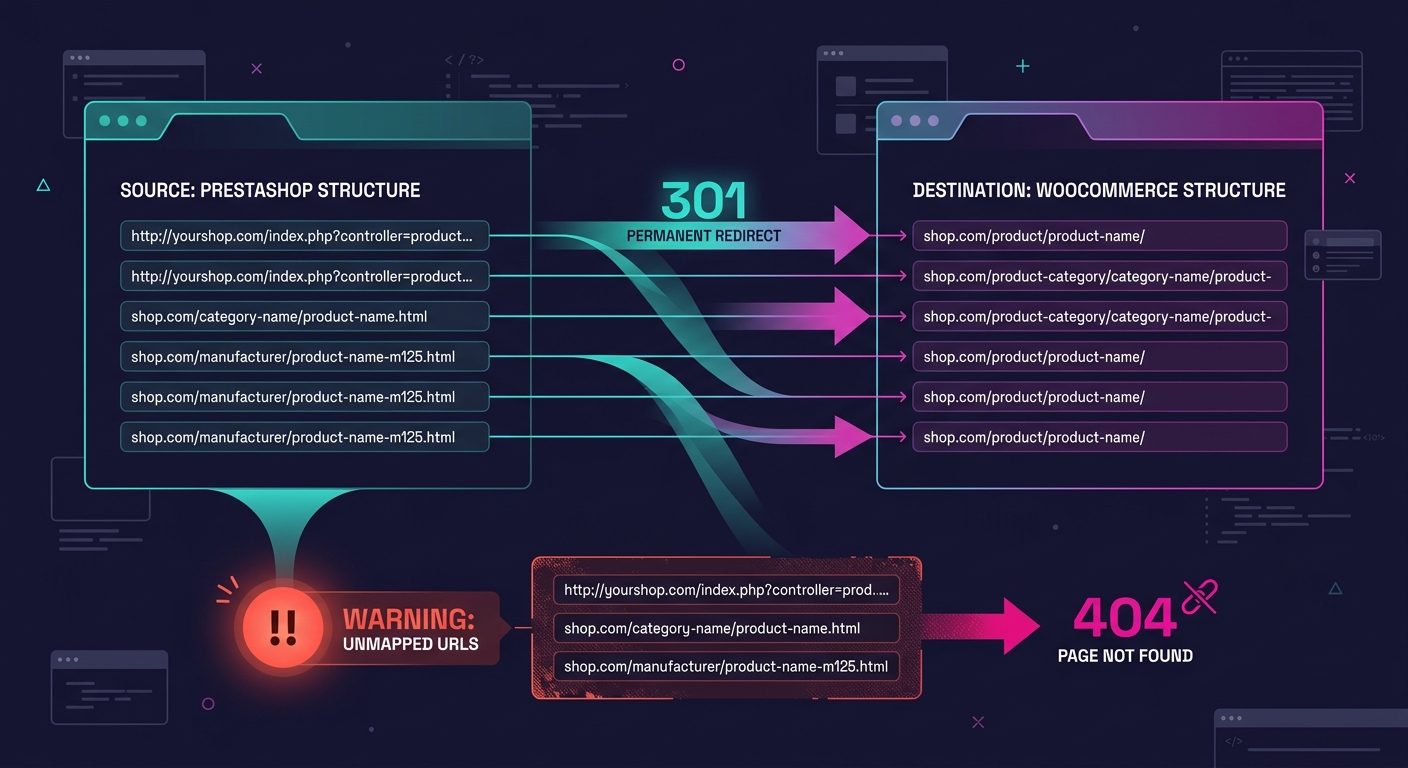
PrestaShop and WooCommerce generate fundamentally different URL structures. PrestaShop uses patterns like /product-name-123.html while WooCommerce defaults to /product/product-name/. Without 301 redirects mapping every old URL to its new equivalent, organic search traffic drops the moment Google recrawls the site.
Automated SaaS tools offer partial SEO migration where meta titles and descriptions usually transfer, but URL redirect creation is either an add-on or requires manual work. The free plugin doesn't handle SEO data at all. Custom scripts can generate a complete redirect map as part of the migration output, which is one of their strongest advantages for content-heavy stores with deep organic traffic.
Regardless of your migration path, install a redirect management plugin on WordPress and import your full redirect map before the DNS cutover. Test a sample of 50–100 redirects with a crawling tool to verify they resolve correctly. One malformed redirect rule in a batch import can cascade into hundreds of 404 errors.
Agencies managing high-SKU WooCommerce stores post-migration should also audit the category and tag URL structures. PrestaShop's category hierarchy rarely maps 1:1 to WooCommerce's taxonomy structure, and misaligned category pages create duplicate content issues that compound over time.
How To Choose Between These Three
The decision comes down to three variables: store complexity, data completeness requirements, and timeline pressure.
Automated SaaS tools (Cart2Cart, LitExtension) are the right pick when the store has under 10,000 SKUs, the client needs zero downtime, and the budget can absorb per-entity pricing plus 2–4 weeks of post-migration integration rebuilding. Accuracy on standard stores is high, and the tools handle the tedious entity-by-entity transfer so your team can focus on rebuilding workflows, configuring payment gateway integration, and testing the checkout experience end-to-end.
The free plugin (FG PrestaShop to WooCommerce) fits projects where the product catalog is the core asset and historical customer and order data can be left behind. Rebrands, fresh-start launches, and stores with under 2,000 products where the agency's developer time is cheaper than licensing fees. Budget an extra day for manual SEO redirect creation, and set expectations with the client about the customer password reset requirement.
Custom scripts are the right investment when losing data means losing compliance, when the store's customizations are too tangled for generic tools to parse, or when the client's order history and customer accounts are central to ongoing operations. The 2–6 week timeline and $3,000–$25,000+ budget reflect the precision you're buying, and for stores above 10,000 SKUs with complex data relationships, that precision pays for itself in avoided post-launch firefighting.
For most agency clients running mid-market PrestaShop stores in the 1,000–8,000 product range, the automated SaaS path delivers the best balance of speed, accuracy, and cost. Pair it with a manual SEO redirect strategy, a fresh payment gateway configuration, and a thorough post-migration QA pass comparing live data against the original store, and the WooCommerce installation your client inherits won't skip a beat in revenue or customer experience.