

WordPress Multisite assigns users one of six default roles that apply identically across every subsite, with no built-in way to scope permissions per individual site. Role-scoped access control fixes this by mapping custom capabilities to specific subsites through network-activated plugins and per-site role definitions.
TL;DR: Multisite's default permission model gives users identical access everywhere on the network. To scope access per client site, restrict Super Admin to 2-3 people, define custom roles per subsite using PublishPress Capabilities or User Role Editor, and run quarterly permission audits to catch drift before it becomes a breach.
What Ships Out of the Box and Why It Falls Short
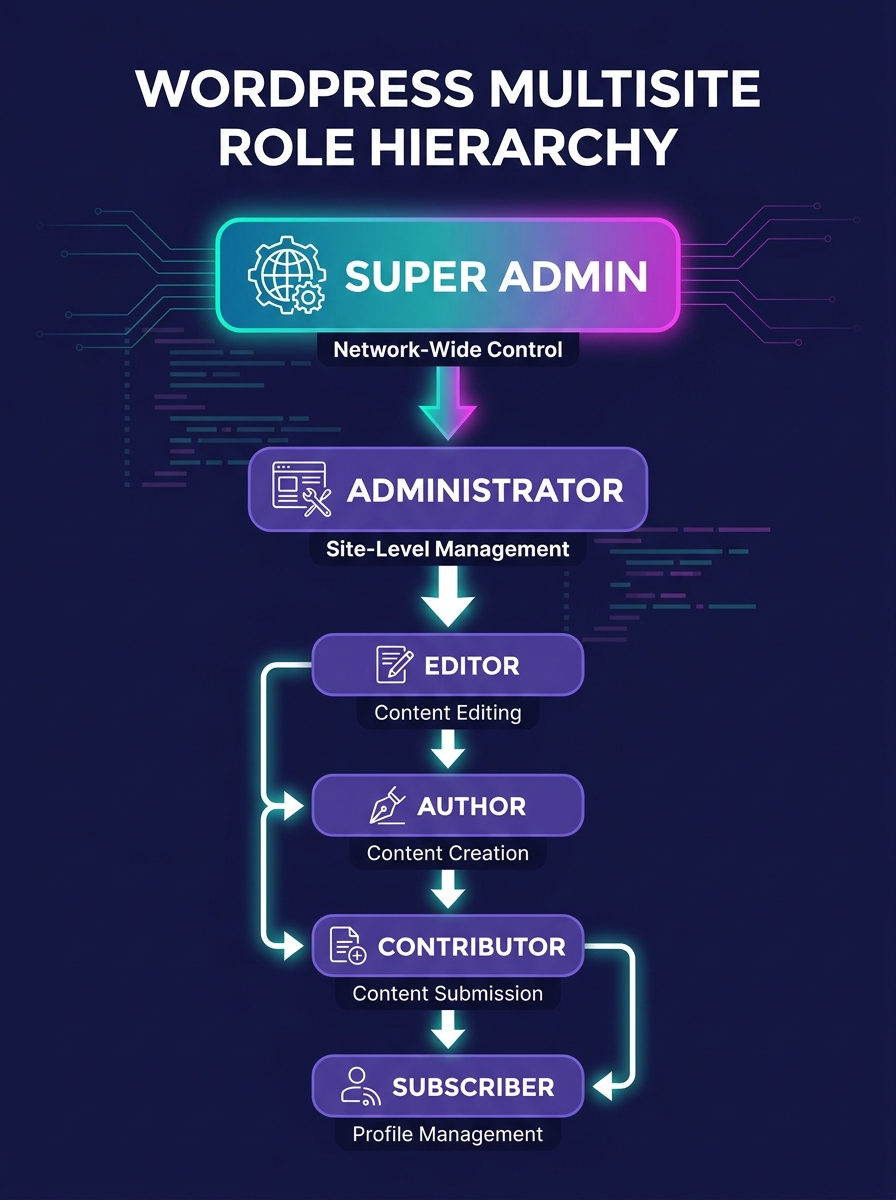
WordPress core provides six user roles, each with a fixed set of capabilities: Super Admin, Administrator, Editor, Author, Contributor, and Subscriber. As Cloudways' 2026 permissions guide documents, "each role is designed for a different type of responsibility, from full site control to read-only access." That hierarchy works fine for a single-site install. On a Multisite network, it creates three problems a white-label agency will hit almost immediately.
First, user accounts are network-wide. When you add a user to Subsite A, that same account exists at the network level and can be granted access to Subsite B, C, or D with a single checkbox. Second, the default Administrator role on any subsite carries roughly 70 individual capabilities, including the ability to install plugins and modify theme files. That's far more power than a client content manager should have. Third, there's no core mechanism for creating a role that exists on one subsite but not another. The Editor role is the same Editor role everywhere.
For an agency running 15-40 client subsites on a single Multisite installation, this flat permission structure means that a freelance contractor brought on for one client's blog content theoretically sits one misconfigured checkbox away from accessing another client's WooCommerce order data. The mechanism that prevents this requires layered configuration across three distinct levels.
The Three-Layer Permission Stack
The mental model that makes WordPress multisite permissions manageable for agency operations is what we call the Three-Layer Permission Stack: network controls, site-level role definitions, and individual capability assignments.
The network layer determines who can manage the Multisite installation itself, including adding subsites, activating plugins network-wide, and creating user accounts. The site layer defines which roles exist on each subsite and what those roles can do. The capability layer fine-tunes individual permissions within a role, allowing you to strip specific actions (like plugin installation) from an Administrator or grant specific actions (like media uploads) to a Contributor.
Each layer filters access downward. A permission granted at the network level can be restricted at the site level, and a site-level role can be further narrowed by removing individual capabilities. The reverse doesn't work: a site-level Administrator cannot grant themselves network-level Super Admin access. That one-directional flow is the security foundation of the entire model.
| Layer | Who It Controls | Managed By | Tools |
|---|---|---|---|
| Network | Super Admins, network-wide settings | wp-config.php, Network Admin dashboard | Core WordPress, 2FA plugins |
| Site | Per-subsite Administrators, Editors, Authors | Subsite Admin dashboard, capability plugins | PublishPress Capabilities, User Role Editor, Members |
| Capability | Individual permissions within any role | Capability editor screens | PublishPress Capabilities, custom code via add_cap() |
This three-layer approach maps directly to the way agencies typically organize access. Your internal dev team operates at the network layer. Your white-label partners or dedicated web development talent operate at the site layer, scoped to specific client projects. And your clients' content teams operate at the capability layer, with permissions stripped down to content management only.
Network-Level Lockdown: Scoping Super Admin
Super Admin is the single most dangerous role in any Multisite installation. A Super Admin can delete subsites, deactivate plugins network-wide, and modify the wp-config.php file through certain plugin interfaces. The Oyova multisite management guide emphasizes that this role "has full access to all sites in the network, including network-wide settings" and can "manage multiple WordPress sites, themes, plugins, and user accounts across the network."
The operating rule for white-label agencies is strict: limit Super Admin to 2-3 people, maximum. These should be senior technical staff at your agency, never client contacts, never freelance contractors. Every Super Admin account should run two-factor authentication (2FA) with an app-based authenticator, not SMS. Password length minimums of 16+ characters are table stakes, especially given that automated bots specifically target WordPress sites through weak credentials.
To enforce this at the configuration level, add the following constant to wp-config.php: DISALLOW_FILE_EDIT set to true. This removes the Theme Editor and Plugin Editor from the dashboard entirely, closing one of the most common privilege-escalation vectors. Even a Super Admin won't be able to inject code through the browser-based editor.
Warning: If a white-label partner or subcontractor requests Super Admin access "temporarily," the answer is no. Create a custom role with the specific capabilities they need instead. Temporary Super Admin access is how accidental network-wide plugin deactivations happen.
Per-Site Role Definitions Using Capability Plugins
This is where the actual scoping happens. WordPress core doesn't support per-site role customization, so you need a plugin that does. Two options dominate the space: PublishPress Capabilities and User Role Editor.
PublishPress Capabilities is the one we see most often in agency Multisite setups. As documented in their multisite configuration guide, you install the plugin on your main network site, set it to "Network Activate," and then configure roles individually on each subsite by navigating to "Capabilities" in each subsite's admin menu. Network Activation makes the plugin available everywhere; it doesn't force identical configuration everywhere. That distinction matters.
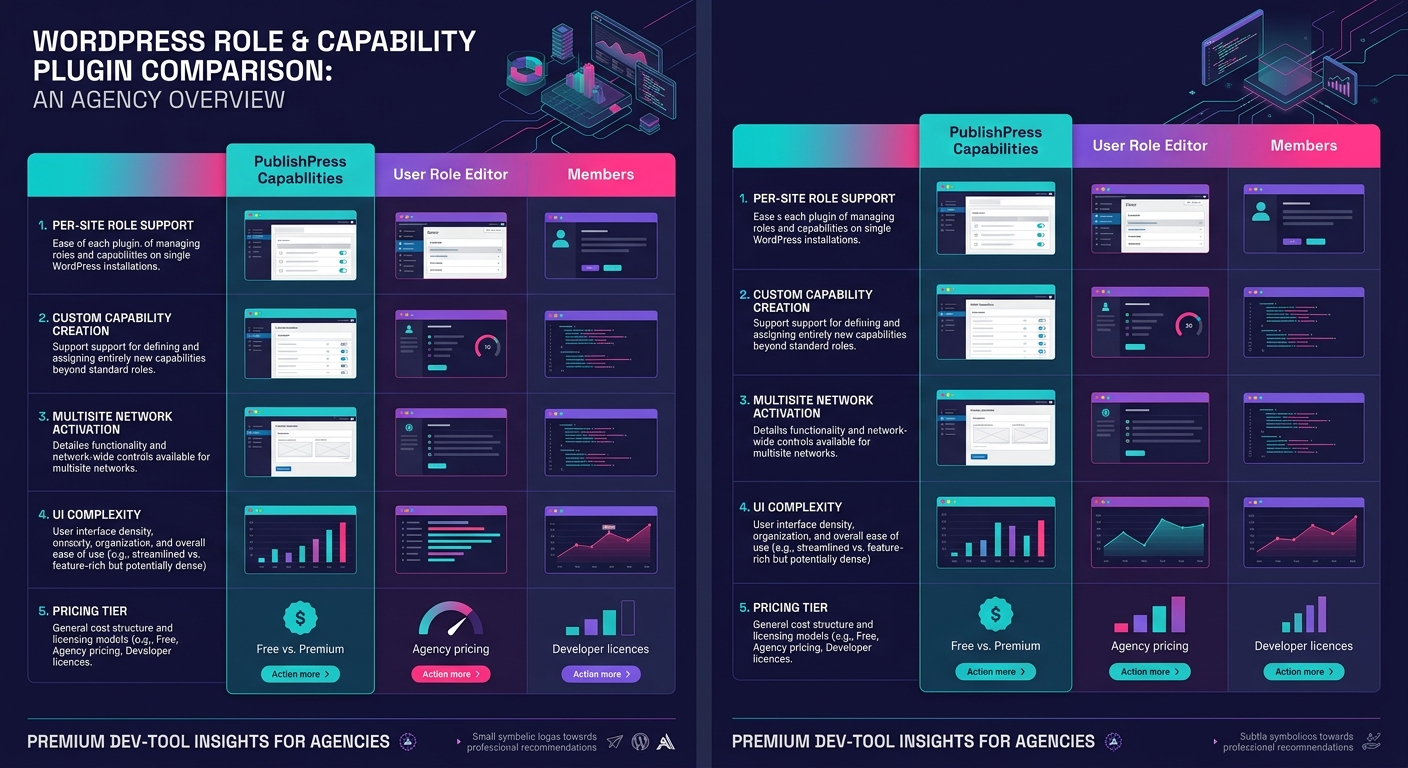
User Role Editor, recommended by Oyova's RBAC documentation, provides similar granular control with a different interface approach. Both plugins allow you to create entirely custom roles that exist only on specific subsites.
The practical implementation follows a repeatable pattern for each new client subsite:
- Switch to the subsite in your Network Admin dashboard.
- Open the capability plugin's settings for that specific subsite.
- Create a custom role named for the client's access tier (e.g., "ClientName Content Manager").
- Assign only the capabilities that role needs: edit_posts, upload_files, edit_published_posts, and read. Remove everything else.
- Assign the client's team members to this custom role on this subsite only.
A typical white-label agency ends up with 3-5 custom roles per subsite. Content Managers get posting and media capabilities. SEO Specialists get access to meta fields and Yoast/Rank Math settings. Client Administrators get user management for their own subsite but zero access to plugin installation, theme switching, or anything that touches code.
The default Administrator role carries roughly 70 individual capabilities. A well-scoped client role should carry 8-12.
If you're running multi-tenant identity provider architecture with client SSO, the capability plugin's role definitions need to align with the identity provider's group mappings. Mismatches between SSO group assignments and WordPress role definitions are one of the more common sources of permission drift.
Propagating Roles Across the Network Without Breaking Isolation
Standardizing roles across 20+ subsites without destroying site-specific customizations is the operational challenge that separates agencies running Multisite well from those constantly fighting fires.
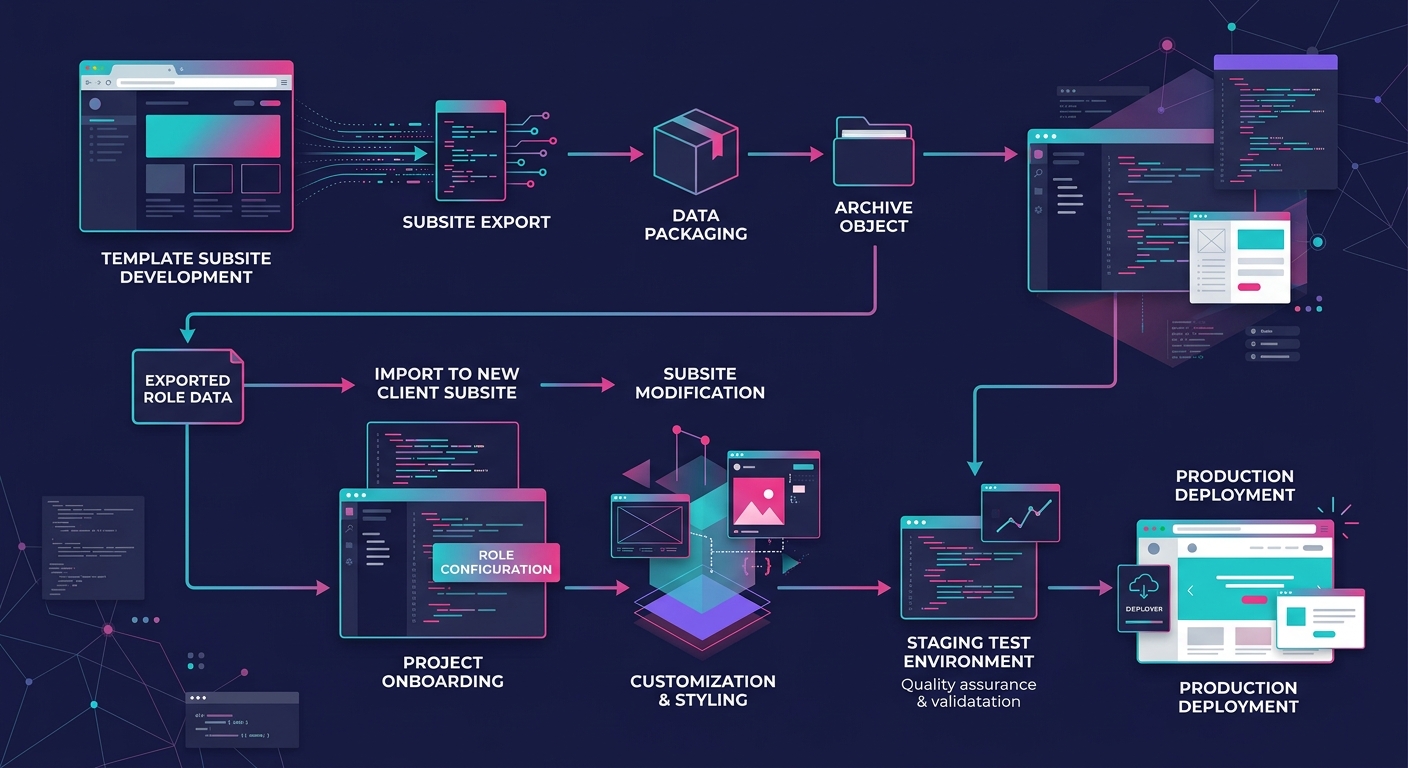
PublishPress Capabilities offers a role export/import function that lets you define a baseline role on one subsite and push it to others. The process is manual and deliberate by design. You export the capability set from your template subsite, switch to the target subsite, and import. The plugin doesn't overwrite existing custom roles unless you explicitly tell it to.
The workflow we recommend:
- Maintain one subsite as your "role template" site. This subsite doesn't serve a client; it exists as your canonical source of role definitions.
- Define your standard agency roles on this template site: Client Content Manager, Client SEO Specialist, Client Admin, Agency Developer, Agency Project Manager.
- When spinning up a new client subsite, export from the template and import to the new site.
- Modify capabilities on the new subsite only where the client's specific needs differ from the baseline.
This approach keeps 80-90% of your role definitions consistent while preserving the flexibility to adjust capabilities for clients with unusual requirements. An e-commerce client running WooCommerce will need capabilities like manage_woocommerce and view_woocommerce_reports assigned to their Admin role. A brochure-site client won't have those capabilities available at all.
For agencies managing this at serious scale, the process connects directly to the broader question of how to build isolated staging environments for each client. Role changes should be tested on staging before being pushed to production subsites. A misconfigured capability can lock a client out of their own content or, worse, grant them access to administrative functions they shouldn't touch.
The Quarterly Audit Loop
Permission drift is inevitable. Freelancers get added to subsites for a two-week project and never removed. A client asks for "temporary" elevated access that becomes permanent. A plugin update resets a custom role to its default capability set.
The countermeasure is a quarterly audit with four specific checks:
- User count per subsite: Flag any subsite where the user count has grown by more than 25% since the last audit. Unexplained user growth usually means accounts were created without following the standard role-assignment process.
- Super Admin roster: Verify that the Super Admin count hasn't crept above your 2-3 person limit. Every name on that list should be someone currently employed at your agency in a senior technical role.
- Capability drift: Open the capability plugin on each subsite and compare the current role definitions against your template. Look for capabilities that were added ad hoc and never documented.
- Inactive accounts: Any user account that hasn't logged in for 90+ days should be deactivated, not deleted. Deactivation preserves content attribution while closing the access vector.
Agencies that have structured their onboarding communication protocols properly will find this audit faster because every role assignment should already be documented in the project's onboarding checklist. Without that documentation trail, the audit turns into guesswork about why a Contributor on Client D's subsite has the edit_theme_options capability.
Tip: Export a CSV of all users and their roles from the Network Admin's Users screen before each audit. Comparing two quarterly CSVs side by side surfaces additions, removals, and role changes instantly.
Where the Model Breaks
The Three-Layer Permission Stack works well up to roughly 40-50 subsites with disciplined role management. Beyond that threshold, three failure modes emerge.
The first is plugin compatibility conflicts. Not every WordPress plugin respects custom capabilities correctly. Some plugins check for the Administrator role by name rather than checking for specific capabilities, which means a custom "Client Admin" role with identical capabilities to Administrator still can't access that plugin's settings. You discover these conflicts one plugin at a time, and the only fix is contacting the plugin developer or writing a small compatibility shim.
The second is role definition sprawl. Over 18-24 months of client work, an agency accumulates dozens of custom roles across subsites. Some differ from the template by a single capability. Others were created for a specific project phase and never cleaned up. Without the quarterly audit discipline, the role list itself becomes technical debt that complicates onboarding and increases the surface area for misconfiguration.
The third is the Super Admin bottleneck. Because only Super Admins can perform certain network-level operations, those 2-3 people become a chokepoint for any task that requires network-level access. Plugin updates, subsite creation, domain mapping changes: these all funnel through a tiny group. Agencies scaling past 50 subsites typically need to consider whether Multisite itself is still the right architecture, or whether separate single-site installs managed through a deployment tool like Composer offer better isolation. We've written extensively about dependency management through Composer as an alternative path.
The permission model also can't solve organizational problems. If your agency doesn't have clear policies about who approves new user accounts and what role they receive, no plugin configuration will prevent permission sprawl. The mechanism works when it's backed by a documented process. Without that process, you're configuring the same RBAC system that agencies with 5 subsites configure, and wondering why it doesn't hold together at 35.