

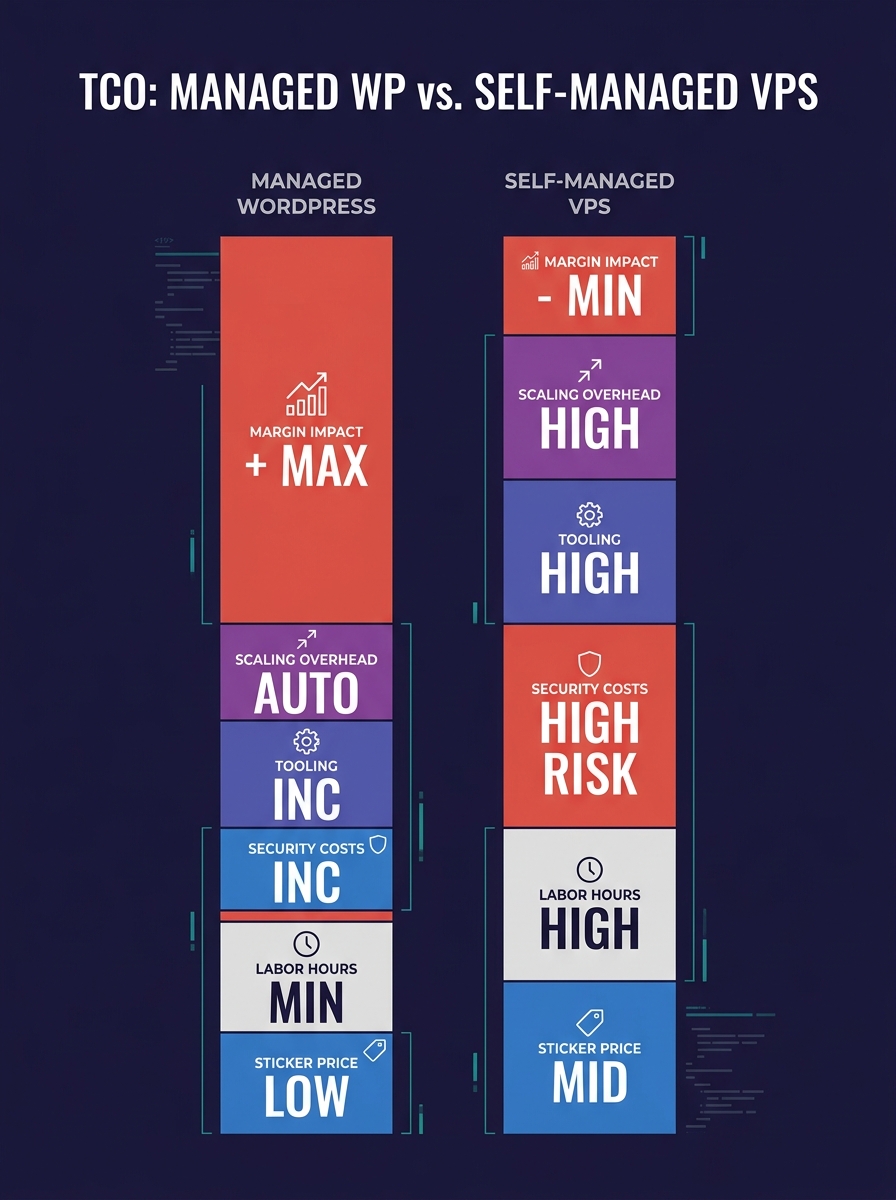
The monthly bill for managed WordPress hosting runs three to five times higher than a self-managed VPS. For white-label agencies, that gap closes once you add the labor, security, and tooling costs the VPS invoice never shows.
TL;DR: A self-managed VPS carries $800 to $2,400 per year in hidden costs that don't appear on the hosting bill. For agencies running fewer than 50 client sites without a dedicated sysadmin, managed hosting delivers lower total cost of ownership and better margins on white-label packages.
White-label hosting infrastructure through providers like Kinsta, WP Engine, or Flywheel costs $100 to $300 per month for 10 to 20 sites, according to InMotion Hosting. A self-managed VPS with similar CPU and RAM resources runs $40 to $80. That raw number is where most agency owners stop their VPS vs managed hosting agencies comparison. The sticker price captures only one of at least six cost layers that determine what you actually spend. Here are six rules for running an honest agency hosting cost analysis before you commit your infrastructure budget.
Count your labor hours before comparing sticker prices
The single largest hidden cost in any self-managed VPS setup is the time your team spends on server work instead of client work. A TCO-focused analysis from ArpHost's guide for IT professionals makes this point directly: comparing managed and unmanaged VPS on monthly price alone is "a critical mistake" because it ignores every indirect expense.
On a self-managed VPS, somebody on your team handles OS updates, PHP version management, Nginx or Apache tuning, SSL certificate renewals, log monitoring, and database optimization. These tasks consume 3 to 8 hours per month for a 15-site portfolio, depending on complexity. If your senior developer bills at $120 per hour internally, that's $360 to $960 per month in diverted labor. A managed WordPress hosting plan bundles all of that into the subscription.
DoHost's cost breakdown describes how outsourcing server management converts variable risks into predictable monthly expenses. Their example: an emergency developer at $200 per hour fixing a crashed server at 3 AM is a real cost that never appears on a VPS invoice, but shows up in your P&L under "contractor fees" or "overtime."
Track every minute your team spends on server-level tasks for 30 days. Multiply that number by your internal hourly rate. Add it to your VPS bill. That total is your real infrastructure cost.
Price security exposure into every hosting invoice
Why does security get its own line item in a WordPress hosting TCO analysis? Because the cost of a single breach on a client site can erase an entire year of hosting savings. Managed providers include firewalls, malware scanning, automatic patching, and WAF protection in their base price. On a self-managed VPS, you configure and maintain every layer yourself.
The practical gap shows up in two places. First, the ongoing maintenance: keeping server-side firewalls updated, configuring fail2ban, monitoring for intrusions, and applying WordPress core patches within hours of release. Second, the incident response: when a plugin vulnerability like the Kirki exploit that allowed admin account hijacking hits the wild, managed hosts roll out network-level mitigations across their fleet before you even read the advisory. On a VPS, your team is the fleet.
Managed platforms also handle SOC2, HIPAA, and GDPR compliance at the infrastructure level. If your white-label agency serves healthcare or financial clients, building that compliance posture on a VPS requires audit preparation, documentation, and periodic third-party assessments. Budget $2,000 to $5,000 per year for compliance work alone on a self-managed setup.
Warning: If you're running client sites on a VPS without automated malware scanning and a documented incident response plan, you're carrying unpriced risk. One compromised site can trigger client churn, legal exposure, and reputation damage that dwarfs any hosting savings.
Treat staging and deployment tooling as a line item
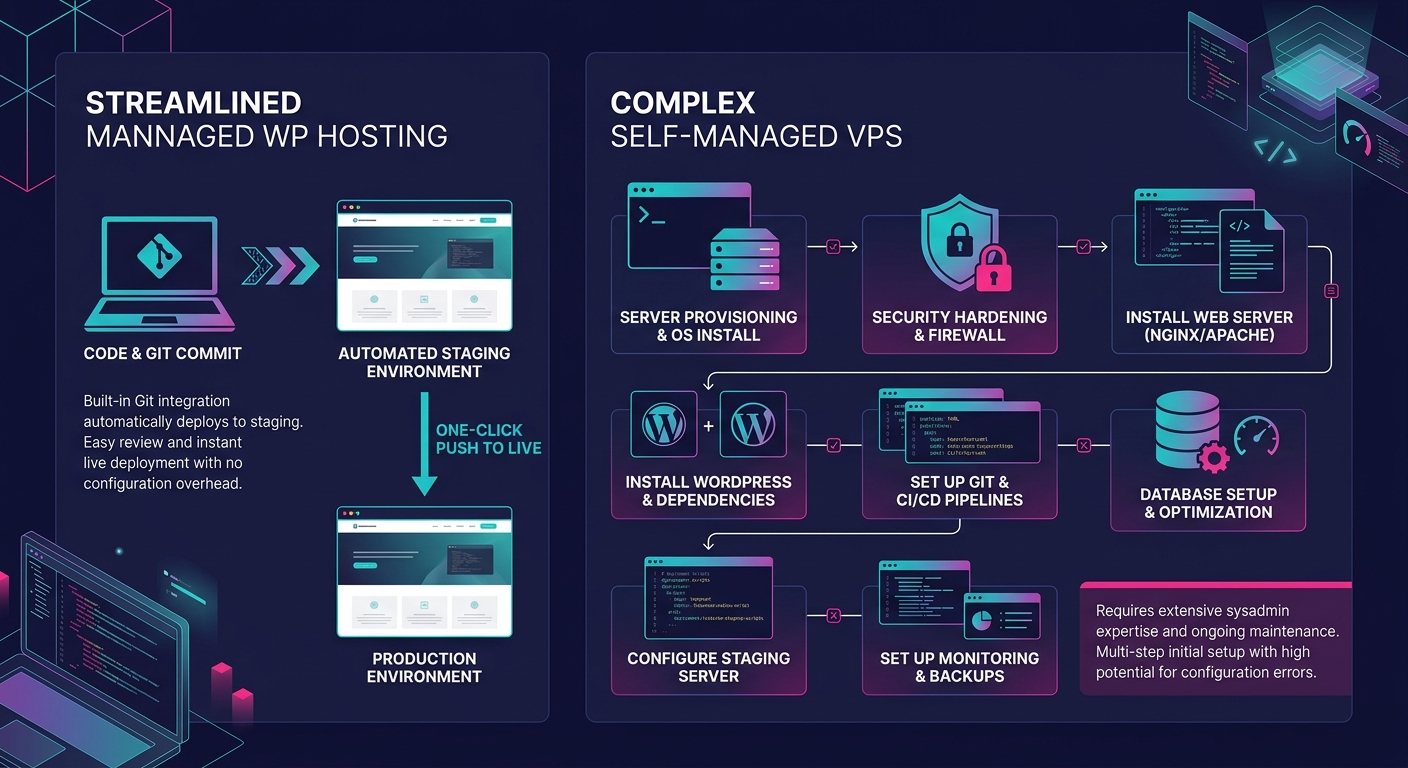
Managed WordPress hosts from Kinsta down to Flywheel include one-click staging, Git-based deployment, and environment cloning as standard features. On a self-managed VPS, you build that pipeline yourself.
The build cost is real. Setting up isolated staging environments per client on a VPS requires configuring separate databases, subdomain routing, SSL certificates for each staging URL, and a deployment workflow (usually Git hooks or a CI/CD tool like GitHub Actions). Initial setup runs 8 to 15 hours for a competent DevOps engineer. Ongoing maintenance adds 2 to 4 hours per month as you onboard new clients or troubleshoot broken deployments.
We've written before about the risks of running isolated staging at scale, and the core problem remains the same: every additional staging environment is another surface area to maintain, another potential configuration drift from production. If your team struggles with environment parity between production and development, a managed host eliminates an entire category of debugging.
The tooling gap matters for white-label agencies because your downstream clients expect professional delivery. A staging link that loads slowly, shows the wrong SSL certificate, or breaks on mobile undermines confidence in your entire operation.
Calculate your margin ceiling, not your cost floor
The revenue side of this decision matters as much as the cost side. According to InstaWP, white-label WordPress hosting plans typically sell for $50 to $300+ per site per month depending on what you bundle, with underlying platform costs as low as $9 per site. That creates margins of 70% or higher. FatLab's analysis confirms that most agencies charge $100 to $200 per month for hosting packages that include security, maintenance, and support.
On a self-managed VPS, your raw hosting cost per site drops lower, sometimes to $3 to $5 per site if you're packing 20 WordPress installs onto a single $80 VPS. Your gross margin per site looks enormous on paper. But your margin ceiling (the maximum number of sites you can profitably manage) drops because each additional site increases the labor load on your team. At some point, you need to hire a sysadmin or outsource server management, and that hire resets your margin math entirely.
Your margin ceiling drops on a VPS because each additional site increases the labor load, and eventually you need to hire a sysadmin who resets the entire cost equation.
With managed hosting, the labor component stays roughly flat as you add sites. Your cost per site goes up, but your margin per hour of team time stays stable. For agencies scaling from 15 to 50 client sites, this predictability is worth more than the theoretical savings of a VPS.
Audit your scaling cost per additional 10 clients
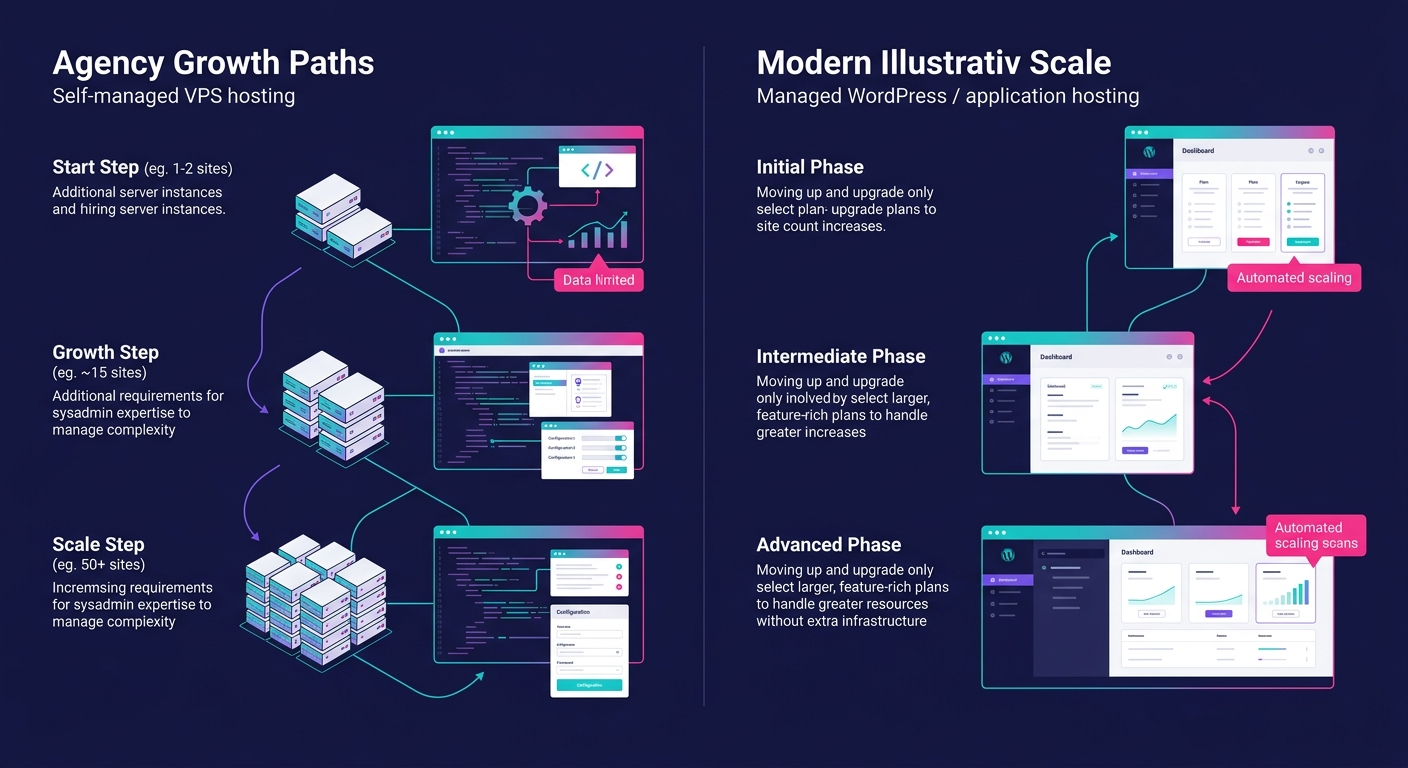
Scaling a self-managed VPS from 15 sites to 25 sites triggers a cascade of decisions. Do you add RAM to the existing server? Spin up a second VPS and split clients between them? Configure a load balancer? Each option carries migration risk, downtime potential, and configuration hours.
Managed hosts handle this transparently. You upgrade your plan or add site slots. The provider manages resource allocation, server migration, and performance tuning behind the scenes. For agencies that have built their scaling model around white-label partnerships rather than headcount, this operational simplicity is a direct enabler of growth.
| Factor | Self-Managed VPS (20 sites) | Managed WordPress Host (20 sites) |
|---|---|---|
| Monthly sticker price | $40–$80 | $100–$300 |
| Monthly labor (server tasks) | $360–$960 | $0 (included) |
| Staging/deployment setup | $960–$1,800 one-time | $0 (included) |
| Security tooling | $50–$150/month | $0 (included) |
| Scaling to 40 sites | New server + migration | Plan upgrade |
| Annual TCO estimate | $6,600–$16,000 | $1,200–$3,600 |
The table above uses conservative estimates for a 20-site agency portfolio. The VPS column includes 5 hours per month of labor at $120 per hour, basic security tooling, and a one-time staging setup cost amortized over 12 months. The managed column assumes a mid-tier plan from Kinsta or WP Engine.
Match your hosting to your team's actual skill distribution
This rule is about honesty. If your agency has a full-time systems administrator or a senior developer who genuinely enjoys server configuration, a self-managed VPS can deliver lower TCO. The labor costs in the table above drop toward zero because that person is already on payroll and already doing the work.
But most white-label agencies between 5 and 30 employees don't have that person. They have frontend developers, designers, project managers, and maybe one generalist developer who handles "everything technical." Asking that generalist to also manage server infrastructure means pulling them away from billable client work. The opportunity cost is real even when it doesn't show up as a separate invoice.
The skill-match question also affects your hiring pipeline. If your agency runs on VPS infrastructure, every developer you hire needs at least basic Linux administration skills. That narrows your candidate pool and increases your average salary offer. Managed hosting removes server skills from your job requirements entirely, letting you hire for WordPress development, design implementation, and client communication instead.
Tip: Ask your team this question: "If our primary server went down at 2 AM on a Saturday, who would fix it, and how long would it take?" If the answer involves hesitation or "I'd figure it out," you're carrying unpriced risk that a managed host eliminates.
When These Rules Break
These six rules assume a specific agency profile: 10 to 50 client sites, a team of 3 to 15 people, no dedicated DevOps engineer, and a business model built on selling white-label WordPress packages at $100 to $200 per month.
The math changes in three scenarios. First, if your agency manages 100+ sites and employs at least one full-time sysadmin, a VPS cluster with proper automation (Ansible, Terraform, custom monitoring) can deliver meaningfully lower per-site costs. At that scale, the labor overhead gets distributed across enough sites to justify the investment. Second, if your clients require custom server configurations that managed hosts don't allow (specific PHP extensions, non-standard caching layers, unusual database setups), a VPS gives you control that no managed platform matches. Third, if you're building headless WordPress deployments with custom Node.js frontends, the managed WordPress hosting model doesn't map cleanly to your architecture.
For every other agency, the WordPress hosting TCO calculation favors managed providers once you count what the VPS invoice leaves out. The sticker price is the smallest part of the decision. Your team's time, your security posture, your deployment workflow, and your ability to scale without operational drag are what determine whether your white-label hosting infrastructure generates profit or quietly drains it.