

Elementor Pro's third-party addon ecosystem, the very thing agencies cite as its primary advantage, is the feature most likely to destroy Core Web Vitals scores across a white-label portfolio. Bricks Builder's leaner output wins the SEO math at scale, but the migration calculus is more complex than performance benchmarks suggest.
TL;DR: Bricks Builder generates 3–5× less JavaScript and 2–3× less CSS than Elementor Pro by default, producing measurably better Core Web Vitals. For agencies selling SEO outcomes across 20+ client sites, those rendering differences compound into ranking advantages that Elementor can only match with heavy optimization labor. But Elementor's client-facing editing experience and addon depth still matter, and switching mid-portfolio carries real SEO risk.
The DOM Problem Is a Ranking Problem
Google's Core Web Vitals thresholds directly influence ranking position: LCP under 2.5 seconds, INP under 200 milliseconds, CLS under 0.1. Excessive DOM nodes slow every one of those metrics, and the two leading WordPress page builders produce wildly different DOM output for identical layouts.
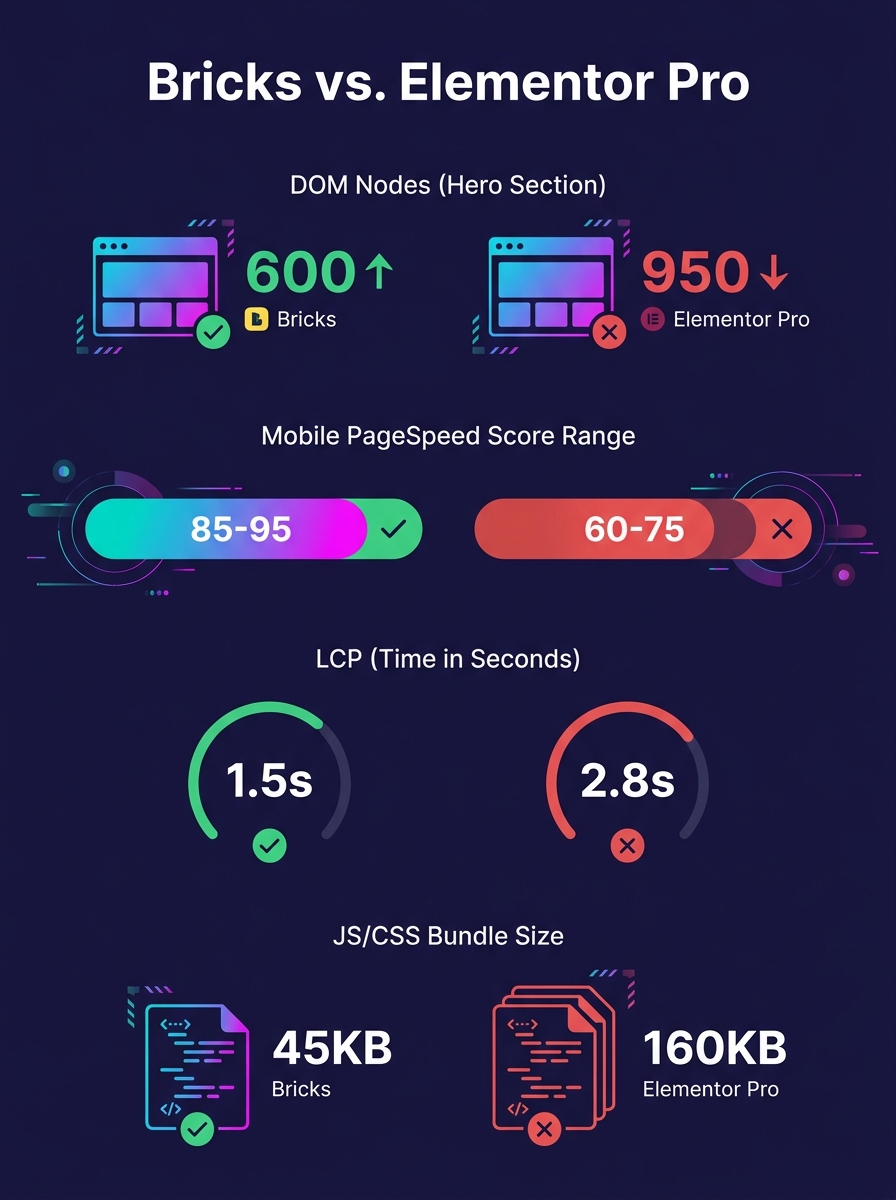
A 2026 Bricks Builder review by RightSyntax found that "Bricks consistently outperforms Elementor for professionals and agencies building high-quality, scalable WordPress websites" across pricing, performance, CSS architecture, and development workflow. The numbers behind that conclusion are specific: a typical hero section in Bricks generates 9–32 DOM nodes compared to Elementor's 21–84 nodes for an equivalent layout. Elementor's "divception," the nested wrapper divs the builder injects around every widget, inflates the DOM tree by 2–4× before you've added a single piece of content.
At the single-page level, that overhead is manageable with optimization plugins and careful widget selection. At the portfolio level, across 30, 50, or 80 client sites under management, it becomes systemic. Every site carries the same structural bloat, and every site needs the same remediation work to hit passing CWV scores.
The PageSpeed gap reflects this directly: Bricks sites average 85–99 on mobile PageSpeed, while Elementor sites typically land at 60–75 without aggressive optimization. LCP follows the same pattern, with Bricks achieving 1.4–2.5 seconds versus Elementor's 3–5 seconds. Those Elementor numbers sit right at or above Google's "needs improvement" threshold, meaning a large share of Elementor-built sites in a white-label portfolio will show yellow or red CWV flags in Search Console.
For agencies whose client contracts include SEO deliverables, this is a margin problem. You're either spending billable hours optimizing Elementor output to reach the same performance floor Bricks hits by default, or you're explaining to clients why their organic traffic isn't growing despite "best practices" being followed. Neither conversation is one you want to have at quarterly reviews. We've written extensively about how technical debt compounds across client portfolios, and builder-generated DOM bloat is one of the most consistent sources of that debt.
The Five-Year Cost Equation Hides a Labor Multiplier
The pricing models of these two builders create divergent economics that affect which agencies can afford to prioritize SEO performance at scale.
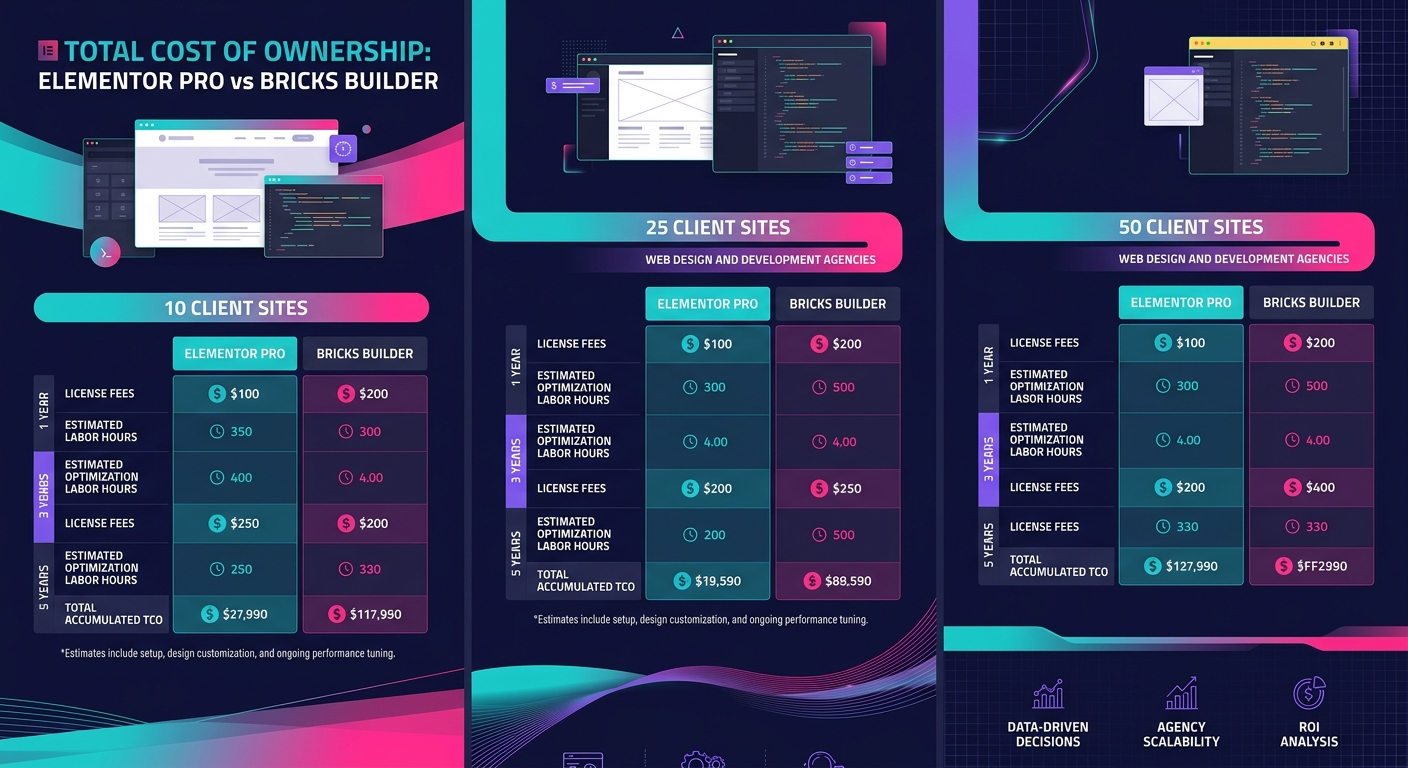
Bricks Builder costs $79–$249 one-time, with the Agency plan at $249 covering unlimited site activations. Elementor Pro runs $59–$399 per year, with the Agency tier at $399 annually. Over five years managing five client sites on the Agency tier, Elementor costs $1,995 compared to Bricks' one-time $249. That $1,746 difference matters, but it's the smaller part of the real cost gap.
The real gap is in labor. Elementor's lower performance floor means agencies building SEO-focused sites need to budget optimization time into every build. Caching plugin configuration, unused CSS removal, render-blocking resource management, lazy-load tuning: these tasks add 2–4 hours per site at launch and recurring maintenance time as plugins update and widgets change behavior.
Bricks reduces that optimization overhead because its output is cleaner from the start. JavaScript bundles are 3–5× smaller, and CSS output runs 2–3× leaner. As a 2026 agency builder comparison from E2M Solutions notes, performance-focused builders like Bricks "remain efficient and maintainable" when paired with defined patterns and standards. The operative word is "maintainable," because a builder whose output degrades gracefully as complexity increases costs less to operate than one that requires constant remediation.
If your team spends 3 hours per site per quarter on Elementor-specific performance fixes across 40 sites, that's 120 hours quarterly, roughly $12,000–$18,000 in developer time at standard agency rates.
Agencies running white-label WordPress development at scale need to factor this labor differential into their builder choice. That labor cost dwarfs the subscription price difference and directly erodes the margins agencies depend on. The page builder scalability question for agencies isn't "which builder costs less per license?" It's "which builder costs less per site per year when you include every hour your team spends making its output rank?"
Migration Carries Real SEO Risk (And a Clear Playbook)
Knowing Bricks performs better doesn't resolve the hardest question: what happens to rankings when you rebuild an existing Elementor site in Bricks?
The honest answer is that migration from Elementor to Bricks requires a full rebuild. There's no automated content transfer between the two builders. A 50-page Elementor site takes 2–4 weeks to reconstruct in Bricks, and during that transition window, several SEO risks are in play.
URL preservation is the first concern. If your slug structure stays identical, and it should, Google won't treat the rebuild as a site migration. But CLS must be audited page by page during the transition. Bricks and Elementor render the same design differently at the CSS level, and layout shifts that didn't exist in the Elementor version can appear in the Bricks rebuild, particularly around image containers and dynamic content blocks. A CLS regression from 0.05 to 0.15 pushes a page from "good" to "needs improvement" in CWV, which is exactly the opposite of why you migrated.
Structured data is the second risk. If the Elementor site used schema markup via an Elementor-specific addon, that markup won't carry over. You'll need to re-implement it through a builder-agnostic solution like a standalone schema plugin or manual JSON-LD injection.
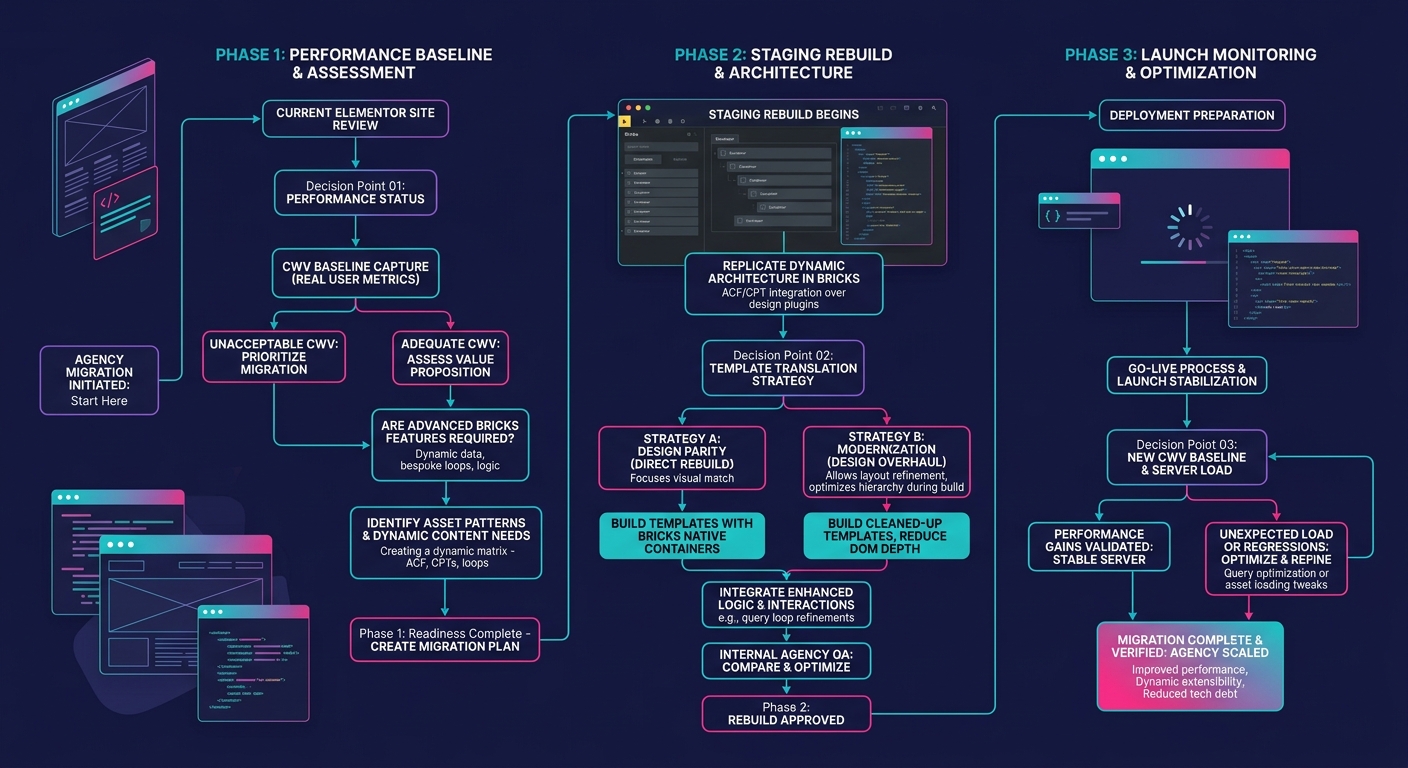
The playbook that works follows what I'd call the Baseline-Staging-Monitor framework, a three-phase process that prevents ranking loss:
- Baseline audit. Run a full CWV assessment of the Elementor site using PageSpeed Insights and Search Console data. Document LCP, INP, and CLS for every page that generates organic traffic. This baseline is your success metric post-migration.
- Staging rebuild. Use an isolated staging environment to build the Bricks version without touching the live site. Run the same CWV audit against staging. If any page scores worse on CLS, fix it before launch.
- Launch with 14-day monitoring. Push the Bricks version live, immediately submit updated sitemaps, and monitor Search Console for coverage errors, CWV regressions, and indexing anomalies daily for a full two weeks.
This process parallels the approach we describe in building isolated staging environments for white-label WordPress. The staging phase is where agencies cut corners most often, and it's where most migration-related ranking drops originate.
Warning: Do not migrate an Elementor site to Bricks during a period of high organic traffic volatility (algorithm update rollout, seasonal peak, major content push). Choose a low-traffic window and give yourself 30 days of stable baseline data before pulling the trigger.
For agencies evaluating which builder to standardize on going forward rather than migrating existing sites, the decision is simpler. New builds on Bricks start with the performance advantage from day one. The white-label speed penalty that plagues many WordPress builds shrinks considerably when the builder's default output already meets CWV thresholds.
The Comparison, Quantified
The table below consolidates the metrics that matter for a white-label page builder comparison focused on SEO outcomes and agency scalability.
| Attribute | Bricks Builder | Elementor Pro |
|---|---|---|
| Pricing model | Lifetime license ($79–$249 one-time) | Annual subscription ($59–$399/year) |
| 5-year cost (Agency tier, 5 sites) | $249 total | $1,995 total |
| DOM nodes per hero section | 9–32 | 21–84 |
| Mobile PageSpeed range | 85–99 | 60–75 (unoptimized) |
| LCP range | 1.4–2.5s | 3–5s |
| JS bundle size (relative) | 1× baseline | 3–5× baseline |
| CSS output (relative) | 1× baseline | 2–3× baseline |
| Third-party addon ecosystem | Growing, limited selection | Thousands of addons |
| Client editing learning curve | Moderate to high | Low |
| Migration effort (50-page site) | Full rebuild, 2–4 weeks | Full rebuild, 2–4 weeks |
| White-label branding control | Full CSS/branding control, no forced branding | Requires white-label plugin or manual removal |
| Refund window | 60 days | 30 days |
This comparison highlights a clean split. Bricks wins on every performance metric that feeds into Google's ranking signals. Elementor wins on ecosystem breadth and the speed at which a web designer without deep technical experience can produce a polished page.
Where This Leaves the Builder Decision
The contrarian claim holds: Elementor Pro's addon ecosystem introduces the DOM bloat and rendering overhead that undermine SEO performance at portfolio scale. Bricks Builder produces measurably cleaner output, passes CWV thresholds with less intervention, and costs a fraction of Elementor's lifetime price.
But the thesis needs qualification. Elementor remains the right choice for agencies whose clients demand self-service editing access and whose contracts don't include SEO performance guarantees. If your revenue model is build-and-hand-off rather than build-and-maintain, the client training cost of Bricks' steeper learning curve outweighs its performance advantages. Your clients won't run PageSpeed audits. They'll run "can I edit this headline without calling you" audits, and Elementor passes that test more often.
The WordPress builder agency workflow that scales best depends on what you're actually selling. Agencies selling SEO outcomes, including rankings, organic traffic growth, and CWV compliance, should standardize on Bricks for new builds and evaluate migration for high-value existing sites where performance improvements would move the needle on organic revenue. Agencies selling design execution and client autonomy should stay on Elementor and budget the optimization labor into their project estimates honestly. As the design system debt conversation makes clear, builder choice ripples through every maintenance cycle and every client interaction for the lifetime of the relationship. The builder you pick today is the one you'll be debugging, optimizing, and defending for years. Choose based on what your agency actually delivers, not what a feature comparison chart looks like in isolation.