

Every platform migration checklist you've seen prioritizes data integrity. The stores that actually crater post-launch had flawless data transfers. Products mapped correctly. Orders imported with the right statuses. Customer records matched one-to-one. And then the store converted at half its pre-migration rate, the client panicked, and the agency scrambled to figure out what went wrong when "everything worked."
The standard platform conversion workflow produces stores that are technically complete and commercially inert. Migration tools, whether Cart2Cart or WP All Import or direct database exports, solve the data problem. They don't solve the buying problem. And for white-label teams handing off migrated WooCommerce stores to agency partners, this gap between "data-accurate" and "conversion-ready" is where client relationships go to die.
The rest of this article defends that claim with three specific pieces of evidence drawn from real migration patterns, PrestaShop-to-WooCommerce projects in particular, and the structural problems baked into how agencies treat white-label e-commerce handoff workflows.
Perfect Data, Broken Stores
The WooCommerce ecosystem has excellent tooling for customer data migration. You can export and import products, orders, customers, and metadata using plugins like WP All Import, which requires paired import/export add-ons for both WooCommerce data and user data to handle the full scope of customer records. The technical side of moving structured data between platforms is, at this point, a well-documented process.
But here's what the tooling doesn't handle: the commercial context surrounding that data. A product listing with accurate titles, prices, SKUs, and descriptions can still fail to convert because the listing page template on the new WooCommerce store buries the add-to-cart button below the fold. Order history imports correctly, but the customer's login credentials require a password reset, and nobody warned them via email, so they assume their account was compromised. Shipping rules transfer as flat data, but the conditional logic that gave free shipping above $75 was tied to a PrestaShop module with no WooCommerce equivalent, so the promotional pricing strategy that drove 30% of repeat purchases just vanished.
WooCommerce's own migration guide acknowledges this indirectly, framing migration as something that requires auditing and planning beyond the data itself. The stores that recover quickly post-migration are the ones where someone mapped the entire purchase funnel before touching an export button.
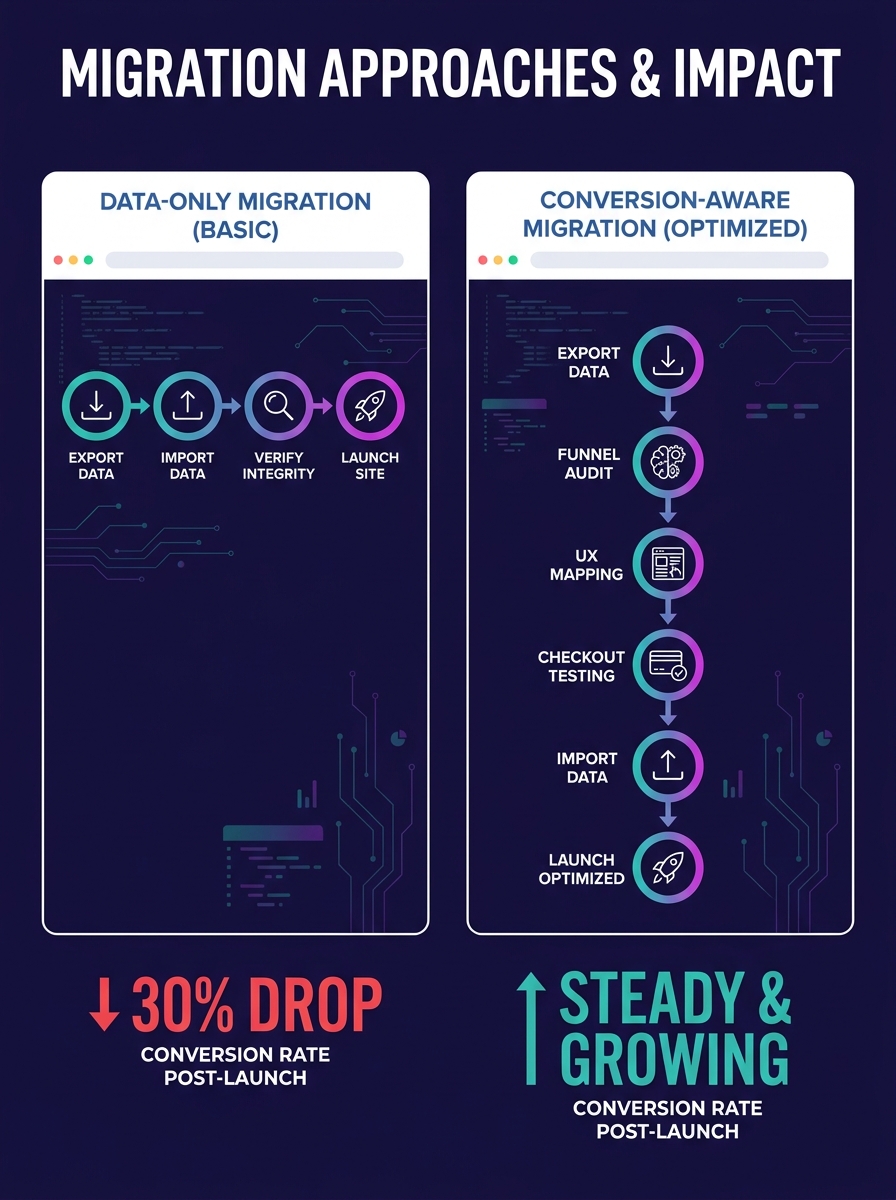
For white-label teams, the implication is uncomfortable. Your migration deliverable, the thing you're actually billing for, probably ends at "data verified, store functional." The conversion gap opens after your work is technically done but before the agency's client considers the project finished. We've written about how white-label partnerships break down at handoff points before, and migration projects are a textbook example of that pattern.
When PrestaShop-to-WooCommerce Becomes a Conversion Redesign
PrestaShop to WooCommerce is one of the most common migration paths agencies bring to white-label teams, and it's also one of the most misleading in terms of apparent simplicity. Tools like Cart2Cart let you select entity types individually and transfer products, orders, or customers either all at once or in phases. WooCommerce's own PrestaShop migration plugin supports filtered imports with bulk or selective data transfer. The tooling works.
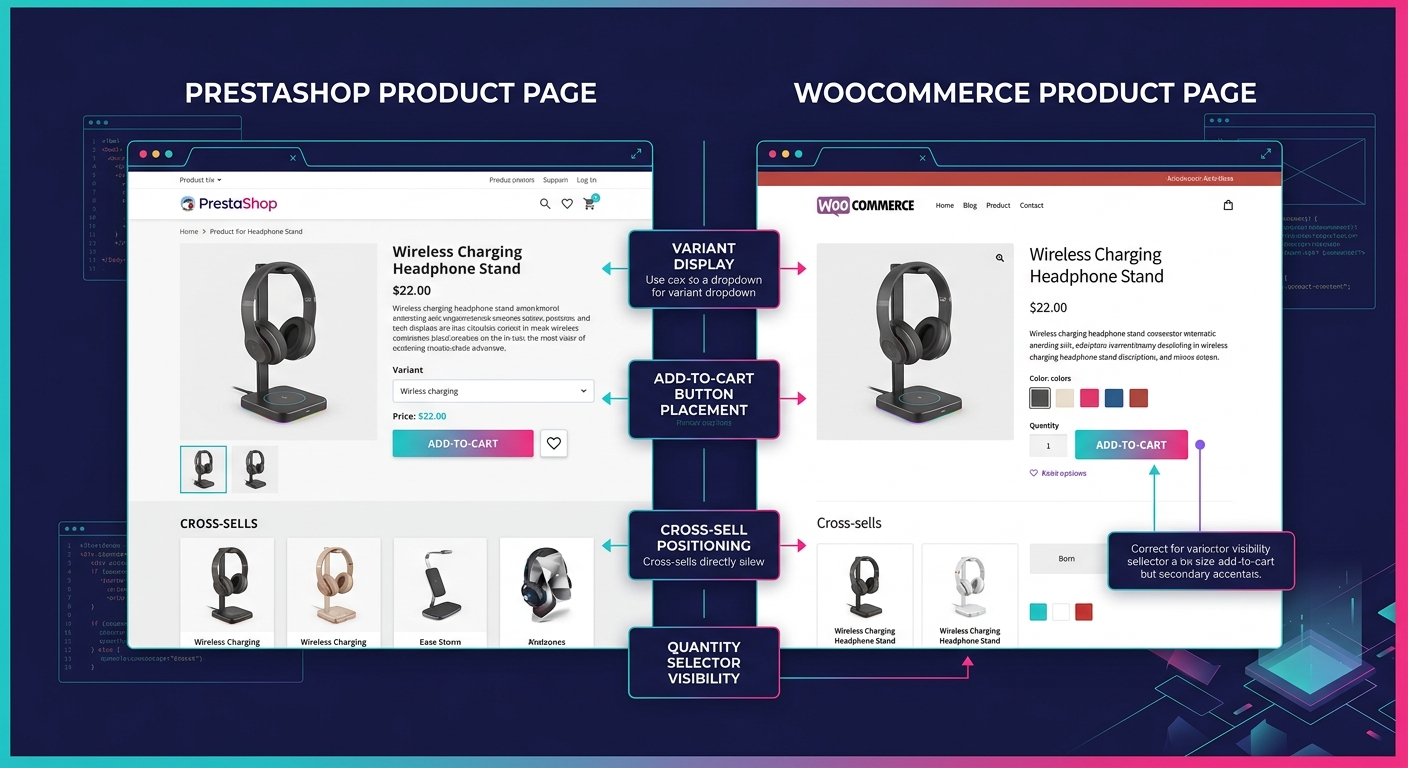
What the tooling doesn't tell you is that PrestaShop and WooCommerce present products in fundamentally different ways, and those presentation differences directly affect conversion rates.
PrestaShop's default product pages feature prominent quantity selectors, combination-based variant displays, and built-in cross-selling blocks positioned above the fold. WooCommerce's default product templates (especially on popular themes like Storefront or Astra) are sparser. Variant selectors are dropdown-based rather than visual. Cross-sells appear below the product description, where roughly 60-70% of mobile users never scroll. If you migrate 3,000 products with perfect data fidelity and then render them in a template that removes the visual merchandising cues PrestaShop customers were trained on, you haven't migrated the store. You've rebuilt it with less commercial intent.
This is where the content marketing angle matters for agencies positioning migration services to their clients. The narrative you tell about a WooCommerce migration can't be "we'll move your data." It has to be "we'll rebuild your buying experience on a platform with better long-term extensibility." That reframe justifies a higher project scope, includes UX and conversion work inside the migration budget, and sets expectations correctly. Agencies that have standardized their brief process tend to catch these gaps early because the brief forces a conversation about what "done" means before any data gets exported.
The Password Reset Problem
One specific conversion killer deserves its own callout because it's so commonly overlooked. PrestaShop stores hashed passwords differently than WordPress/WooCommerce. When you migrate customer accounts, passwords don't transfer. Every single returning customer will need to reset their password on first login.
Warning: If you don't proactively email customers before launch explaining the password reset, expect a 20-40% spike in support tickets and a measurable drop in returning-customer conversion rates during the first two weeks post-migration. Some customers will assume the site has been hacked and never return.
This is a marketing communications task, not a development task, and it needs to be scoped into the migration project from day one.
The White-Label Handoff Kills What Migration Preserved
Here's where the structural problem gets specific to white-label teams. A typical white-label e-commerce handoff goes like this: the agency sells the migration project, scopes it loosely, sends a brief to the white-label partner, the partner executes data migration and basic QA, and the store goes back to the agency for client review. The agency checks that products show up and orders imported. The client says "looks good." Everyone launches.
Nobody tested the checkout flow with a real payment method on the production domain. Nobody verified that transactional emails (order confirmations, shipping notifications, password resets) render correctly with the client's branding. Nobody checked whether the migrated coupon codes actually apply discounts at checkout. Nobody ran the store through a mobile device and tried to complete a purchase in under 60 seconds.
The ServMask team's migration guide emphasizes that putting the old server in maintenance mode is the simplest approach and that verification of every store component is essential. But "every component" in the context of a white-label handoff often means "every data component," and nobody in the chain owns "every commercial component."
The conversion gap opens after your work is technically done but before the agency's client considers the project finished.
This gap exists because the white-label partner's deliverable scope and the client's definition of success are measuring different things. The partner measures data accuracy. The client measures revenue. And the agency in the middle often lacks the technical depth to bridge those two definitions before launch day.
If your white-label team has been through the QA collapse pattern where testing gets compressed or skipped as deadlines tighten, migration projects amplify that problem. Migration QA requires testing commercial workflows, not just page rendering. A product page that loads correctly but has a broken add-to-cart button due to a JavaScript conflict with the migrated theme is a QA failure that looks like a success until real orders start (or rather, don't start) coming in.
What a Conversion-Ready Handoff Actually Includes
For agencies thinking about how to position WooCommerce migration services in their marketing, the differentiator here is tangible. A conversion-ready migration handoff includes:
- Pre-migration funnel audit of the source platform documenting every touchpoint that influences purchase decisions (product page layout, cart behavior, checkout fields, post-purchase emails)
- Template parity check ensuring the WooCommerce theme reproduces or improves upon the source platform's commercial UX patterns
- Transactional email verification confirming that WooCommerce's default emails are branded, functional, and don't trigger spam filters on major providers
- Payment gateway end-to-end test with a real transaction on the production URL, refunded after confirmation
- Customer communication plan including pre-launch emails about password resets, new login URLs, and any feature changes
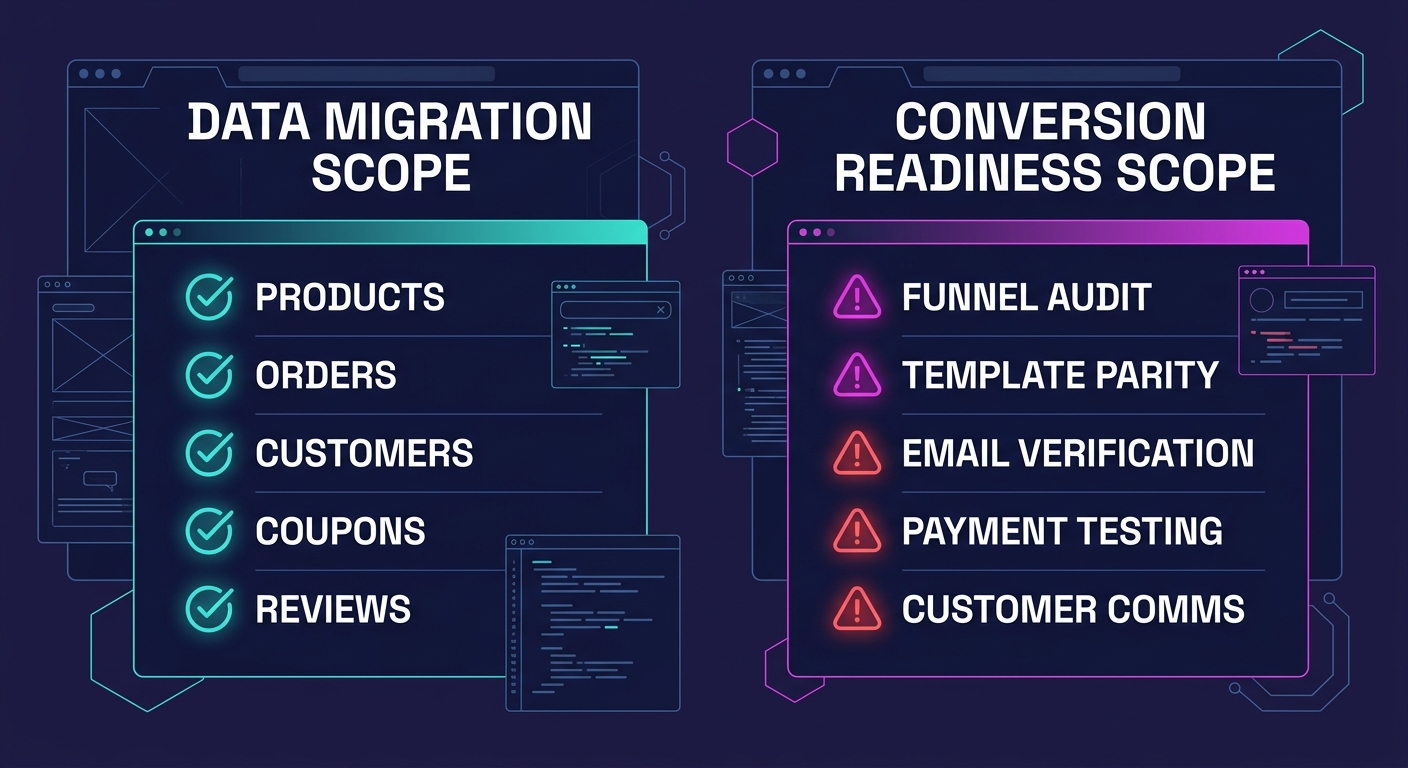
That list turns a $3,000 migration project into a $8,000-$12,000 project, and it's the difference between a client who launches with stable revenue and a client who calls their agency in a panic 72 hours after go-live. For white-label teams, scoping these items explicitly in the brief protects everyone. The architecture decisions you make during the migration (block themes versus ACF, which page builder handles product templates) flow directly from this conversion-first framing.
The Claim, Reconsidered
So the original thesis: the standard platform conversion workflow produces stores that are data-accurate and commercially inert. After walking through the evidence, I'd soften it slightly. The workflow can produce conversion-ready stores, but only when someone deliberately expands the scope beyond data transfer to include UX parity, transactional communications, and commercial QA. The tools for WooCommerce migration are mature enough. Cart2Cart handles PrestaShop to WooCommerce entity mapping well. WP All Import gives you granular control over filtered exports and selective imports. The Pressable team's documentation on installing migration tools on both source and destination sites simplifies the database-level approach.
Where the playbook fails is in the space between technical completion and commercial viability. For agencies selling migration services, this gap is actually a marketing opportunity. Every competitor in your market is selling data migration. If your content, your case studies, and your project scopes explicitly address conversion preservation, you're competing in a different category. And for white-label partners executing these projects, the move from "platform agnostic data mover" to "conversion-aware migration team" is what turns a commodity service into a retained partnership where the agency keeps coming back with bigger stores and tighter deadlines, confident that the handoff will hold.