

Design system tokens automate roughly 60-70% of the visual rebranding work when agencies deploy WordPress campaign landing pages across 50+ social media clients — handling primary colors, font families, spacing scales, and logo placement through CSS custom properties. The remaining 30-40%, covering component variants like shadows, border treatments, and padding ratios, still requires manual design decisions. That split defines the real margin math of scalable rebranding.
TL;DR: CSS custom properties stored in theme.json can push brand-specific colors, typography, and spacing to dozens of WordPress campaign sites without touching templates. But token counts balloon from ~12 at launch to over 200 by the 15th client, and agencies that don't architect for that sprawl end up maintaining 20 parallel design systems instead of one.
Why Social Campaign Pages Create the Rebranding Bottleneck
Every social media campaign your agency runs terminates at a WordPress page. Lead forms for Facebook ads. Contest entries for Instagram giveaways. Link-in-bio hubs for TikTok creators. Event registrations promoted through LinkedIn. When you manage social campaigns for 50+ clients, each with distinct brand guidelines, the bottleneck shifts from content creation to page production — specifically, to the 15-45 minutes a designer spends manually adjusting colors, fonts, and spacing on each new landing page to match a client's visual identity.
Agencies operating at that scale report designers spending approximately 40% of their working hours debugging inherited CSS overrides rather than producing campaign creative. That time comes directly out of the work that generates results for clients: the ads, the copy, the conversion optimization. Design system tokens exist to reclaim that time by centralizing brand decisions in a single token file that propagates across every page template automatically.
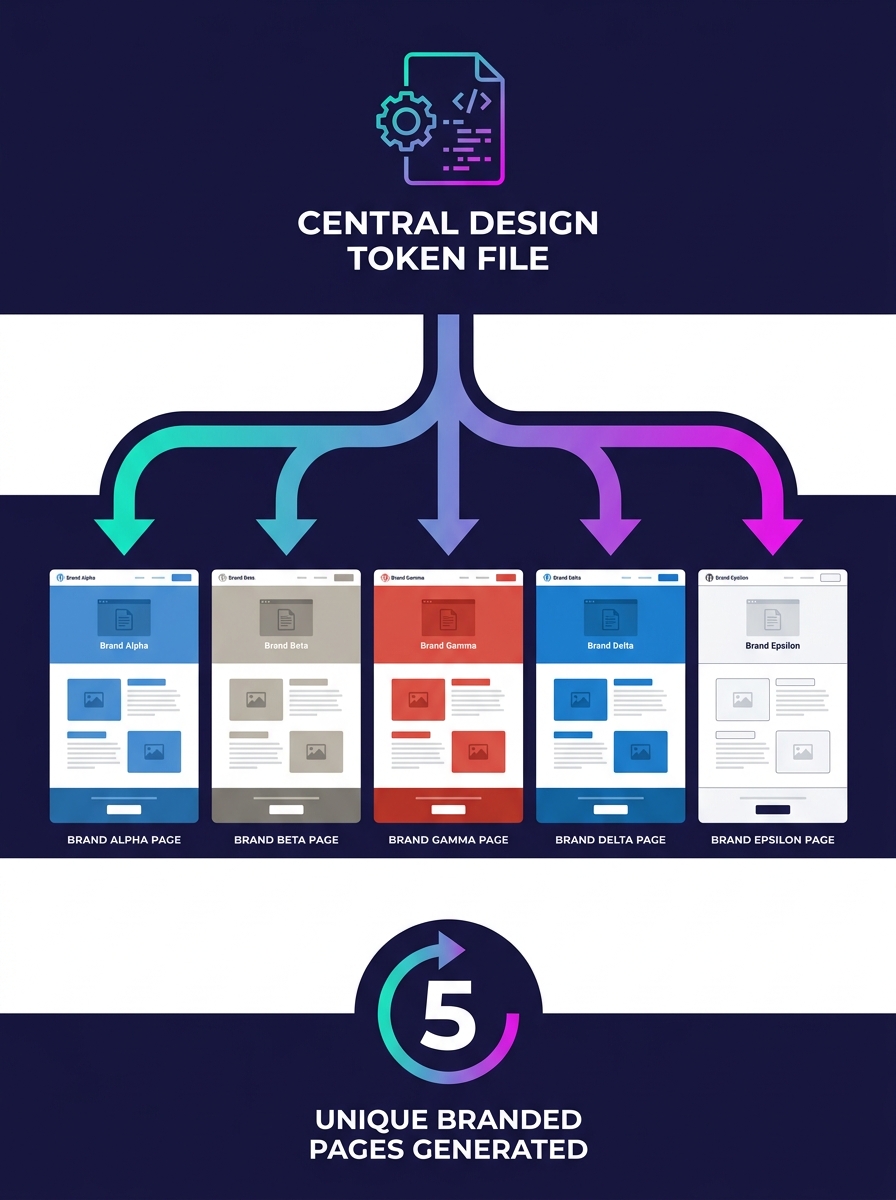
The Token Layer and Where Automation Stops
Design system tokens are named variables — think of them as labels like "color-primary," "font-heading," or "spacing-section" — that hold brand-specific values. Instead of hard-coding a hex color into 47 different CSS rules, you reference the token. Change the token's value once, and all 47 rules update.
In WordPress, tokens live in two places. Block themes use theme.json to define global style settings that feed into the site editor. The Contentful engineering team explains that token transformers automatically handle complex tasks like resolving aliases and creating CSS classes for different modes, maintaining consistency without manual adjustments. For Elementor-based builds, the Design Tokens Manager plugin provides bulk editing, fluid typography with full clamp() support, and two-way sync that pulls from or pushes to Elementor Site Settings.
What reliably automates: primary and secondary brand colors, font families, base font sizes, logo placement, and spacing scales. What doesn't: complex component variants. Shadows, border radii, padding ratios between elements, hover state treatments, and icon styles still require per-client design judgment. If you've been building your Figma design systems with token structures, the handoff is cleaner, but the manual layer remains.
Warning: Automated rebranding reliably covers only 5-7 token categories. Attempting to tokenize everything — down to individual component padding and animation timing — creates a system so granular that changing one value cascades unpredictably across 50 sites.
Three Deployment Architectures Compared
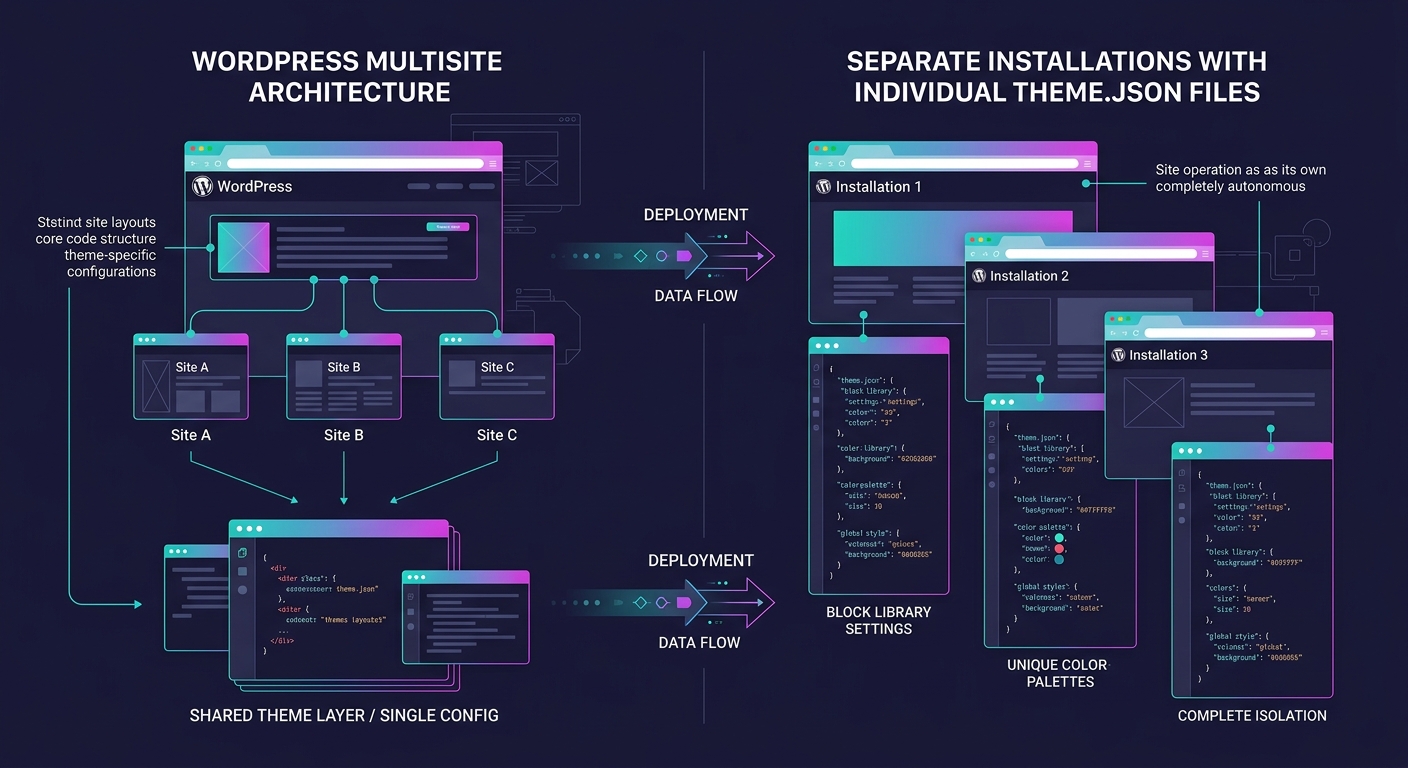
How you structure your WordPress installations determines how tokens propagate. Each architecture trades isolation against deployment speed.
| Architecture | Token Propagation | Isolation | Update Overhead | Best For |
|---|---|---|---|---|
| WordPress Multisite | Automatic — subsites share theme codebase, PHP/CSS changes propagate to all | Low — one broken update affects every subsite | Minimal per-site | 20-50 sites with similar layouts |
| Separate installations + orchestration | Manual push via WP-CLI, Ansible, or deployment scripts | High — each site is independent | High without tooling, moderate with CI/CD | 50+ sites needing strict client isolation |
| Block theme with theme.json overrides | Per-site theme.json swap or child theme | Medium — shared parent theme, isolated child | Low per-site, medium for parent updates | Agencies using Full Site Editing |
Pantheon's Multisite architecture documentation confirms the core tradeoff: Multisite is built to maximize efficiency by sharing core resources while keeping sites independent in terms of content. But that shared theme codebase means a CSS regression in your token layer hits every subsite simultaneously. For agencies managing social campaign landing pages where downtime costs ad spend, that risk calculation matters.
Separate installations solve the isolation problem but create a deployment problem. Without orchestration tooling — WP-CLI batch scripts, Git-based deployment pipelines, or a management platform like WPMU DEV's Branda Pro — you're manually updating each of 50+ instances every time a token value changes. Agencies already managing environment parity at scale have the infrastructure for this; those without it will find the overhead unsustainable.
From Figma Variables to Live CSS Custom Properties
The toolchain connecting design tools to WordPress has matured enough to be practical, though it still involves manual checkpoints. Two plugins handle the core translation:
Charlie Prince's Design Token Bridge for WordPress converts design tokens and Figma variables into vanilla CSS custom properties that WordPress sites consume directly. The output is straightforward CSS variable declarations scoped to :root, which means any theme or page builder that respects standard CSS can read them.
Fueled's Figma plugin takes a different approach, exporting tokens directly into a theme.json file that WordPress block themes interpret natively. Colors, typography, and spacing defined in Figma appear as selectable options in the content editor without additional CSS.
The practical workflow for a 50-client social campaign operation looks like this:
- Designers maintain one Figma file per client with brand tokens defined as Figma variables
- On campaign launch, the relevant plugin exports those tokens to either CSS variables or theme.json format
- A deployment script pushes the token file to the correct WordPress installation
- Template pages built with tokenized references automatically adopt the client's brand
Steps 1 and 4 are automated. Steps 2 and 3 still involve human decisions — which tokens to export, which site receives them, and whether the output needs manual review before going live. Agencies that have documented their component library architecture find this review step takes 5-10 minutes per client rather than 30-45.
The gap between "fully automated" and "fast enough" is where profitable white-label WordPress automation actually lives. Chasing zero-touch deployment for 50 brands creates more problems than it solves.
Token Sprawl Is the Real Scaling Problem
A clean design token system starts with approximately 12 tokens: 2-3 brand colors, 2 font families, 3-4 spacing values, and a logo reference. By the 15th client onboarding, agencies routinely discover that count has ballooned to over 200 tokens — because each client needed "just one more" custom value that didn't fit the original schema.
By the 20th client, you're maintaining 20 slightly different design systems rather than one system with 20 configurations. Every update requires regression testing across every variant. If you've noticed design system drift across your portfolio, token sprawl is typically the root cause.
CSS variable management at this scale requires enforced naming conventions and explicit override rules. The approach recommended across the WordPress community, including discussions in CSS-focused developer forums, involves outputting brand colors as CSS custom properties in the document head using :root scope, then referencing those properties throughout the stylesheet. This works cleanly with 12-30 tokens. At 200+, the cascade becomes unpredictable, and debugging which token overrides which requires tracing through multiple layers of specificity.
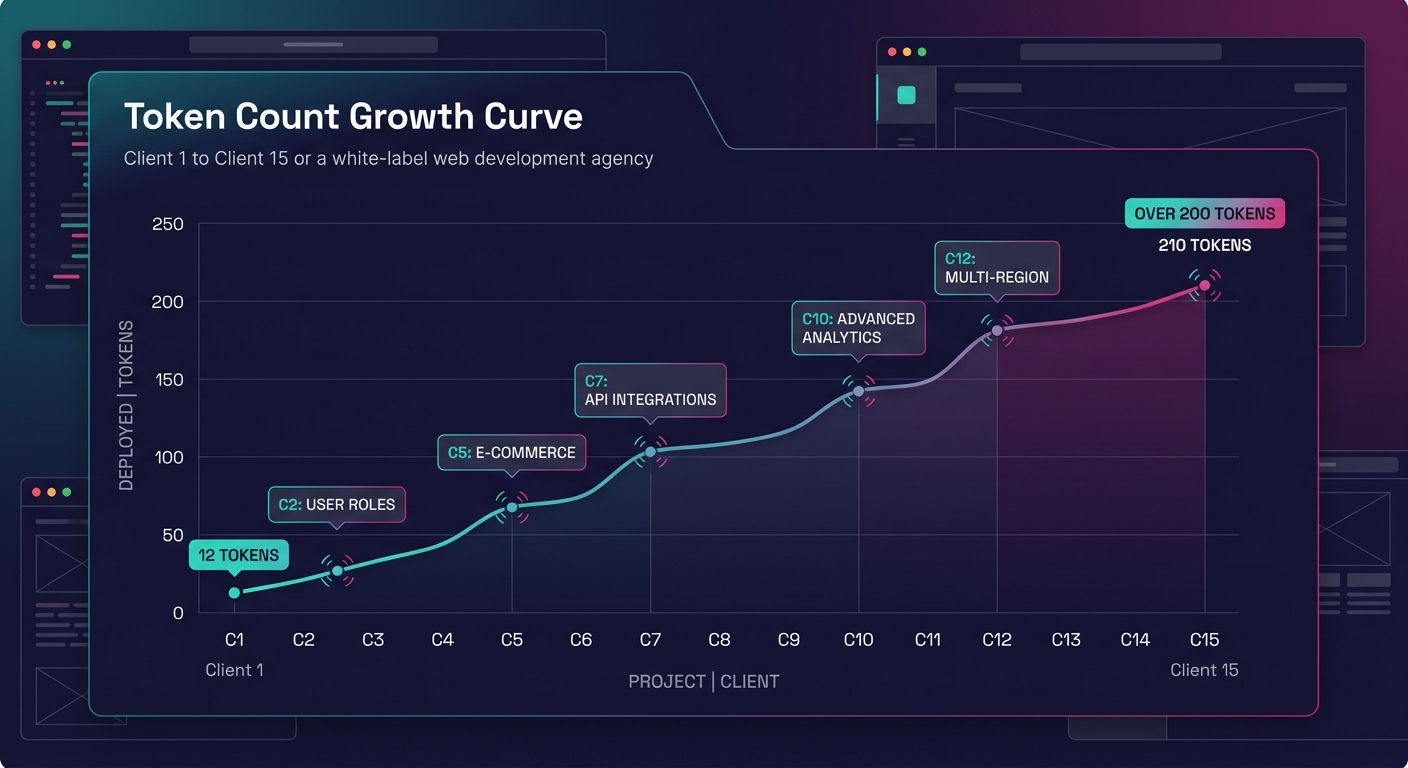
The practical ceiling for clean white-label WordPress automation through tokens appears to sit around 30-40 well-structured tokens per client. Beyond that number, you're not managing a design system — you're managing per-client stylesheets with extra abstraction on top, and the abstraction itself becomes the maintenance burden.
What Still Isn't Settled
Three questions remain open for agencies pushing multi-client theme deployment past the 50-site mark.
Token versioning across live campaigns. When you update a spacing token while 12 clients have active paid social campaigns driving traffic to landing pages built with the previous value, there's no WordPress-native mechanism for versioned token rollout. Agencies are building custom solutions — Git-tagged token files, environment-specific overrides, staged rollouts — but no standard has emerged.
Full Site Editor token parity. WordPress block themes consume theme.json tokens natively, but the Full Site Editor's handling of custom token categories beyond colors and typography remains inconsistent across WordPress 6.x releases. Agencies building on Elementor or Bricks Builder bypass this entirely through their own token plugins, which fragments the ecosystem.
Client-side override governance. Social media clients with internal marketing teams inevitably request the ability to tweak "just the button color" on a campaign page. Every undocumented override compounds design system debt. Agencies need structured escape hatches — custom CSS fields with permission levels and documentation requirements — but the tooling for enforcing those boundaries across 50+ sites at the WordPress level doesn't exist yet. The architecture decisions you make on vendor relationships and exit clauses directly affect how much override flexibility you can afford to offer without losing control of the system.
The agencies getting scalable rebranding right aren't the ones chasing full automation. They're the ones who've drawn a clear line between what tokens handle (brand identity primitives) and what humans handle (component-level design decisions), and they've built their campaign production workflows around that boundary rather than pretending it doesn't exist.