

WooCommerce stores with large catalogs slow down because of a single architectural reality: WordPress stores every product attribute as a separate row in the wp_postmeta table. White-label agencies that don't account for this structure ship stores that work at 500 products and crawl at 5,000.
TL;DR: High-SKU WooCommerce performance problems trace back to five mechanical failures: unbounded postmeta queries, plugin-driven query multiplication, variation table explosion, misconfigured WP-Cron, and handoff briefs that never specify speed targets. Fix the architecture at each layer, not the symptoms on the surface.
The wp_postmeta Table and Why It Punishes Scale
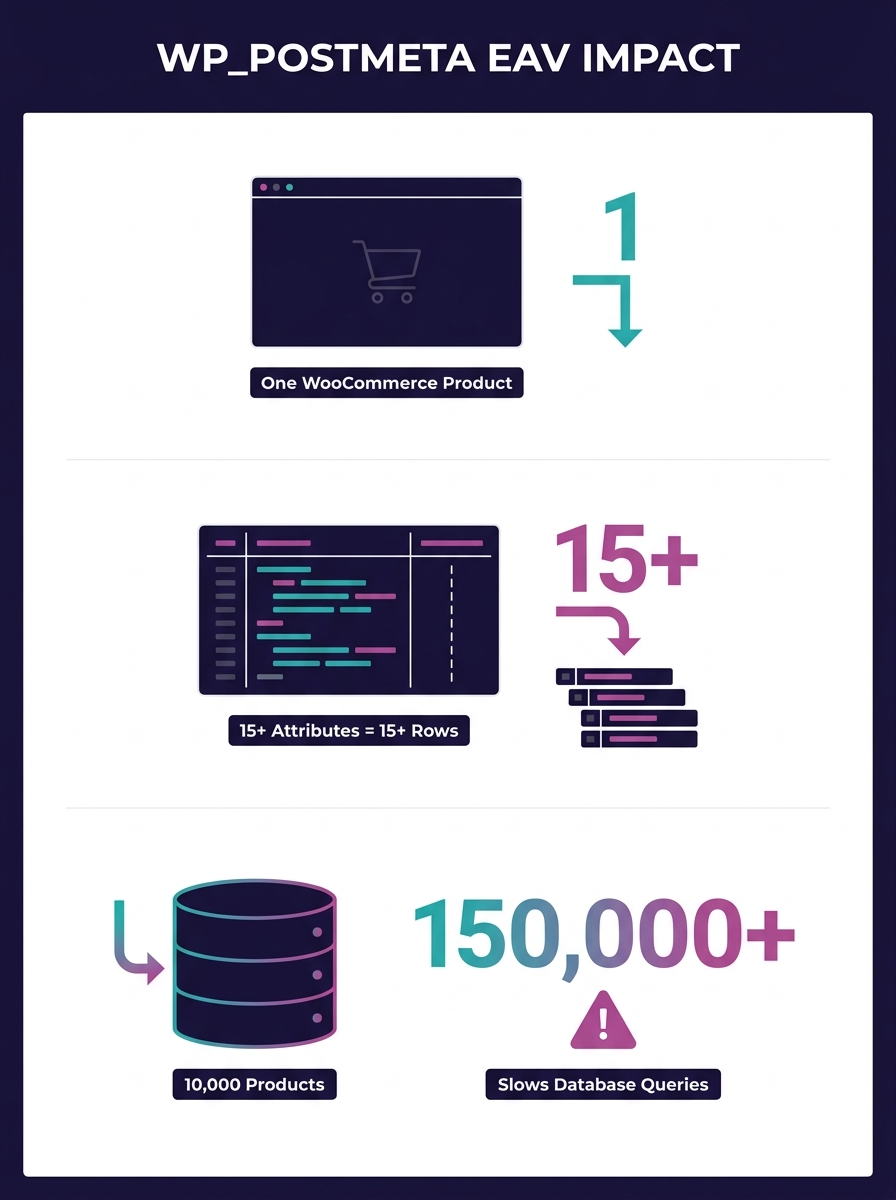
Every WooCommerce product stores its data across two tables. wp_posts holds the product title and description, while wp_postmeta holds everything else: price, stock status, weight, dimensions, custom attributes, and the SKU itself. Each piece of data occupies its own row. A single product with 15 attributes generates 15+ rows in wp_postmeta. Scale that to 10,000 products and you're looking at 150,000 or more meta rows that MySQL must search through on every product query.
The problem compounds because wp_postmeta uses an Entity-Attribute-Value (EAV) schema. As documented by Performant Code's analysis of high-SKU database optimization, "queries must search through large volumes of meta records to retrieve relevant data. As your catalog grows, these queries become heavier and slower."
White-label agencies building for clients with 3,000+ products need to understand this isn't a hosting problem you can throw RAM at. The bottleneck is structural. WooCommerce query optimization starts with how data is stored and indexed, and the default schema was designed for blogs with a few hundred posts, not product catalogs with tens of thousands of metadata rows.
The fix: Add composite indexes on the meta_key and meta_value columns for your most-queried attributes. But be precise about it. As White Label Coders explains, "it's important to use indexes judiciously, as they can increase the time it takes to insert, update, or delete data." Too many indexes on a store processing 200+ orders per day will slow write operations, trading one bottleneck for another. Index the columns your shop page actually filters on (price, stock status, product category) and leave the rest alone.
Plugin Accumulation and the Query Multiplier
Every plugin that touches WooCommerce product data adds its own database queries to every page load. A wishlist plugin queries postmeta. A product comparison plugin queries postmeta. A dynamic pricing plugin queries postmeta. On a 500-product store, the overhead is invisible. On a 10,000-SKU catalog, you've multiplied your already-heavy meta queries by the number of plugins reading from the same table.
Brave's aggregated analysis of agency WooCommerce failures found that 96% of WordPress security issues stem from plugins, but the performance cost runs parallel. Each plugin adds conflicting CSS and JavaScript files to the front end on top of the database overhead.
Warning: Installing a new WooCommerce plugin on a high-SKU store without running Query Monitor first is a recipe for invisible degradation. Use Pressable's [guide to WooCommerce database diagnostics with Query Monitor](https://pressable.com/blog/woocommerce-database-optimization-with-query-monitor/) as your baseline for identifying which plugins are generating the heaviest queries.
The fix isn't "use fewer plugins." That advice is too vague to act on. The fix is to audit query count per plugin per page load. Install Query Monitor, load your shop page, and sort by query time. On a store with 8,000 products, a single product feed plugin can generate 340+ queries on the admin products page alone. One WordPress.org forum user with nearly 5,000 products reported that "the performance has gotten to the point where I am wondering if I don't need to check into using a different shopping cart system." The answer wasn't switching platforms. It was identifying which plugins were making unnecessary queries against a table that already held 75,000 rows.
This connects directly to the technical debt that compounds across client portfolios when agencies skip these audits at handoff.
Variation Explosion and What It Does to Cart Queries
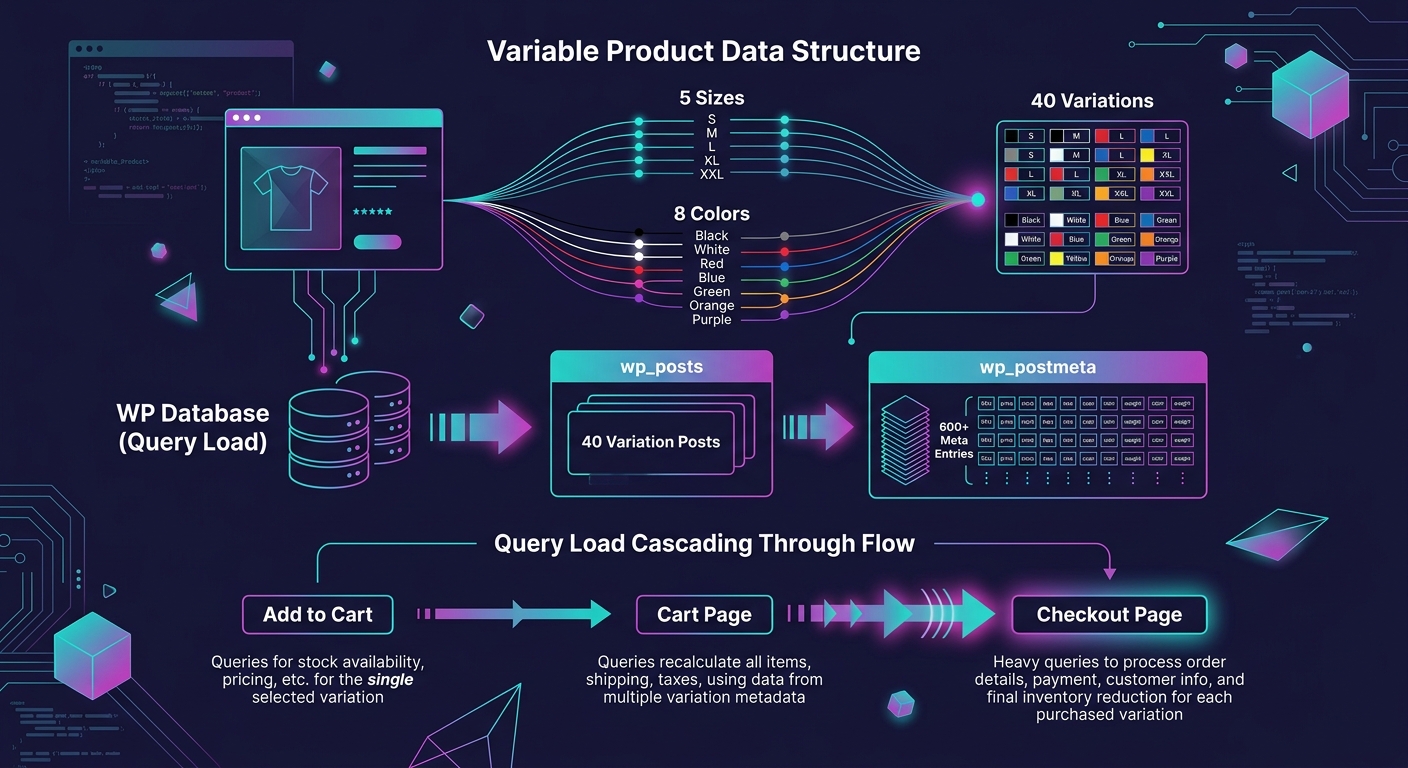
Product variations are the most underestimated performance killer in large catalog WordPress stores. A t-shirt with 5 sizes and 8 colors creates 40 variations. Each variation is stored as its own post in wp_posts with its own set of meta rows in wp_postmeta. That single product now occupies 41 rows in wp_posts and potentially 600+ rows in wp_postmeta.
Multiply that across a catalog of 2,000 variable products and you're looking at database tables with millions of rows. Cart operations slow because WooCommerce must validate stock and pricing for each variation at checkout. The checkout page makes round-trip queries to confirm that every item in the cart is still available at the displayed price.
Pantheon's analysis of slow WooCommerce checkout identifies resource isolation as critical: "Shared hosting might be tempting for its affordability, but it often struggles to deliver the performance needed for a WooCommerce site, especially during high-traffic times or complex checkout processes."
The fix involves two layers. First, cap variation counts where possible. If a product has 200+ combinations, consider using a product add-ons approach instead of generating every permutation as a separate WooCommerce variation. Second, enable persistent object caching (Redis or Memcached) to store variation data in memory rather than hitting MySQL on every page load. This is where your hosting architecture decisions have outsized impact. A $30/month shared plan physically cannot run Redis.
Understanding how WooCommerce handles checkout block customizations becomes essential here too, since the block-based checkout interacts differently with variation data than the legacy shortcode checkout.
WP-Cron Scheduling Under Catalog Load
WP-Cron is WordPress's built-in task scheduler. It handles sending emails, syncing inventory, processing scheduled sales, and running plugin background tasks. The catch is that WP-Cron is triggered by page visits. On a high-traffic store, it fires on every request. On a low-traffic admin session editing products, it might not fire for hours.
For high-SKU WooCommerce stores, this creates two distinct problems. During peak traffic, cron tasks pile up and execute simultaneously, competing with customer-facing queries for database connections. During off-peak admin work, scheduled imports and inventory syncs stall because nobody is visiting the front end to trigger them.
Too many scheduled events, or stuck ones, can significantly affect admin performance on WooCommerce stores with thousands of products.
As Wooninjas documents in their analysis of slow WooCommerce admin performance, the recommendation is clear: "Consider switching to a real server cron job for better control and performance. This is especially useful for stores with high traffic or multiple plugins relying on automated tasks."
The fix: Disable WP-Cron's page-visit trigger by adding the DISABLE_WP_CRON constant to wp-config.php, then set up a real server-side cron job that runs on a fixed schedule (every 5 or 15 minutes depending on how time-sensitive your inventory syncs are). This single change eliminates the resource spikes that happen when 12 cron tasks try to execute during a traffic burst.
Batch processing matters here too. Product feed plugins that try to export all 10,000+ SKUs in a single operation will timeout. WP Marketing Robot's performance testing confirmed that "the most critical feature for handling large catalogs is batch processing. Instead of trying to process all 10,000+ SKUs at once (which inevitably leads to timeouts), a well-built plugin breaks the export into smaller, manageable chunks."
The Brief Gap That Creates Every Other Problem
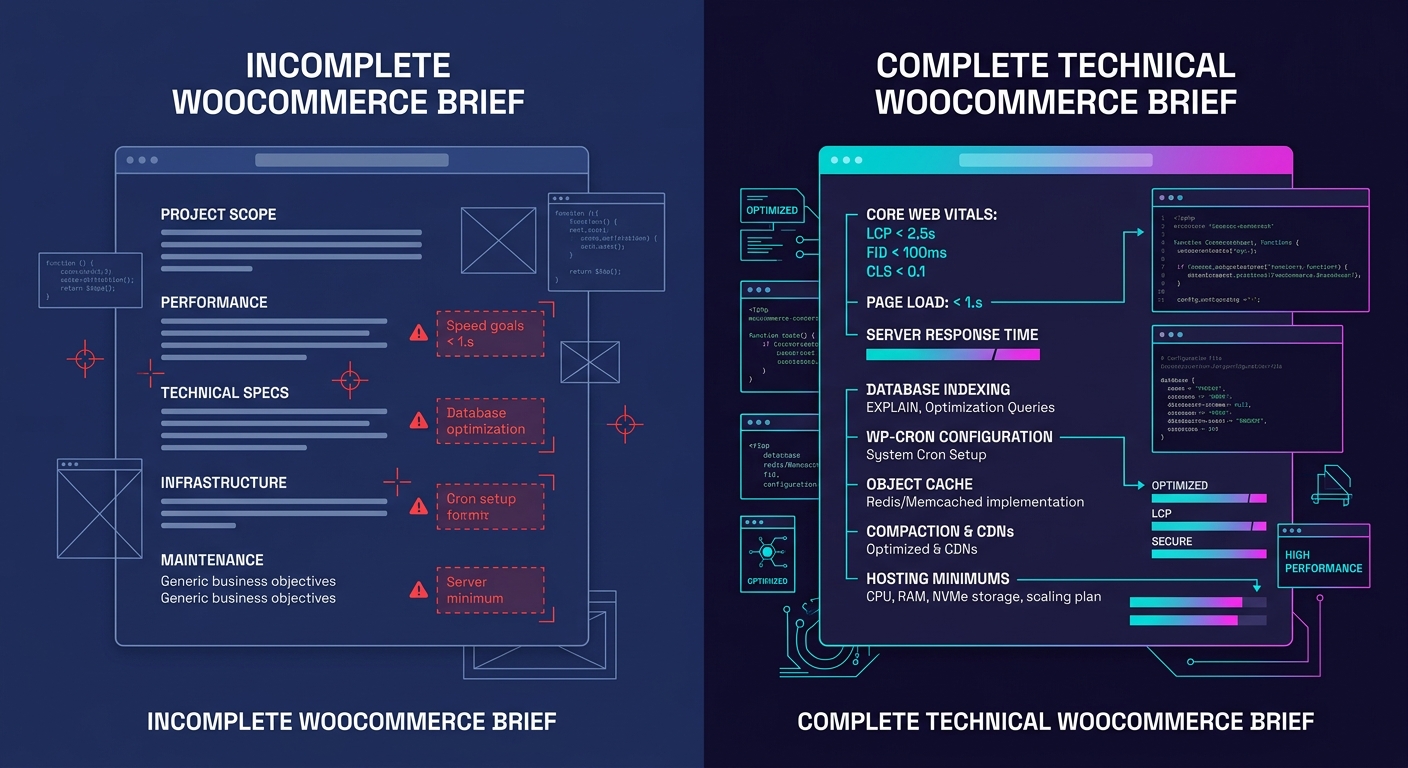
Why do the four technical failures above keep recurring across agency portfolios? Because the agency handoff brief never mentioned performance. White-label WooCommerce performance doesn't degrade because developers lack skill. It degrades because the scope document specified "build a WooCommerce store with 8,000 products" without defining what acceptable speed looks like.
Web Help Agency's guide to white-label WooCommerce development puts it directly: "If your brief doesn't specify Core Web Vitals targets, your partner will optimize for functional completeness, not speed. The store will work. It will also load in 5–7 seconds on mobile because no one told them otherwise."
The numbers to include in every high-SKU WooCommerce brief: LCP under 2.5 seconds on mobile, CLS under 0.1, PageSpeed score above 75 on mobile. These aren't aspirational targets. They're the thresholds where Google stops penalizing you in search rankings. And a single second of additional load time can reduce ecommerce conversions by 7%.
This is the same pattern that drives budget overruns in white-label WordPress projects: when the brief leaves a dimension undefined, the partner makes their own assumptions, and those assumptions almost never favor performance over feature completeness.
Where This Optimization Model Breaks Down
Everything above assumes your store's performance problems originate in the database layer and the WordPress application stack. For stores above 50,000 SKUs, the bottleneck often shifts to search and filtering. MySQL full-text search becomes unusable at that scale regardless of how well you've indexed postmeta, and you'll need an external search engine like Elasticsearch or Algolia to handle faceted filtering. Object caching helps with repeated queries but does nothing for the first cold-load query that still hits the database directly.
The EAV architecture itself has a ceiling. WooCommerce's High-Performance Order Storage (HPOS) addressed part of the problem by moving order data into dedicated tables, but product data still lives in the same postmeta structure it always has. Agencies managing stores with catalogs in the tens of thousands of SKUs should evaluate whether the speed penalties inherent to WordPress's architecture warrant a headless approach, where WooCommerce serves as the backend engine while a faster front-end framework handles product display and filtering.
The five fixes outlined here solve the problems white-label agencies encounter between 2,000 and 25,000 SKUs, the range where most agency-built stores actually live. Beyond that range, the conversation shifts from WooCommerce performance optimization to full re-architecture. Knowing exactly where the model stops working is as valuable as knowing how to keep it running well within its limits.