

Elementor's own speed optimization guide, updated May 11, opens with a blunt line: "a slow website kills your business in 2026." What the guide doesn't address is why sites built on page builders consistently underperform custom WordPress builds by 20 to 40 PageSpeed points on mobile, and why agencies running white-label operations absorb that penalty most directly. FatLab Web Support's March 2026 benchmarks, drawn from managing over 200 WordPress sites, put the realistic mobile PageSpeed range for a well-optimized Elementor or Divi site at 35 to 60. A lightweight custom theme on identical hosting infrastructure routinely hits 80 or above. That spread has direct SEO consequences now that Core Web Vitals carry real weight in Google's ranking signals, and the industry conversation this week has shifted from "does speed matter?" to "how much speed are we sacrificing for scalability?"
Where the Extra Kilobytes Live
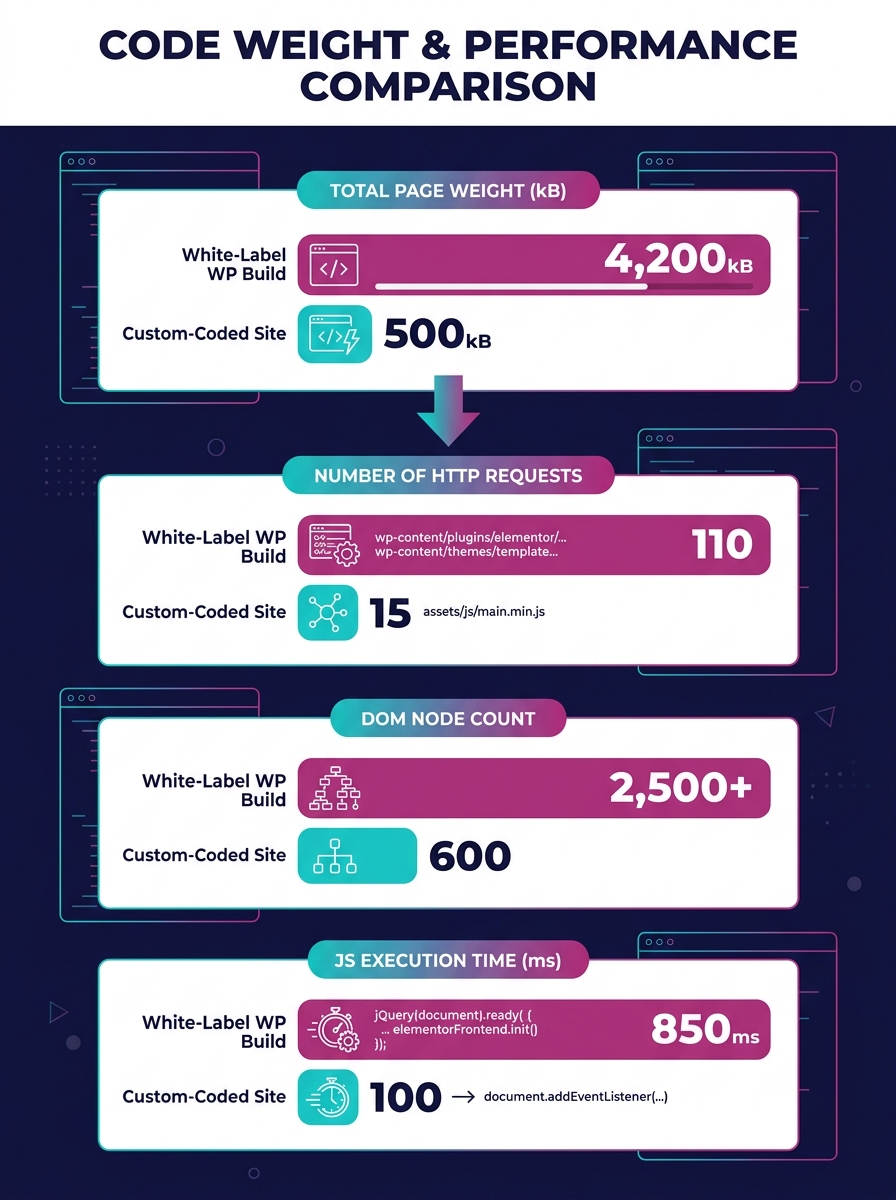
The performance gap between white-label WordPress builds and custom sites doesn't come from one dramatic source. It accumulates across dozens of small decisions that make perfect business sense individually but compound into measurable standardized solutions performance debt. Template themes and page builders like Elementor, Divi, and WPBakery ship with component libraries designed to cover every possible layout a client might request. That flexibility is the entire product proposition. But flexibility means loading global CSS and JavaScript for sliders, tabs, accordions, toggles, and animation libraries on pages that use none of them.
A custom WordPress theme built for a single client loads only the code that specific site needs. The difference shows up most clearly in two Core Web Vitals metrics: Largest Contentful Paint (LCP) and Interaction to Next Paint (INP). Page builders generate large DOM trees because their visual editors nest containers inside containers inside containers, and every nested div adds parsing time. An analysis by Moosi Web published this month found that maintaining an "approved blocks" list and enforcing component-level asset loading rules can reduce unnecessary script weight, but most white-label operations skip this step because it adds configuration overhead to every new project. That's the tension between customization and standardization every agency confronts, and the performance cost of choosing standardization is rarely measured at deploy time.
The plugin stack compounds the problem further. White-label builds tend to rely on standardized plugin sets because consistency across client sites reduces support complexity and training costs. A typical white-label stack might include a form plugin, an SEO plugin, a caching plugin, a security plugin, an analytics plugin, and a backup solution. Each one enqueues its own scripts and styles. Custom builds can choose lighter alternatives or write purpose-built functionality that doesn't carry the overhead of a plugin designed to serve millions of different configurations. Then come the third-party scripts: chat widgets, marketing pixels, Google Tag Manager containers stuffed with dozens of tags, heatmap tools, A/B testing scripts. These aren't technically part of the WordPress build, but white-label agencies often include them as part of the handoff because the reselling agency's client expects them. The Blog Herald published two pieces this week arguing that site speed silently erodes publisher trust, and the culprit in their analysis was almost always third-party JavaScript blocking the main thread. The same dynamic plays out on white-label client sites, except nobody's watching the performance budget because the agency that sold the site isn't the agency that built it.
Benchmarking That Actually Tells You Something
If you run a white-label WordPress operation and you aren't benchmarking load times at handoff, you're shipping a product with an unknown defect rate. That sounds harsh, but the data supports it. Technocrackers reported on May 11 that their white-label maintenance SOP now includes monthly WordPress load time benchmarking using Google PageSpeed Insights and GTmetrix, with a hard threshold: any drop of 10 or more PageSpeed points or any CLS increase above 0.1 triggers an immediate review. That kind of discipline is still rare, and the fact that a team felt the need to formalize it tells you how common performance regression is in these environments.
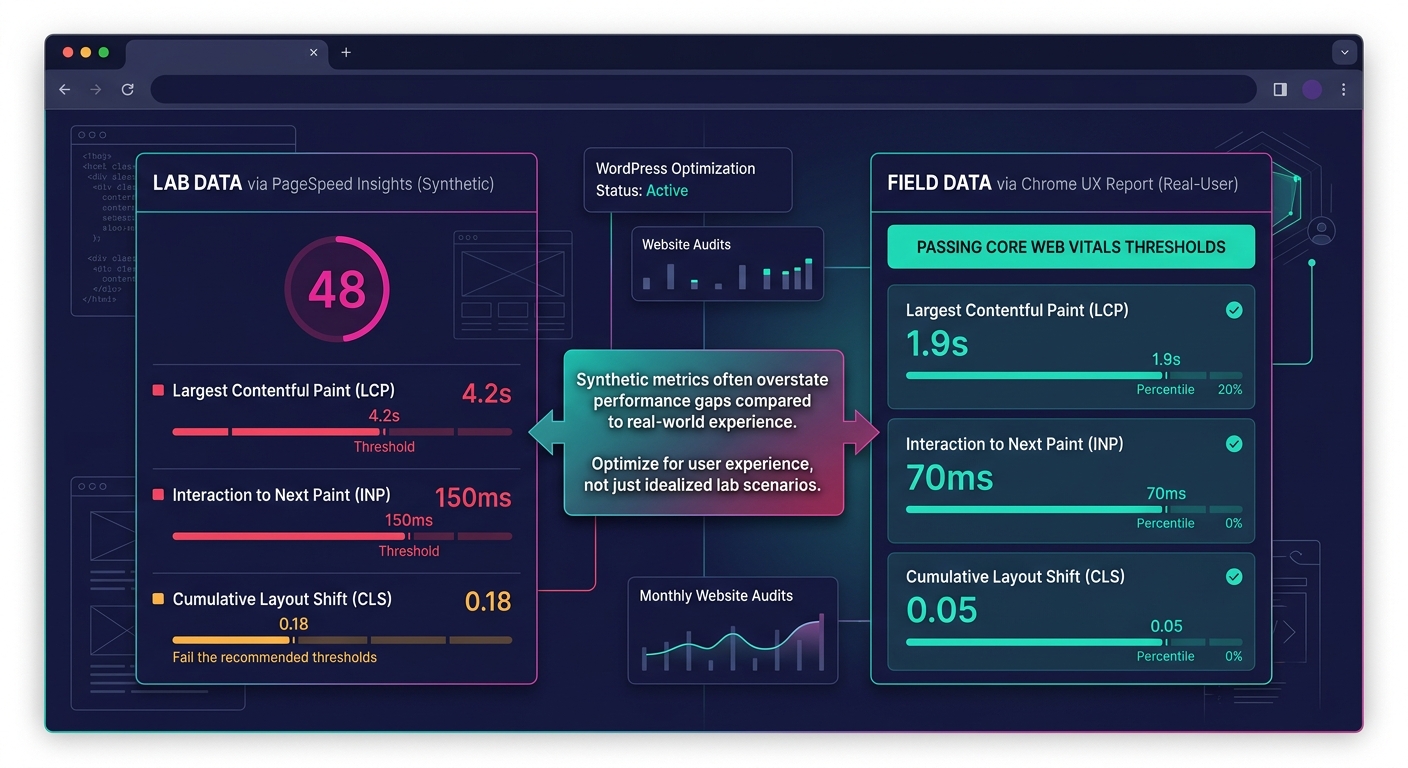
The right approach starts with choosing the correct metric for the correct audience. PageSpeed Insights scores are useful for a quick comparison, but they're synthetic, meaning they test from Google's servers under controlled conditions. Real-user monitoring data from the Chrome UX Report tells you what actual visitors experience, and the gap between synthetic and field data can be enormous. A site might score 55 in PageSpeed Insights but pass all Core Web Vitals thresholds in the field because its real visitors are mostly on fast connections in urban areas. The reverse is also true, and more common with white-label builds serving regional businesses with audiences on slower mobile connections.
The agency that sold the site isn't the agency that built it, and nobody's watching the performance budget.
A benchmarking protocol that produces actionable white-label WordPress performance data involves three layers working together. First, run PageSpeed Insights against the homepage and two interior pages at handoff and record the scores as a baseline you can reference when performance questions come up months later. Second, set up a monitoring tool like Site24x7 or the WP Benchmark plugin to track server-side response times, including TTFB, database query speed, and PHP execution time on a recurring schedule so you can spot degradation before it shows up in client complaints. Third, check Chrome UX Report data for each domain monthly. If a site's P75 LCP is above 2.5 seconds or its P75 INP is above 200 milliseconds, that site is failing Core Web Vitals in the field, and Google is treating it accordingly in rankings. Agencies that treat performance as an observable production metric rather than a launch-day checkbox tend to catch problems weeks before the reselling agency's client notices organic traffic slipping.
The NGINX FastCGI Cache Intervention
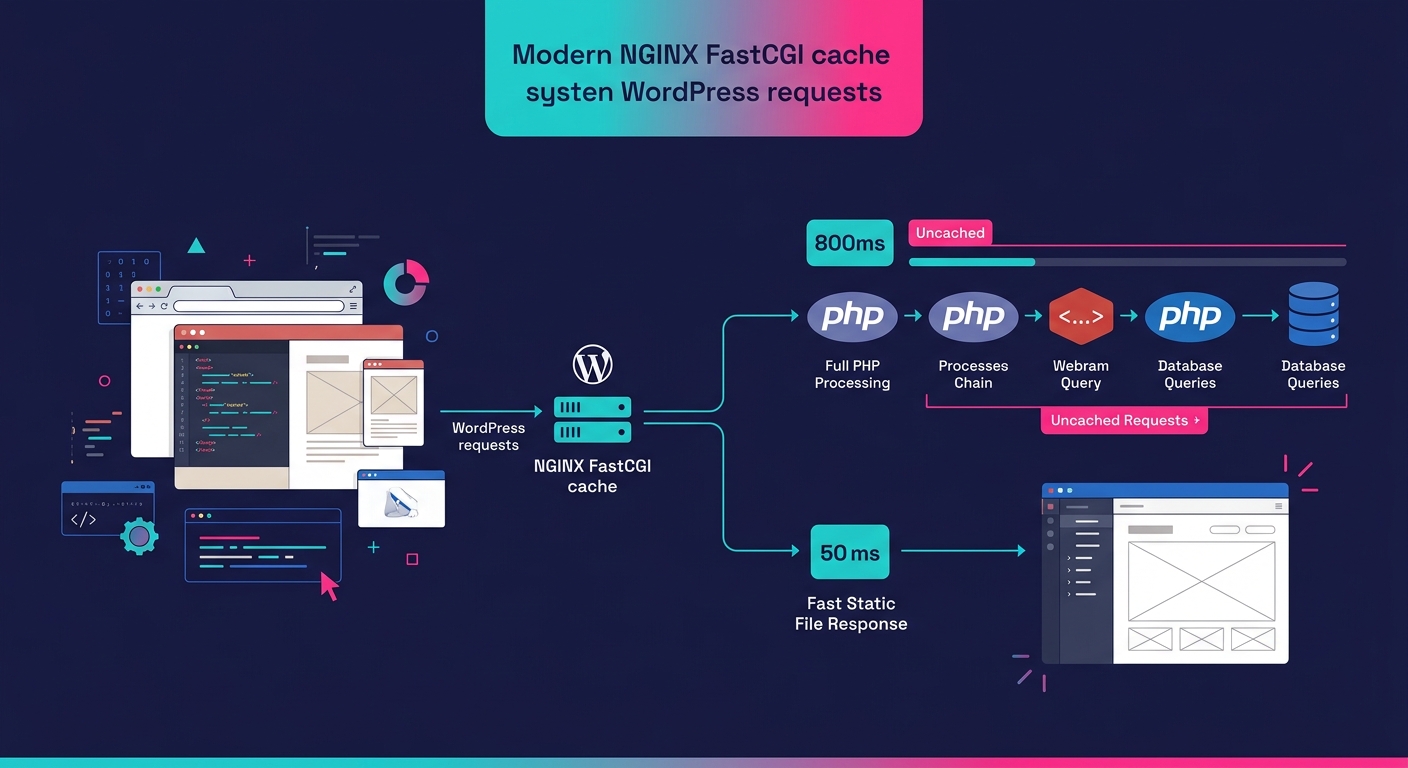
Server-level caching is the single most effective way to close the white-label WordPress performance gap without rewriting themes or rebuilding plugin stacks. NGINX FastCGI caching works by storing the fully rendered HTML output of WordPress pages so that subsequent requests bypass PHP processing entirely. Instead of WordPress executing dozens of database queries, loading plugin files, rendering page builder layouts, and assembling the page on every request, NGINX serves a static HTML file from memory. A white-label Elementor build that takes 800 milliseconds to generate a page through PHP can serve that same page in under 50 milliseconds through FastCGI cache.
RunCloud's NGINX caching guide for WordPress describes FastCGI cache as "generally considered one of the best caching solutions for NGINX with WordPress" because it operates at the web server layer rather than the application layer. This matters for white-label operations because NGINX caching optimization doesn't require touching the WordPress codebase at all. You configure the cache at the server level, set appropriate expiration rules, and exclude dynamic pages like WooCommerce carts and checkout flows from caching. The performance gains apply uniformly across every white-label site on that server. The tricky part is cache invalidation: when a client updates a page, the cached version needs to purge and regenerate. Most managed WordPress hosts handle this automatically now, and Cloudways just launched their Site Manager dashboard this week with centralized cache management across 16 or more sites from a single interface. For agencies looking to hire dedicated web development talent who can handle both the WordPress build and the server configuration, this kind of full-stack competence is becoming a baseline expectation rather than a specialty.
But NGINX caching doesn't eliminate the standardized solutions performance debt that accumulates from heavy themes and plugin stacks. It masks the server-side cost. The page still ships the same amount of CSS and JavaScript to the browser. LCP might improve because the HTML arrives faster, but INP won't change because the browser still has to parse and execute the same JavaScript bundle. Think of FastCGI caching as a very effective band-aid: it addresses the symptom of slow TTFB without touching the underlying condition of frontend bloat. For many white-label agencies, that band-aid is enough to keep Core Web Vitals in the green zone, and that pragmatic calculation is valid. The design system debt that makes white-label themes heavy in the first place is a structural feature of how these products are built. Caching buys time and breathing room while you decide whether the performance penalty is acceptable for your client portfolio.
The Uncomfortable Arithmetic
The white-label speed penalty exists because speed and scalability pull in opposite directions for agencies. A custom WordPress build is fast because it's bespoke: every line of CSS serves a purpose, every script loads intentionally, and the theme architecture reflects one client's needs. That precision is expensive to produce and impossible to replicate across 30 client sites per quarter. White-label WordPress performance will always trail custom builds as long as the economic model depends on reusable components, standardized plugin stacks, and page builders that trade rendering efficiency for visual editing flexibility. The question for agencies isn't "how do we eliminate the gap?" but "how wide can the gap be before it costs rankings and conversions?"
Tip: Set percentile-based performance budgets (P75 LCP under 2.5s, P75 INP under 200ms) and tie any regressions to specific deployment dates. Without that data trail, performance conversations with reselling partners devolve into blame-shifting.
Where that threshold sits varies by client vertical and competitive landscape. A local plumber's site competing against other local plumber sites, most of which are also built on templates, doesn't suffer much from a 50 on mobile PageSpeed. A DTC ecommerce brand competing against sites with dedicated engineering teams will feel every millisecond. Agencies offering white-label development services need to match the performance investment to the competitive context, and that matching requires the benchmarking infrastructure described above. Without field data, you're guessing whether the speed penalty matters for each specific client, and guessing is a poor foundation for an SEO strategy that depends on Core Web Vitals passing binary thresholds. The agencies that will navigate this well are the ones willing to measure the penalty, communicate it honestly to their reselling partners, and treat server-level interventions like NGINX caching as a default part of every deployment rather than something they bolt on after the first complaint.