

DoorDash's engineering team eliminated their staging environments entirely. Rather than maintaining parallel test systems that consistently diverged from production, they created a dedicated production tenant called "DoorTest," routing all end-to-end testing through the live platform with strict data isolation enforced at the tenant boundary.
White-label WordPress agencies managing 20, 50, or 100+ client sites face the same underlying problem. And most are solving it the wrong way.
The Staging Server That Served Everyone and Tested Nothing
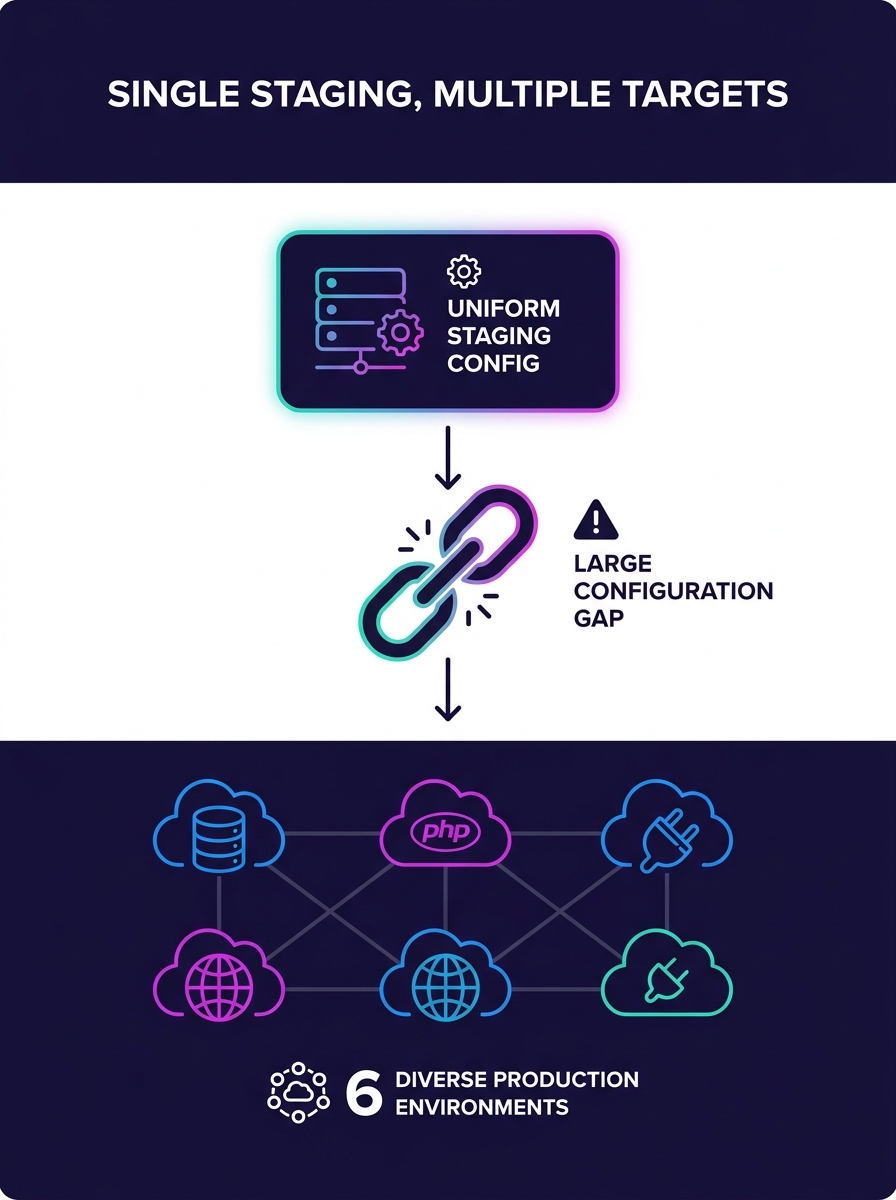
DoorDash's pre-DoorTest staging infrastructure suffered from three failures that will sound familiar to any agency running shared white-label infrastructure: data that didn't match production, services pinned to unstable versions, and observability tools that simply didn't exist in the test environment. Staging contained no real user data (for PII compliance reasons), ran service versions that diverged from production deployments, and lacked the monitoring stack that would catch failures in the live system.
For white-label WordPress agencies, the parallel is precise. A single staging server handling QA for 15 different client brands typically runs one PHP version, one MySQL configuration, and one set of plugins. But client A's production site runs PHP 8.1 on MySQL 8.0 with WooCommerce 9.2 and Elementor Pro 3.24, while client B runs PHP 8.2 on MariaDB 10.11 with a custom Gutenberg block library. The staging environment matches neither. As MOSS's documentation on localhost WordPress development emphasizes, containerization with Docker helps maintain parity between environments by matching the same PHP major/minor version and compatible database engine locally. When you skip that step, every "passed QA" stamp is a guess.
The failure compounds at scale. An agency managing 40 white-label sites with a single shared staging server is running 40 different configurations through one environment. Plugin conflicts that would surface on client C's production site never appear because client D's conflicting plugin is also installed. Database schema differences between WooCommerce 9.1 and 9.2 get masked. CSS specificity collisions between two different theme frameworks vanish because both frameworks load simultaneously instead of in isolation. Testing environment parity collapses precisely when you need it most.
DoorDash's Production Tenant Pivot
DoorDash's solution inverted the traditional model. Instead of replicating production in staging (and failing), they embedded testing inside production. The "DoorTest" tenant ran on the same infrastructure, the same service versions, and the same monitoring stack as every other tenant. Test traffic was restricted via VPN to prevent external access. Audit logs tracked every test session for compliance. The result: tests ran against real infrastructure with real configurations, and failures in testing mapped 1:1 to failures that would affect real users.
SysGenPro's white-label SaaS testing framework documentation captures this principle directly, stating that "testing must be scalable, tenant-aware, and upgrade-safe." The emphasis on tenant-awareness is what separates functional multi-tenant staging infrastructure from a shared server with multiple WordPress installs dumped onto it. Each tenant's configuration, plugin set, theme, and database schema needs to be testable independently, free from interference by other tenants' configurations.
For WordPress agencies, a tenant-aware testing approach means each client site gets its own isolated environment with its own wp-config.php, its own database, and its own plugin/theme stack. WP Freighter, an open-source multi-tenant WordPress tool, approaches this by requiring write access to wp-config.php and wp-content/ for each tenant. But it also exposes a critical limitation: files in the root directory, including robots.txt and .htaccess, are shared across all sites. That shared layer means rewrite rules, security headers, and crawl directives tested for one client can silently affect every other client in the cluster.
A QA Test Lab guide published in April 2026 outlined the testing mandate for multi-tenant SaaS platforms: "start early and test continuously; use automation testing advantages; apply security, performance, and usability testing to get a comprehensive view of the platform." The "continuously" part matters for WordPress agencies specifically because plugin updates arrive weekly, WordPress core updates ship quarterly, and PHP minor versions rotate annually. Each update needs validation against every active client configuration.
A staging environment that routes 40 different client configurations through one shared server isn't testing anything. It's generating false confidence.
Three Isolation Architectures and What They Cost
The architecture you choose for your multi-tenant staging infrastructure determines both the reliability of your testing and the monthly hosting bill. Three models dominate, each with distinct tradeoffs for WordPress deployment isolation.
| Architecture | Database Model | Data Isolation Risk | Testing Complexity | Estimated Monthly Cost per Tenant |
|---|---|---|---|---|
| Single app, single database | Shared with tenant ID columns | High (requires strict row-level validation) | High (shared workloads cause interference) | $5–15 |
| Single app, separate databases | One database per tenant | Medium (natural separation, shared app layer) | Medium (predictable environments, shared PHP) | $15–40 |
| Separate apps, separate databases | Fully isolated stacks | Low (complete separation) | Low (independent environments) | $40–120 |
WordPress Multisite falls into the first category by default. All sites share one database with blog_id prefixes separating tables. A plugin that runs an expensive database migration on one site's staging test can lock tables that affect every other site's test suite. Testing environment parity becomes nearly impossible because you can't simulate client A's database load without also simulating clients B through Z.
The second model, which tools like WPCS.io implement through Kubernetes orchestration, gives each tenant its own database while sharing the WordPress application layer. This is where most agencies should land. WPCS.io's approach addresses performance problems found in traditional multisite setups and enhances data isolation between tenants. You can run plugin update tests against client A's database without touching client B's data, and database-level performance metrics remain isolated.
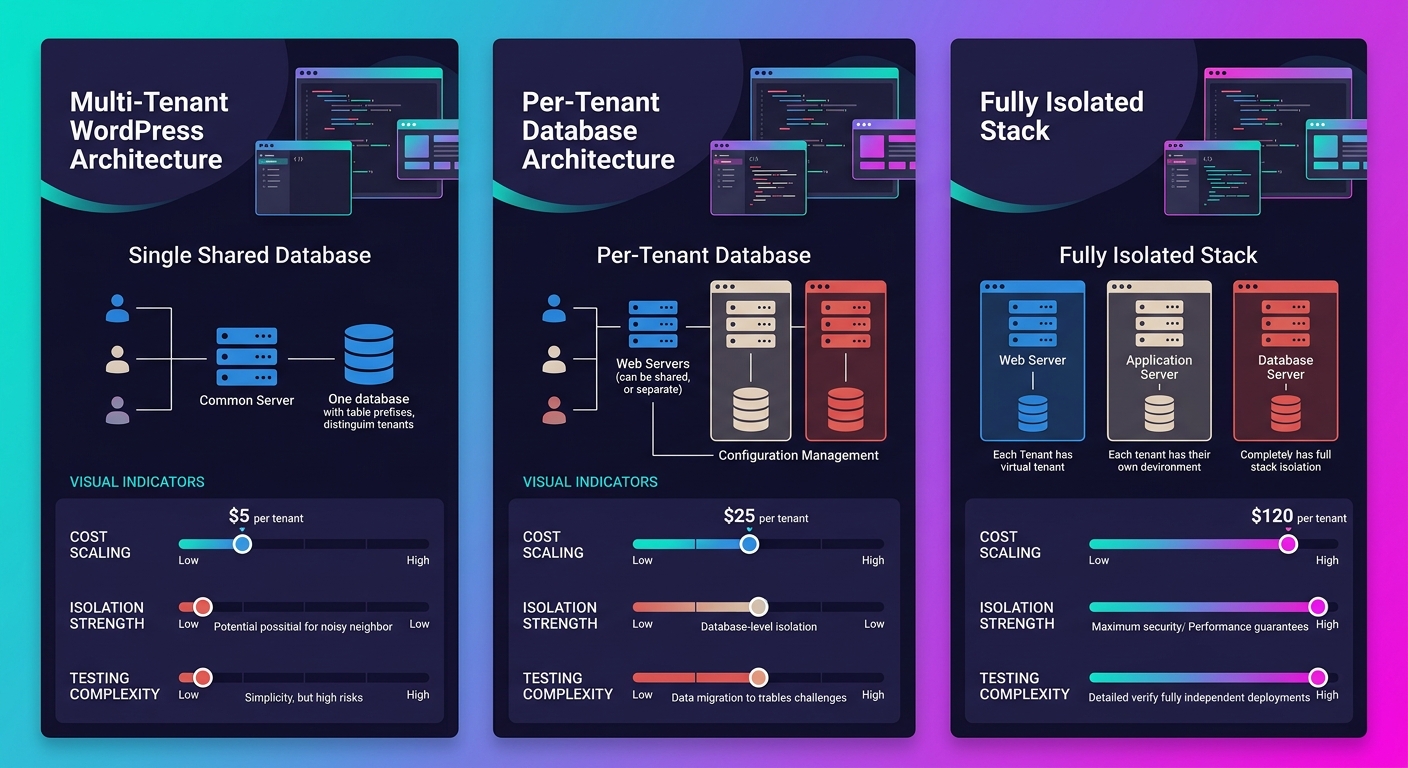
The third model provides the strongest WordPress deployment isolation but costs 3x to 8x more per tenant. For agencies where environment parity disasters have already crashed production, the investment often pays for itself after the first prevented incident. Agencies using infrastructure-as-code tools like Terraform or Pulumi can template these fully isolated stacks and provision new tenant environments in minutes rather than hours, as recommended in Seahawk Media's 2026 enterprise WordPress hosting guide.
If your team's dependency management already runs through Composer, the per-tenant isolation model pairs well with Git-based deployment workflows. Each client gets a composer.json that pins exact plugin and theme versions, and CI builds a deployable artifact specific to that tenant's stack.
The .htaccess Leak and WordPress-Specific Contamination Points
WP Freighter's documentation flags a detail that most multi-tenant WordPress discussions skip: root-level files are shared across all tenants. This includes .htaccess (which controls URL rewrites, security headers, caching directives, and access rules) and robots.txt (which controls search engine crawling behavior). A staging test that modifies .htaccess for one client's redirect rules will modify it for every client sharing that root directory.
The practical consequence plays out like this: an agency developer runs a staging test adding custom rewrite rules for client A's WooCommerce checkout flow. Those rules now apply to clients B through F. Client D's headless WordPress setup, which routes API calls through custom endpoints, breaks because the new rewrite rules intercept those requests. The staging test for client A "passes." Client D's production deploy, built from the same shared staging base, fails silently. Agencies that have audited their production-development environment parity consistently find that .htaccess drift is the most common source of "works in staging, breaks in production" failures for WordPress sites.
Warning: If your multi-tenant staging setup shares a single document root across client sites, every .htaccess change, robots.txt edit, or root-level redirect tested for one client silently propagates to all others. This is the most common source of cross-tenant contamination in white-label WordPress environments.
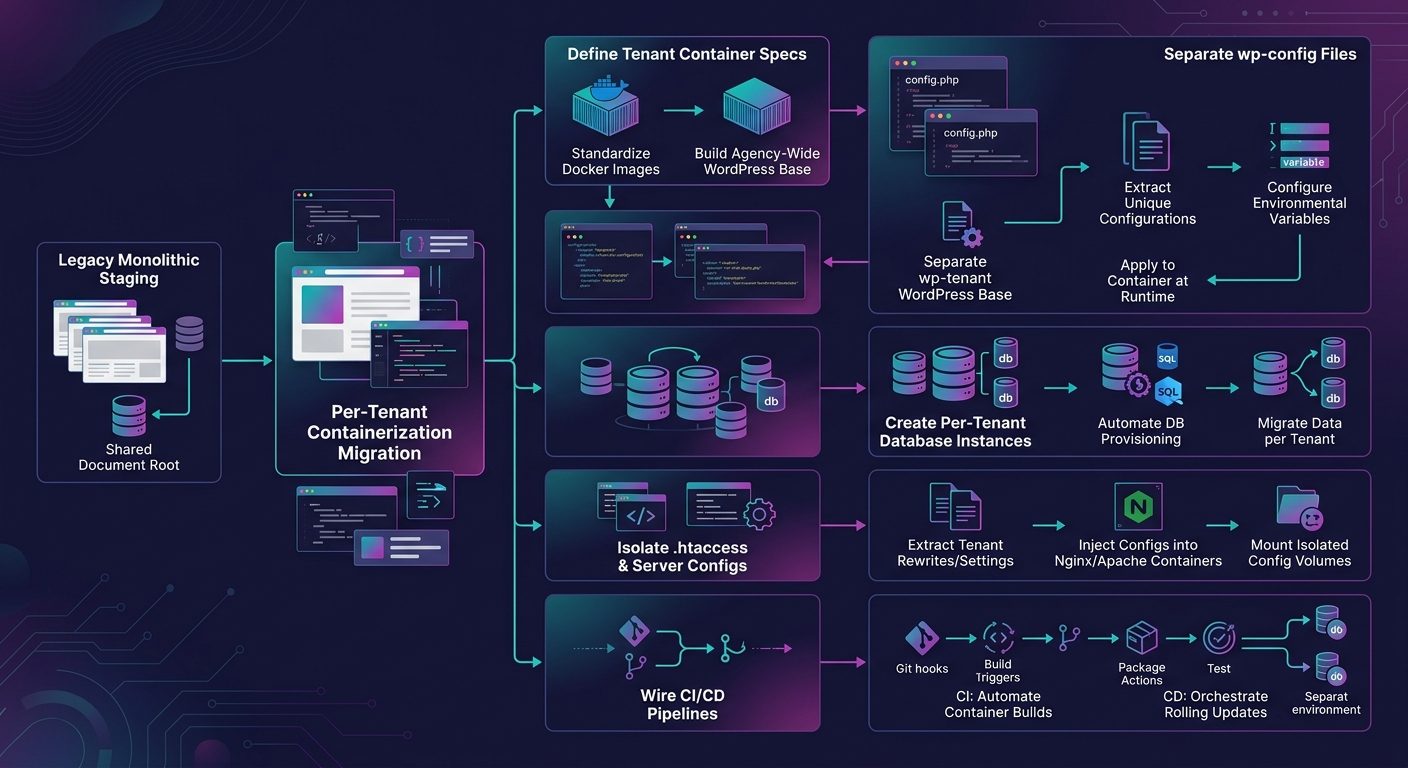
The fix is architectural: each tenant needs its own document root, its own .htaccess, and its own web server configuration block (whether Apache VirtualHost or Nginx server block). MOSS's hosting documentation for multiple WordPress sites recommends using container registries and standardized images for the WordPress PHP runtime, with Git-based workflows for themes and plugins where CI builds containers or deployable artifacts per tenant.
For agencies running shared white-label infrastructure today, the migration path involves moving from a single document root with symlinked WordPress core files to per-tenant containers. The PHP runtime, database engine, web server config, and WordPress core version all become part of the container definition. When the QA process runs at scale, each test executes inside a container that matches production exactly, because the container IS the production artifact.
Why the DoorTest Model Needs Different Plumbing for WordPress
DoorDash's shift to production-based testing worked because their infrastructure already supported strict tenant isolation at every layer: network, data, configuration, and observability. WordPress agencies adopting the same philosophy need to build that plumbing first. Running tests against a production WordPress install without tenant isolation means test data leaking into client-facing databases, test plugin activations affecting live sites, and test theme changes rendering on real visitors' screens.
The sequence matters. First, establish per-tenant database isolation (model two or three from the comparison table). Second, give each tenant its own document root and server configuration. Third, implement feature flags per tenant so you can test functionality changes without deploying code to every client simultaneously. Fourth, wire CI/CD pipelines through GitHub Actions or a comparable tool to build and test tenant-specific artifacts after every commit.
Agencies with dedicated WordPress developers assigned to specific client accounts can own this per-tenant testing responsibility. The developer who maintains client A's site runs tests against client A's isolated staging container, with client A's exact plugin versions (pinned to specific patch releases), theme, and server config. Cross-contamination from client B's environment becomes physically impossible because the two environments share nothing except the orchestration layer.
The investment is real. Moving from a shared staging server to per-tenant isolated containers means higher hosting costs (plan for 3x to 5x your current staging spend at the second-model tier, or 8x to 12x at full isolation), more complex CI/CD configuration, and a longer provisioning process for new clients. But the alternative, discovered the hard way by every agency that's scaled past 20 white-label clients on shared infrastructure, is a testing process that catches fewer bugs as you add more clients. White-label environment management that scales means isolation that scales. The staging environment that serves everyone catches nothing reliably, and your team will spend more hours debugging production failures than it would have spent building per-tenant containers in the first place.