

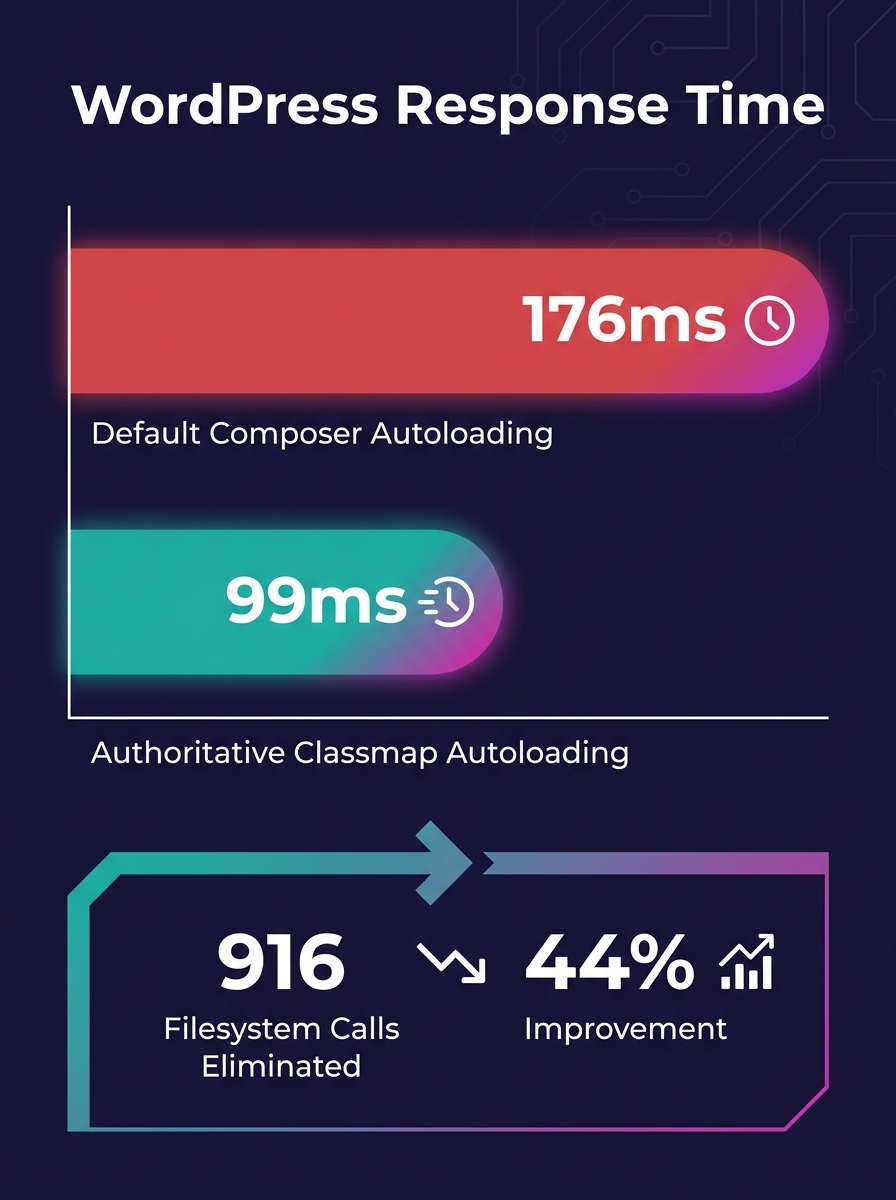
Switching a 14-plugin WooCommerce site to authoritative Composer autoloading dropped response time from 176 ms to 99 ms, eliminating 916 unnecessary filesystem calls per request. For white-label agencies shipping e-commerce builds, that gap between a managed WordPress Composer workflow and manual plugin installs hits checkout completion rates directly.
TL;DR: Composer-based dependency management gives white-label teams reproducible WordPress builds across every environment. Authoritative autoloading alone cuts WooCommerce response time by 44%. Committing the lock file, scoping dependencies, and automating updates through CI/CD are the three operational pillars that prevent client-site breakage at scale.
94.5% of Composer-Using Plugins Ship With Suboptimal Autoloading
Only 349 out of 6,331 WordPress plugins using Composer (5.5%) have adopted authoritative classmaps as of April 2026. The remaining 94.5% rely on default autoloading behavior that triggers filesystem lookups for every class resolution. On a WooCommerce store running 14 plugins including WooCommerce itself and Yoast SEO, those lookups compound into 916 extra filesystem calls per page load.
Jordi Boggiano, the creator of Composer, endorsed the authoritative autoloading flag as "the best solution" for production deployments, while acknowledging the challenge of widespread adoption across the plugin ecosystem. The WordPress Developer Blog has approved a forthcoming article promoting this as a standard practice, following successful pull requests merged into plugins like ACF and EWWW Image Optimizer.
For agencies delivering white-label WordPress development to e-commerce clients, this matters because every millisecond of server response time affects conversion. A store responding in 99 ms instead of 176 ms loads its above-the-fold content faster, and that speed compounds across every page in a checkout funnel. When you're managing 15 or 20 client stores, the performance difference between a properly configured Composer build and a default one determines whether clients renew or churn.
The Lock File Is Your White-Label Insurance Policy
Composer's composer.lock file records the exact version of every installed dependency. When you run an install command on staging, production, or a colleague's local machine, Composer reads the lock file and pulls those precise versions. Without it, each environment resolves dependencies independently, and the versions drift.
This is where white-label e-commerce delivery gets dangerous. A WooCommerce store with Stripe payment gateway 8.2.1, a shipping calculator, and a tax compliance plugin forms a tested combination. If a developer runs a fresh install without the lock file and Stripe resolves to 8.3.0, the checkout flow that passed QA breaks in production. A discussion on the Seravo WordPress repository documents this exact scenario: without the lock file in version control, production deployments require a manual step that developers forget, leading to version mismatches between environments.
The strategy for reproducible WordPress builds is straightforward. Commit composer.lock to Git. Exclude the vendor/ directory and wp-content/plugins/ via .gitignore. Run the install command (which reads the lock file) in CI/CD pipelines, never the update command (which ignores it). As Codeboxr's analysis of Composer package sources confirms, this approach ensures version control, reproducibility, automated updates, and cleaner deployments without manual ZIP downloads or FTP uploads.
If your agency has struggled with parity between staging and production environments, the lock file is the single most impactful fix. It guarantees that the plugin versions your QA team tested are the plugin versions the client's live store runs.
WPackagist, WP Packages, and the Repository Decision for E-Commerce
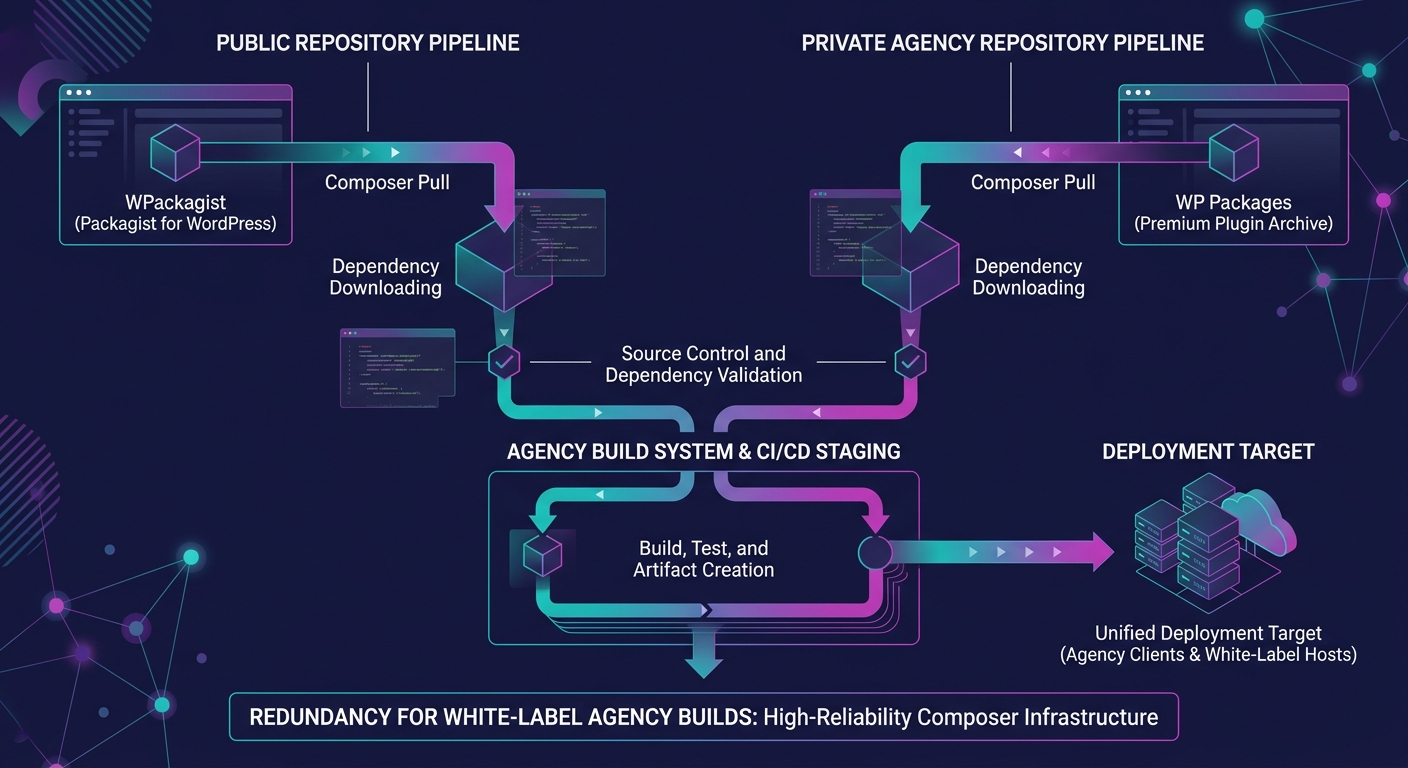
Why does repository choice matter for a white-label Composer workflow? Because your build pipeline depends on whichever mirror it pulls from, and downtime during a deploy stalls every client project in your queue.
WPackagist has served as the primary Composer mirror for WordPress.org plugins and themes since its creation. In March 2026, WP Engine acquired WPackagist, solidifying its infrastructure but concentrating the ecosystem's Composer dependency on a single corporate owner. Roots.io responded by launching WP Packages as an independent alternative, giving agencies a second option for WPackagist automation in their build pipelines.
Both repositories let you require plugins using familiar prefixes. WPackagist uses wpackagist-plugin/ and wpackagist-theme/, while WP Packages provides its own namespace. For an e-commerce build, your project file might declare WooCommerce, a payment gateway, a shipping plugin, and a handful of marketing integrations as dependencies, all pulled from one of these repositories during the install step.
| Attribute | WPackagist | WP Packages |
|---|---|---|
| Operator | WP Engine (acquired March 2026) | Roots.io |
| Plugin prefix | wpackagist-plugin/ | wp-packages namespace |
| Theme prefix | wpackagist-theme/ | wp-packages namespace |
| Cost | Free | Free |
| Independence | Corporate-owned | Community-driven |
| Bedrock integration | Native | Native |
Bedrock by Roots.io released v1.29.0 in March 2026 with a PHP 8.3+ requirement. It enforces environment-based configuration through .env files and treats WordPress core itself as a Composer dependency. For agencies building WooCommerce stores at scale, Bedrock provides the structural foundation that makes dependency management white-label workflows possible. Mohan Raj, writing about News UK's white-label WordPress infrastructure, described how his team uses Composer to install plugins and themes hosted within their GitHub organization, keeping dependency declarations centralized rather than scattered across individual servers.
Dependency Scoping Prevents the Collision That Kills Checkout
WordPress loads all active plugins into a single global namespace. If Plugin A bundles Monolog v2 and Plugin B bundles Monolog v3, the first plugin loaded wins. Plugin B crashes silently, and if Plugin B handles payment processing, your client's checkout page returns a white screen.
Tools like PHP-Scoper and Mozart automatically wrap all Composer vendor packages in a custom namespace, preventing these collisions. The scoping process rewrites class references so that Plugin A's Monolog and Plugin B's Monolog coexist without interference.
A store running WooCommerce, a payment gateway, a subscription manager, and an analytics plugin could easily load four different versions of the same underlying library into a single PHP process.
For white-label agencies, the risk is especially acute. You're integrating plugins from multiple vendors into a single WooCommerce installation, and you don't control the internal dependency choices those vendors made. Without scoping, the conflict remains invisible until a customer hits the checkout button. Including dependency scoping in your build process adds 30-60 seconds to CI/CD pipeline execution. The alternative is debugging production checkout failures while your agency partner's client loses revenue per minute of downtime.
When you're auditing technical debt across white-label projects, unscoped dependencies should sit near the top of the risk list, especially on stores processing transactions.
Automating Plugin Version Control Without Manual Overhead
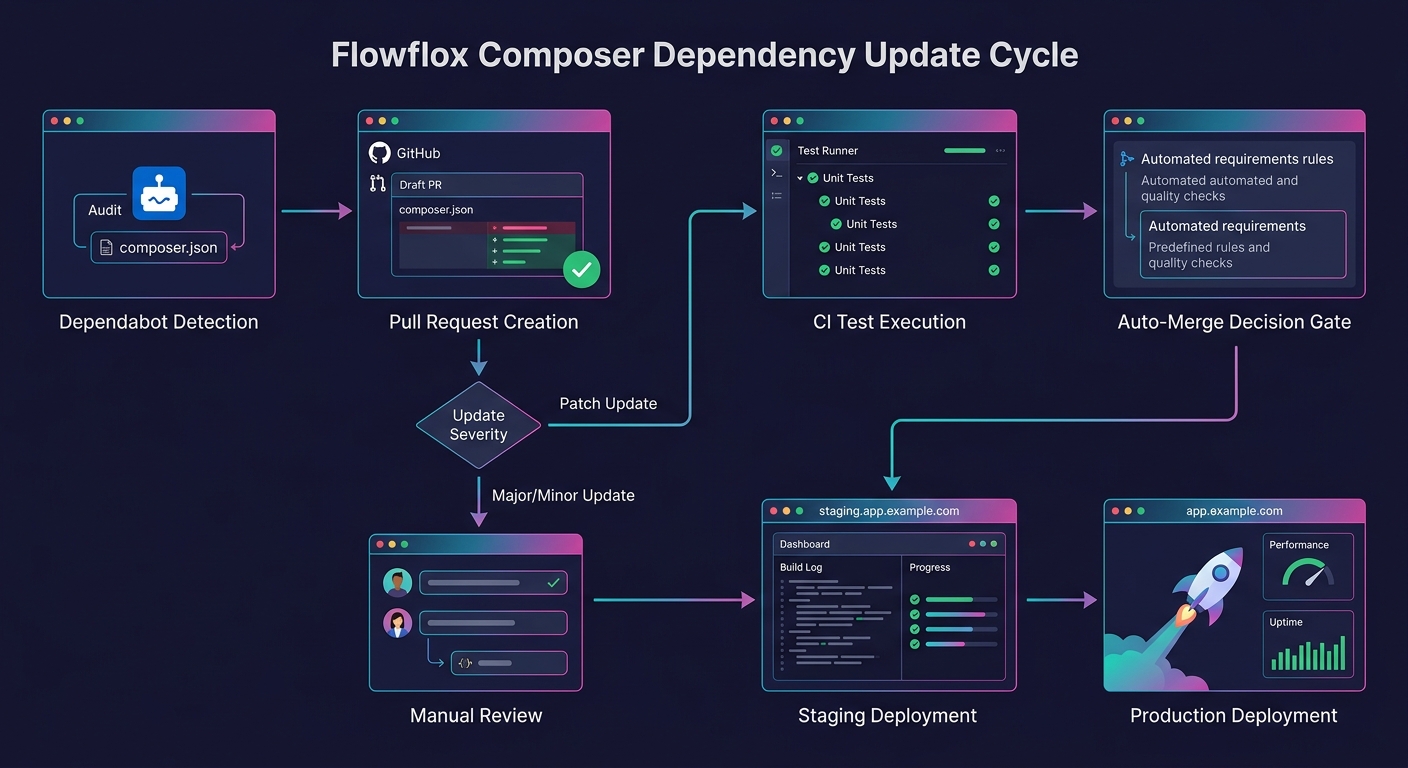
Dependabot and similar tools run daily checks against your dependency declarations, opening pull requests when newer versions of WordPress core, WooCommerce, or any declared plugin become available. Pairing Dependabot with an auto-merge tool like Mergify lets low-risk updates (patch versions, security fixes) flow through automatically while holding major version bumps for manual review.
The workflow for a white-label e-commerce build follows a predictable sequence:
- Dependabot detects that WooCommerce 9.4.1 is available (your lock file pins 9.4.0)
- A pull request opens against your Git repository
- CI runs the install command, executes your test suite against the updated lock file
- If tests pass and the version bump is a patch release, Mergify auto-merges
- Your deployment pipeline picks up the merged lock file and deploys to staging
- After staging verification, the same lock file deploys to production
This pipeline ensures plugin version control without manual intervention for routine updates. Major version changes (WooCommerce 9.x to 10.x, for example) still require human review because they carry breaking-change risk that automated QA pipelines alone can't catch.
Warning: Never run the Composer update command directly on a production server. Always update the lock file in a development or CI environment, test the result, and deploy the verified lock file to production.
Hosting platforms including Kinsta and WP Engine now support Composer-based deployments natively, meaning your install step runs as part of the deployment hook rather than requiring SSH access. This removes another failure point from the white-label delivery chain.
What the Benchmarks Don't Capture
The 44% response-time improvement from authoritative autoloading was measured on a controlled benchmark with 14 specific plugins. Your client's WooCommerce store might run 25 plugins or 8. The improvement scales with plugin count, but the exact numbers differ per site, per hosting environment, per PHP version.
The 94.5% adoption gap tells us that the WordPress plugin ecosystem hasn't caught up with Composer best practices, but it doesn't tell us how many of those 6,331 plugins are actively maintained, how many run on e-commerce sites specifically, or how many would break under authoritative autoloading because they generate classes dynamically at runtime (those plugins are incompatible with static classmaps).
And the long-term effect of WP Engine's WPackagist acquisition on ecosystem independence remains an open question. WP Packages exists as an alternative, but its adoption numbers aren't public. If WPackagist's terms change or its availability degrades, agencies with hard-coded repository dependencies in their build files will need to migrate under pressure.
The numbers support adopting a Composer-managed WordPress workflow for white-label e-commerce delivery. The lock file eliminates environment drift. Dependency scoping prevents checkout-killing conflicts. Automated updates keep stores secure without manual overhead. Where the data falls short is in quantifying the transition cost: migrating an existing portfolio of manually-managed WooCommerce sites to Composer takes meaningful engineering time, and no published benchmark measures that investment against the ongoing savings. That calculation depends on your client count, your plugin complexity, and how many 2 AM checkout emergencies you're willing to absorb before the math becomes obvious.