

The standard PrestaShop-to-WooCommerce migration toolkit assumes both platforms organize product data the same way, and that assumption is where every migration nightmare begins.
PrestaShop and WooCommerce share a surface-level similarity — they're both e-commerce platforms managing products, categories, customers, and orders. But underneath, they store and structure that data in fundamentally different ways. PrestaShop uses its own relational schema with specific tables for combinations, features, and multilingual fields. WooCommerce stores almost everything as WordPress post meta, taxonomies, and custom fields. Migration tools that promise a one-click transfer gloss over this structural mismatch, and agencies end up spending 3x the quoted hours fixing the wreckage.
This article defends a specific claim: WooCommerce migration failures aren't caused by bad tools or incompetent developers. They're caused by treating a structural translation problem as a simple data transfer. And the agencies that avoid disaster are the ones running these projects through white-label teams with dedicated WooCommerce migration protocols.
Product Data Mapping Is Where the Money Burns
The single most documented failure point in PrestaShop-to-WooCommerce migrations is product category and attribute mapping. As multiple migration guides confirm, product categories and custom attributes from PrestaShop frequently don't map correctly in WooCommerce. This sounds like a minor data issue until you realize it can affect every product in the catalog.
PrestaShop handles product variations through a "combinations" system — a product can have multiple combinations of attributes (size, color, material), each with its own price, stock quantity, and reference number. WooCommerce uses "variable products" with "variations," which work differently at the database level. A PrestaShop combination with three attributes might import as a WooCommerce variation with only two, or might not import at all if the attribute mapping table wasn't configured before the migration ran.
The e-commerce data mapping risks multiply when you factor in custom fields. Many PrestaShop stores use modules that add custom product fields — things like estimated delivery dates, manufacturer-specific codes, or compliance certifications. These fields live in module-specific database tables that no generic migration tool knows about. They simply get left behind.
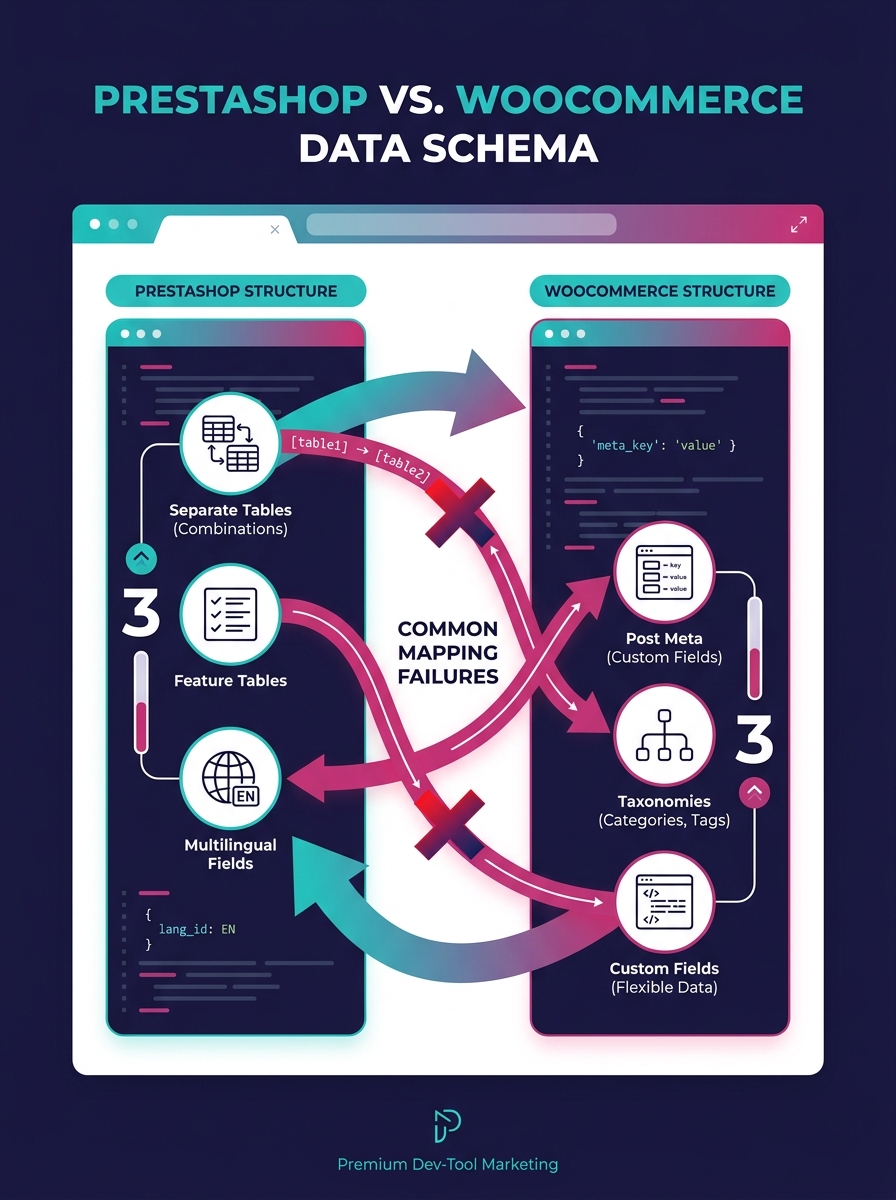
White-label teams that specialize in WooCommerce handle this by building a complete data map before any migration script runs. The map documents every PrestaShop table, every custom module field, and exactly where each piece of data should land in WooCommerce's schema. This process typically takes two to five days for a store with 500+ SKUs and saves weeks of post-migration cleanup.
Agencies trying to handle platform migration white-label without this mapping step are the ones posting in forums about broken imports and missing products. The mapping step is the actual work of migration. Everything else is moving files.
The mapping step is the actual work of migration. Everything else is moving files.
SEO Erosion Happens Before Anyone Notices
The second evidence point is SEO loss, and it's particularly insidious because the damage shows up weeks after the migration appears "done."
PrestaShop generates URLs in a specific pattern. WooCommerce generates them in a different one. Even when you set WooCommerce permalinks to match the old PrestaShop structure, there are edge cases — product URLs with language prefixes, category paths that nested three levels deep, manufacturer pages that don't have a WooCommerce equivalent. Every unmatched URL is a 404 error waiting to happen, and Google's crawler will find them all.
According to migration specialists, SEO drops rank among the most common post-migration issues, alongside broken imports and missing customer data. The guidance from experienced teams is pointed: keep your website's URL structure and design identical in the initial days after launch, and make changes incrementally. If you change the platform and the URL structure and the design simultaneously, Google Search Console triggers a full reindex, and traffic drops off a cliff.
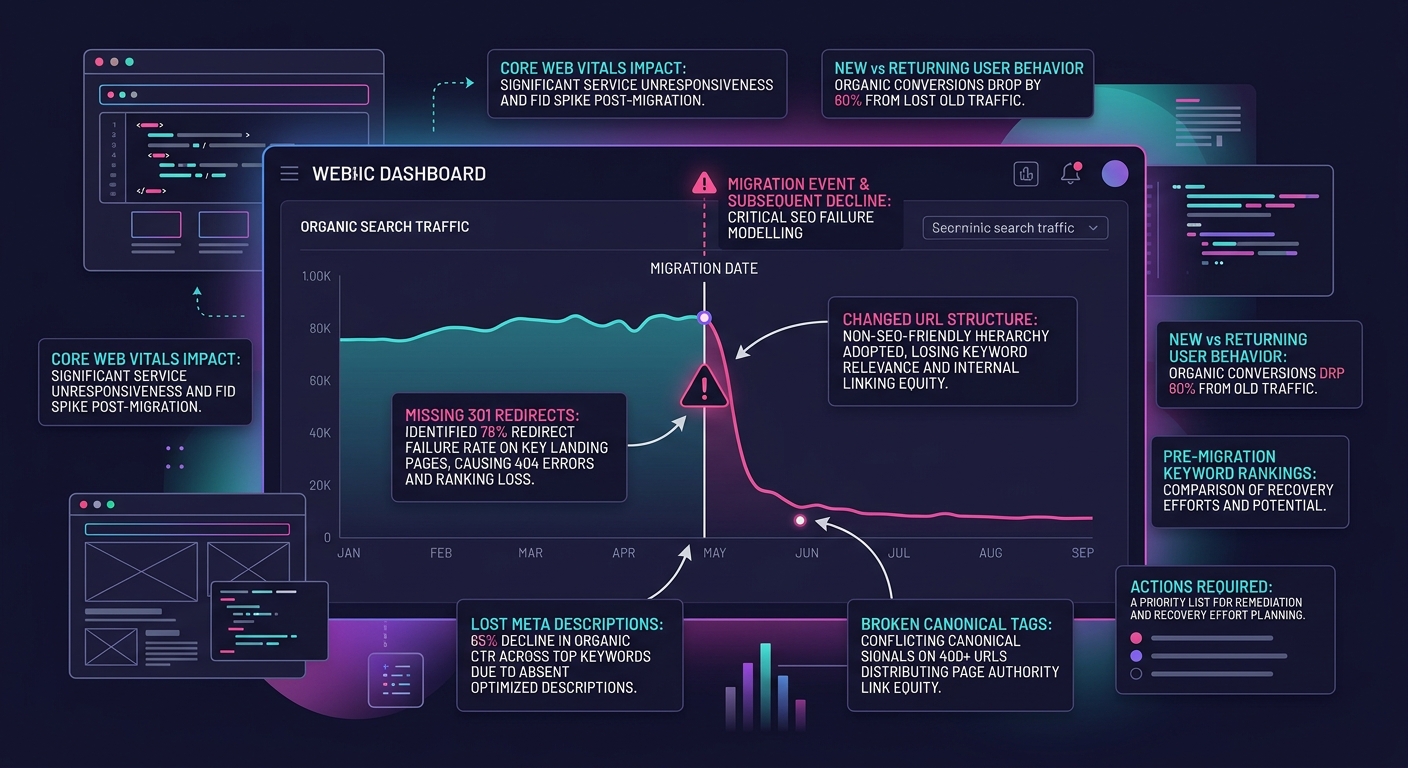
White-label WooCommerce teams build a redirect map as part of the pre-migration data mapping phase. Every PrestaShop URL gets a corresponding WooCommerce URL and a 301 redirect rule. Meta titles, meta descriptions, and canonical tags get migrated as structured data, not recreated from scratch. And there's a post-launch monitoring period — typically 30 days — where the team watches Google Search Console for crawl errors and fixes them before rankings slip.
This is the kind of discipline that agencies should expect from a white-label WordPress development partner, and it's the kind of discipline that disappears when migrations are treated as one-time projects rather than phased transitions.
Post-Migration Performance Is a Different Problem Than You Think
Here's where agencies get blindsided. The migration finishes. Products are in place. Orders are flowing. And then the store starts running slowly — checkout pages take four seconds to load, product filtering lags, and the admin dashboard crawls.
Post-migration performance debugging is a distinct discipline from migration itself, and most teams don't staff for it. The performance problems after a PrestaShop-to-WooCommerce migration aren't the same ones you'd encounter on a fresh WooCommerce install. They're specific to migrated data.
The WooCommerce developer documentation covers general performance optimization techniques — caching, image optimization, database maintenance, CDN configuration. But migrated stores have additional issues that these general guides don't address. The database often contains orphaned meta rows from PrestaShop fields that didn't map to anything. The wp_postmeta table (already WooCommerce's biggest bottleneck) gets bloated with thousands of entries that serve no purpose. Autoloaded options from migration plugins stay in the database long after the plugin is deactivated.
Performance engineers recommend running integrity checks, adding necessary foreign keys, and tuning innodb_buffer_pool_size post-migration specifically to recover the performance that migrated data costs you. These aren't standard WooCommerce optimization steps — they're migration-specific remediation.
The challenge for agencies is that these problems often don't surface in staging. A staging environment with a subset of data performs fine. Production, with 15,000 products and 40,000 customer records and years of order history, behaves completely differently. We've written about debugging production WordPress issues that can't be replicated locally, and migration projects are one of the most common triggers for that exact frustration.
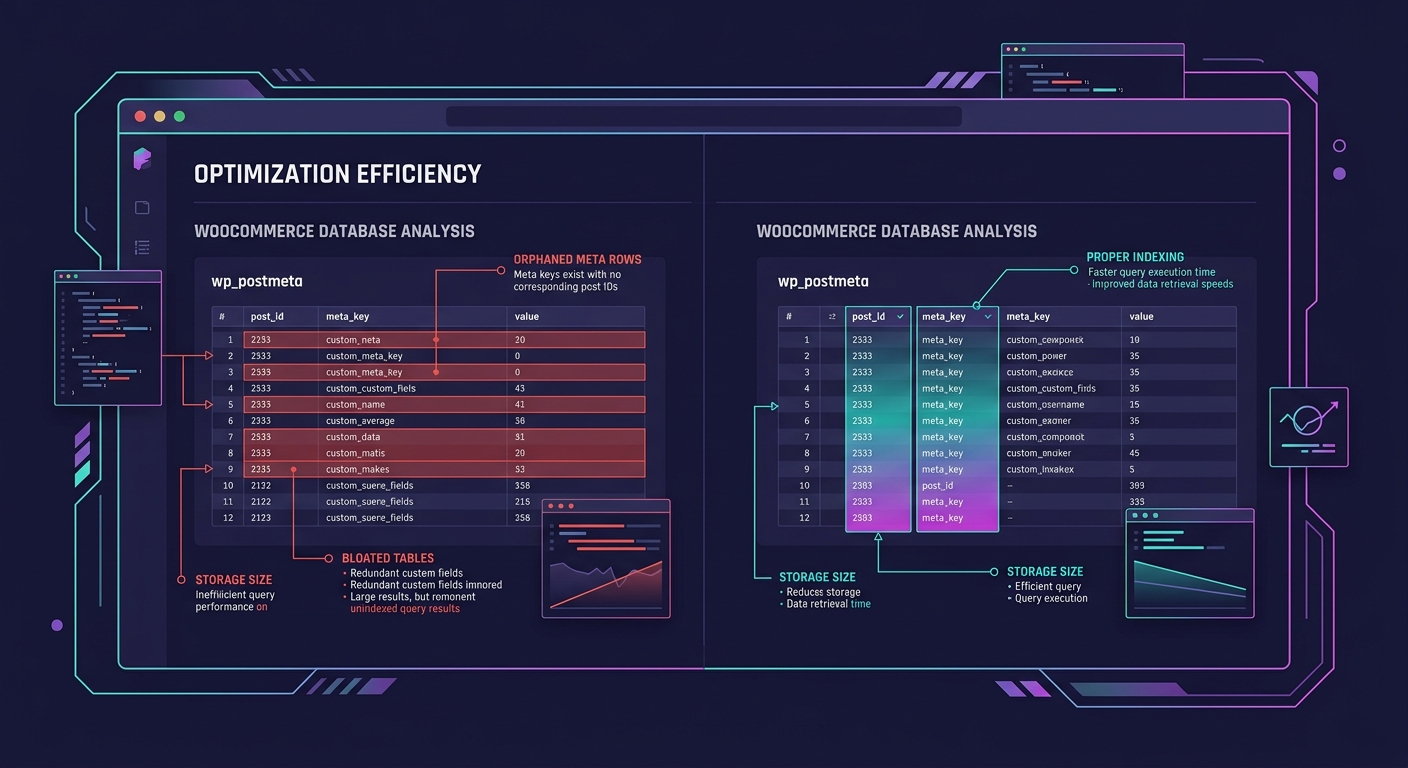
White-label teams that handle WooCommerce migrations routinely include a performance audit as a line item — not as an upsell, but as a required phase. The audit runs against production data (or a full production-size copy) and addresses migration-specific bloat before the client's customers ever see the new store.
Tip: If your post-migration WooCommerce store is slower than the PrestaShop store it replaced, the problem is almost certainly orphaned data and unindexed tables, not hosting or caching configuration. Audit the database before you throw money at infrastructure.
The Trickle Migration Alternative
One structural approach that experienced platform migration white-label teams use is what the industry calls a trickle migration. Instead of a single big-bang cutover, data moves to WooCommerce in small, validated batches over days or weeks. As Versa Cloud ERP's migration guide explains, this method takes more time and resources but minimizes the possibility of failure because problems can be caught and repaired in small sections rather than discovered after the entire catalog is already broken.
Trickle migration works particularly well for stores with complex product catalogs — those with hundreds of configurable products, multiple price lists, or heavy use of PrestaShop's "features" system (which has no direct WooCommerce equivalent and requires custom taxonomy creation).
The tradeoff is coordination. A trickle migration means running two platforms simultaneously for a period, which means syncing orders and inventory across both systems. This is where the collaboration structure of your white-label team matters enormously — a siloed team where the migration developer doesn't talk to the person managing the live PrestaShop store will create data conflicts that are worse than the problems trickle migration was supposed to prevent.
Agencies considering this approach for a client project should be working with dedicated WordPress developers who have completed WooCommerce migrations before. This isn't a project for generalists, and it definitely isn't a project where you want to be discovering the process as you go.
The Claim, Revisited
WooCommerce migration failures trace back to a misunderstanding about what migration actually is. It's a translation project, not a transfer project. PrestaShop and WooCommerce speak different dialects of e-commerce data, and converting between them requires a mapping phase, a redirect phase, and a performance remediation phase that most project timelines don't account for.
The agencies that avoid migration nightmares aren't using better tools. They're using teams that understand the structural differences between platforms and build project plans around the three failure points above: data mapping gaps, SEO erosion, and post-migration performance degradation. White-label teams with repeatable migration protocols catch these problems in staging and pre-launch audits rather than in panicked Slack threads two weeks after go-live.
If your agency is planning a PrestaShop-to-WooCommerce migration for a client, budget for the translation work. Budget for the redirect map. Budget for the performance audit against production-size data. Those three line items are the difference between a migration that works and one that turns into the project your team talks about in cautionary terms for years afterward. Our 2026 WooCommerce development guide covers the broader landscape of building on WooCommerce, but for migrations specifically, the unglamorous planning work is where the project lives or dies.