

Every white-label WordPress deployment shares the same vulnerability surface: plugins and themes account for 96% of discovered security flaws, and the platform absorbs roughly 94,000 attack attempts per minute. A standardized WordPress security checklist for agencies, applied identically to every client site, converts security accountability from reactive firefighting into a predictable operations process.
Before the First Plugin: Hosting and Server Selection
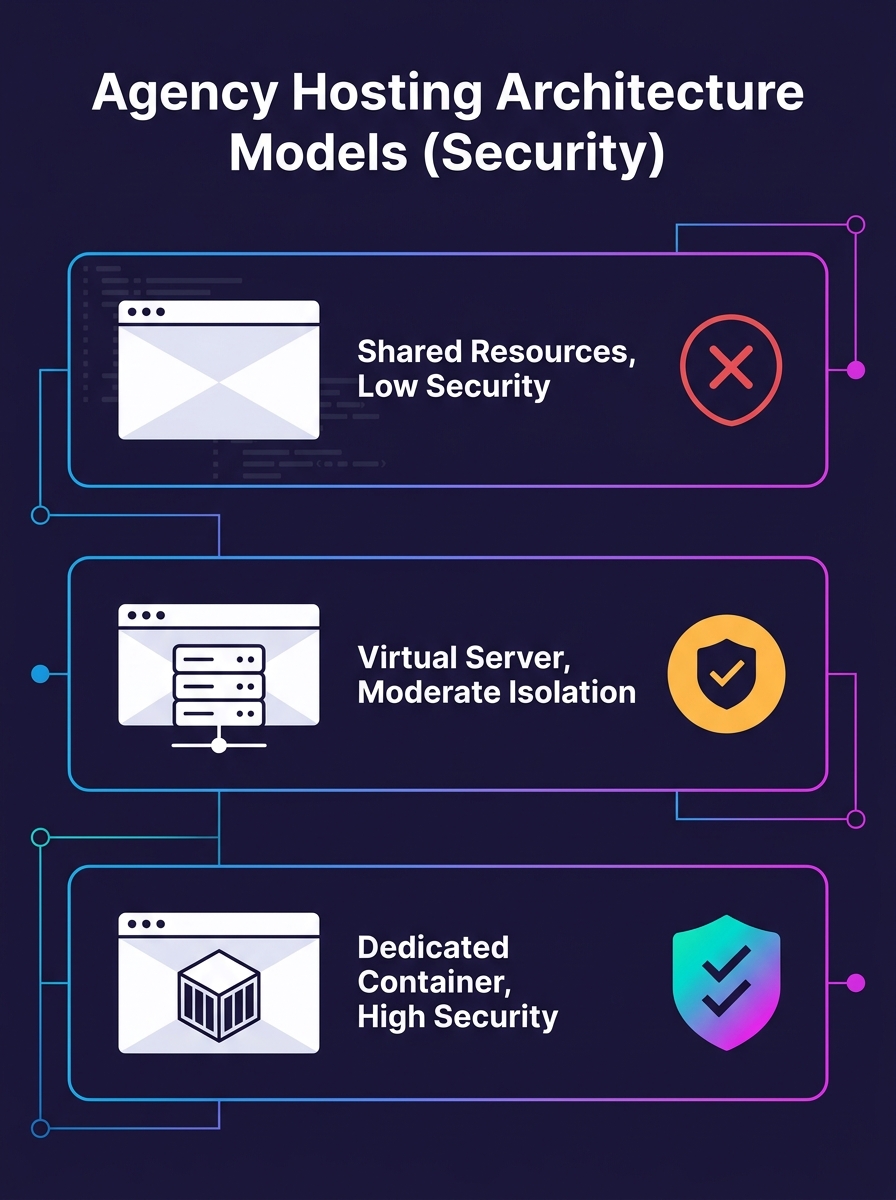
The security ceiling for any WordPress deployment gets set before anyone installs a theme. Your hosting environment determines what's architecturally possible and what stays permanently out of reach.
Pantheon's enterprise WordPress documentation specifies container isolation, read-only filesystems, edge WAF, SSO, automated updates with rollback, and SOC 2 compliance as minimum infrastructure requirements. Smaller agencies don't always need full SOC 2, but those six criteria form a useful scoring rubric for evaluating any managed host.
Concretely, this means your white-label WordPress security baseline starts with three server-level decisions:
- PHP version: PHP 8.2 or higher. Older versions no longer receive security patches, and 43% of the internet runs on WordPress, making outdated PHP installations a high-value target for automated scanning tools.
- Filesystem permissions: The server should enforce read-only access to core files. Writable filesystems let a single compromised plugin modify wp-config.php or inject backdoors into theme files.
- Account isolation: Each client site needs its own containerized environment. A breach on one client's site should never propagate to your other accounts.
If you're weighing managed hosting against running your own VPS, we've broken down the total cost of ownership comparison in detail. The short version: managed hosting shifts server hardening responsibility to the host, which matters when you're deploying 15 or 40 client sites under your brand.
Locking Down Core Access and Authentication
With the server environment selected, the first deployment milestone is WordPress core installation and access control. This phase has the highest ratio of impact to effort in the entire white-label WordPress security baseline.
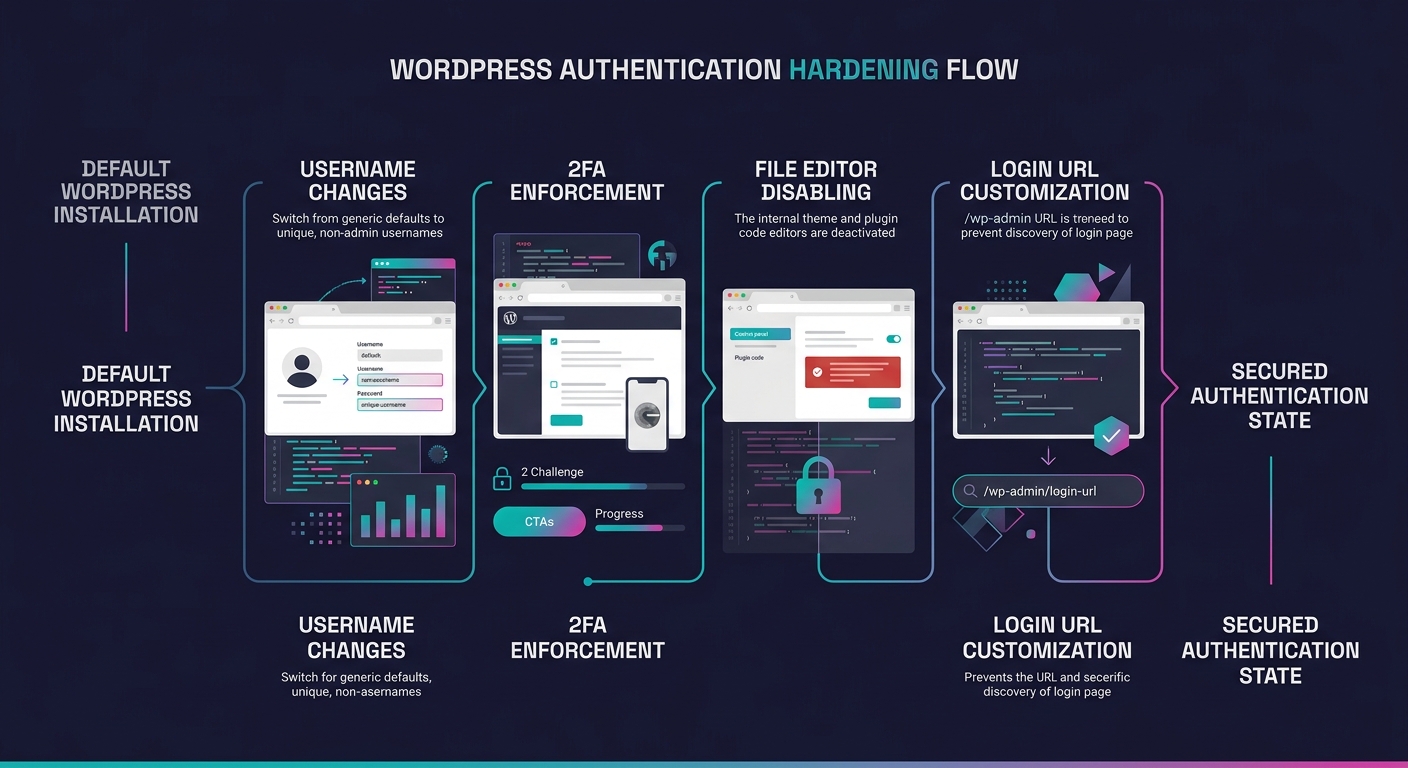
Automattic's 28-step WordPress security checklist organizes hardening into six categories, but the access control steps deliver the most immediate protection. Here's what the baseline requires:
Remove the default "admin" username. Automated brute-force scripts target "admin" as the first credential guess on every WordPress login page. Rename it during installation, not after.
Enforce two-factor authentication (2FA) for all administrator and editor accounts. This single control blocks 99.9% of credential-stuffing attacks, according to Microsoft's identity security research. For white-label deployments, push 2FA as a non-optional default in your provisioning process rather than a suggestion in a post-launch email.
Disable the built-in file editor. Adding DISALLOW_FILE_EDIT to wp-config.php prevents anyone with wp-admin access from modifying theme or plugin files through the browser. If an attacker compromises an admin account, this control stops them from injecting malicious code directly through the WordPress interface.
Change the default login URL. Moving /wp-admin or /wp-login.php to a custom path reduces automated login attempts by eliminating the predictable endpoint that bots scan for. This doesn't replace authentication hardening, but it drops the noise floor on brute-force attacks significantly.
Tip: Standardize these four access controls into a deployment template or WP-CLI script that runs automatically during every new client site setup. Manual checklists get skipped; automated provisioning doesn't.
The Plugin and Theme Vetting Gate
Why does this phase deserve its own deployment milestone? Because 91% of WordPress vulnerabilities specifically reside in plugins, and the 2025 threat data documented 11,334 new vulnerabilities across the ecosystem. Premium plugins showed three times more Known Exploited Vulnerabilities than free alternatives, which means a higher price tag provides zero security guarantees.
Your WordPress deployment security depends on a strict vetting gate before any plugin or theme enters the production stack:
- Delete inactive plugins and themes entirely. Deactivation leaves exploitable code on the server. The Everest Forms Pro vulnerability that generated over 29,300 exploitation attempts targeted code that many sites had installed but weren't actively using.
- Verify developer reputation and update frequency. Any plugin without an update in 6+ months is a liability. Cross-reference against current CVE databases and plugin-specific vulnerability feeds before approving installation.
- Apply updates within 48 hours of release. AI-driven botnets now exploit unpatched flaws within hours of public disclosure. The first 24 hours after a vulnerability announcement represent the highest-risk window.
- Limit total plugin count. Each plugin adds attack surface. If a feature can be achieved with custom code or a theme function, that's almost always the safer choice.
A higher price tag on a premium plugin provides zero security guarantees. Premium plugins showed three times more Known Exploited Vulnerabilities than free alternatives in 2025.
The recent wave of security plugin vulnerabilities injecting JavaScript into admin dashboards illustrates the paradox perfectly: the tools agencies install for protection can themselves become the entry point.
WAF, SSL, and the Infrastructure Layer
With access controls and plugin hygiene in place, the next chronological milestone is layering infrastructure-level protection between the public internet and your WordPress installation.
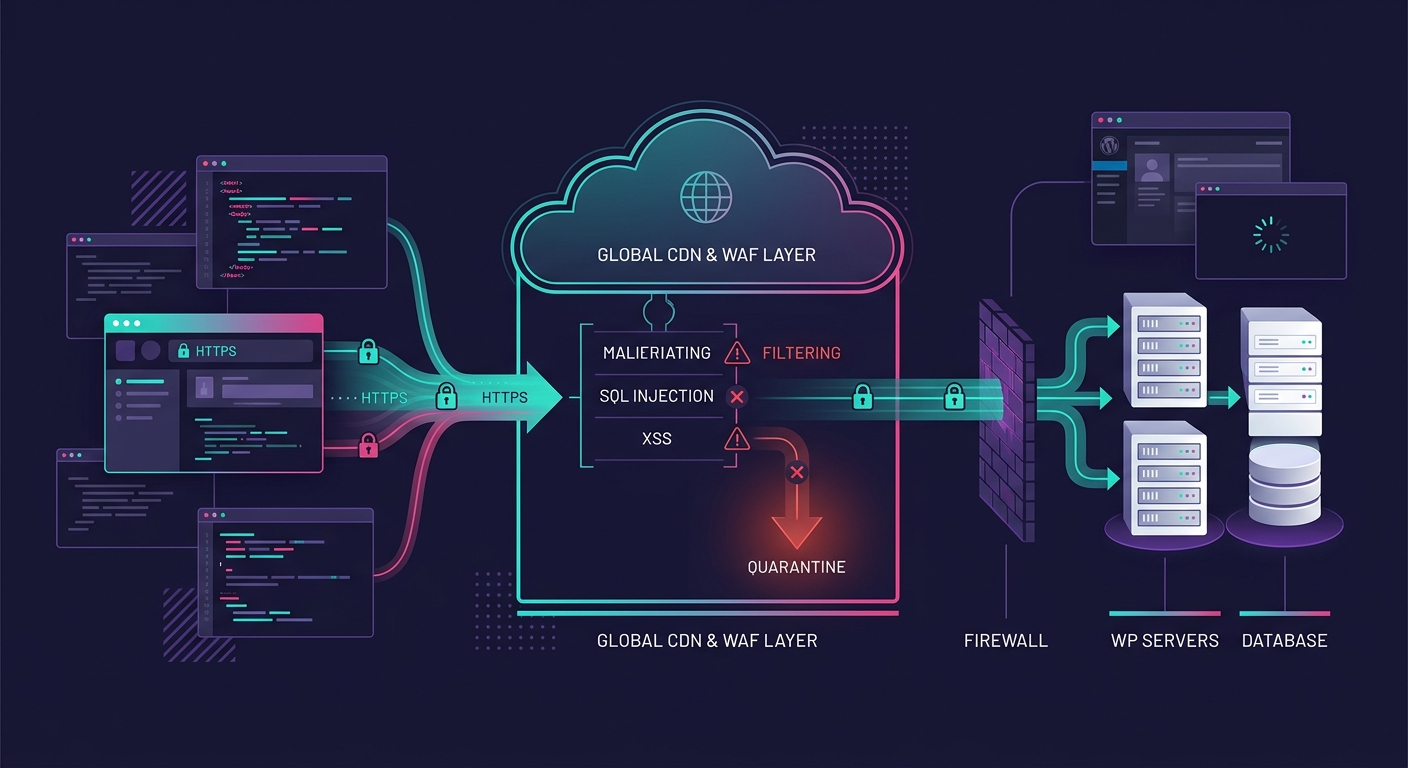
Hosting platforms that serve agencies well handle protection at the infrastructure layer, according to Onrec's analysis of agency hosting security. Web Application Firewalls filter malicious traffic before it reaches your WordPress install, and automatic DDoS mitigation absorbs traffic spikes without taking sites offline.
The three infrastructure components in this phase:
| Component | What It Does | Baseline Requirement |
|---|---|---|
| Cloud WAF | Filters malicious requests at the edge before they reach the server | Cloudflare, Sucuri, or equivalent; active on every client domain |
| SSL/TLS | Encrypts data between the browser and server | Enforced site-wide via HTTPS redirect; auto-renewal enabled |
| DDoS Mitigation | Absorbs volumetric attacks without downtime | Always-on at the CDN/WAF layer; no manual activation required |
SSL certificates are a baseline expectation for clients, as Kinsta's security documentation notes: encryption protects sensitive data like personal information and credit card details from interception. But the agency security accountability angle goes further. You need to track certificate and domain renewal dates with 30-day advance alerts to prevent expiration-related downtime. An expired SSL certificate on a client's ecommerce site doesn't get blamed on the certificate authority. It gets blamed on you.
WPBeginner reported that Sucuri helped block 450,000 WordPress attacks in a single month across their network, which speaks to the volume a WAF handles at scale. For white-label agencies running 20+ client sites, a shared WAF configuration where a blocked IP on one site gets blocked across all managed sites creates a portfolio-wide defense layer.
Backup Architecture and Monitoring Loops
The penultimate deployment phase covers what happens when prevention fails. Every client site hardening WordPress strategy needs a recovery plan that's been tested before it's needed.
Implement the 3-2-1 backup rule: 3 copies of all site data, stored on 2 different media types, with 1 copy held off-site in a service like AWS S3 or a dedicated backup provider. Daily encrypted backups are the minimum cadence for active sites. And here's where most agencies fail: backups that haven't been tested through a restore drill are backup theater. Run monthly restore tests in a staging environment to verify that your recovery points actually work.
On the monitoring side, the baseline includes:
- Real-time malware scanning against current CVE databases, covering core files, active themes, installed plugins, and server-level components
- Audit logging for all admin actions, with Slack or email alerts triggered by failed login attempts and unauthorized file changes
- Uptime monitoring with 1-minute check intervals and immediate notification routing
White Label IQ's security audit guidance recommends "annual security audits at minimum, with ongoing security monitoring for sites that handle sensitive data or ecommerce transactions." For agencies managing payment-processing sites with skimmer risks, quarterly audits are a more realistic cadence given the 11,334 new vulnerabilities discovered in 2025 alone.
The Pre-Launch Security Gate
Before any client site goes live, run a structured security review that covers every phase above. This gate catches the controls that were planned but not actually implemented, the 2FA that got configured for the admin account but not for the editor accounts, the staging plugin that never got removed.
The pre-launch gate covers five verification points:
- Server configuration matches the baseline (PHP version, filesystem permissions, container isolation)
- All admin and editor accounts have 2FA active with the default username removed
- No inactive plugins or themes remain on the server
- WAF is active and SSL is enforced with auto-renewal confirmed
- Backup schedule is running and has completed at least one successful cycle
Document the results. Store them alongside the client project file. When a client asks "what are you doing about security?" six months from now, this documentation is your answer.
Where This Lands Now
The white-label WordPress security baseline described above covers 90% of the attack surface that agencies actually encounter. The remaining 10% is situational: SSO integration for enterprise clients, WCAG compliance reviews that intersect with security (keyboard navigation, form validation), and the emerging threat surface from WordPress 7.0's AI connector infrastructure.
What makes this a baseline rather than a wishlist is standardization. Every client deployment gets the same controls. No site launches without passing the pre-launch gate. Plugin vetting follows the same criteria whether the client is a local dentist or a mid-market ecommerce brand. The agency that treats security as a per-project judgment call will eventually ship a site that skips 2FA, leaves an inactive plugin on the server, and generates a breach notification 4 months later. The agency that runs the same checklist every time won't.
Security doesn't show up in a client's Google Analytics dashboard or their monthly traffic report. It shows up in the absence of incidents, in the renewal conversation where the client never had a reason to question your competence. That's the return on a non-negotiable baseline.