

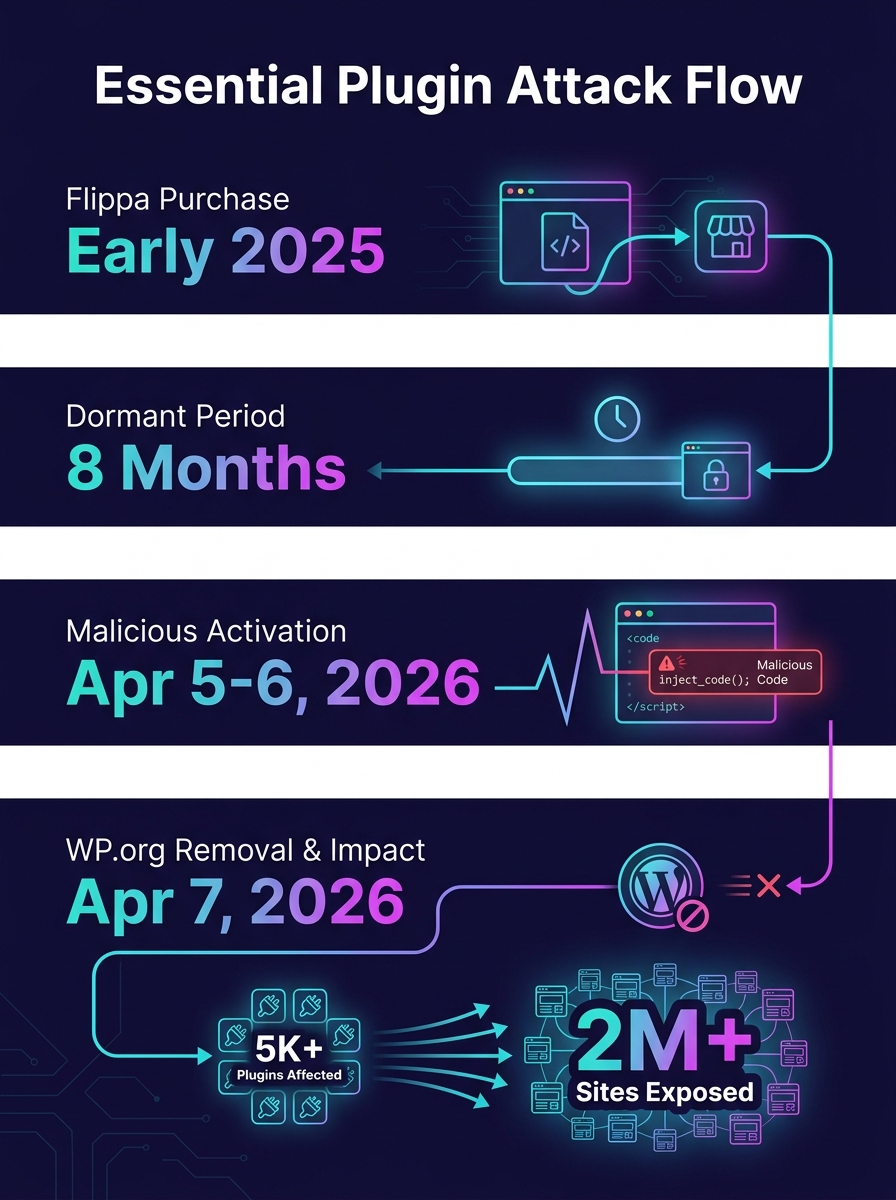
Thirty-one WordPress plugins disappeared from the official directory on April 7, 2026. WordPress.org pulled the entire "Essential Plugin" portfolio after researchers confirmed that a PHP deserialization backdoor had been injected into every one of them, potentially exposing up to 400,000 websites. The attacker didn't hack anything. They bought the plugins on Flippa for a six-figure sum, gained SVN commit access, and pushed a single malicious update disguised as a WordPress 6.8.2 compatibility patch. That update contained 191 lines of code that sat dormant for eight months before activating.
For agencies managing dozens or hundreds of client sites, this wasn't a theoretical security exercise. It was a fire drill. And if you run a white-label WordPress operation, the implications go beyond patching—they hit your brand, your client relationships, and your credibility as a trusted partner. Here are the rules your team should be operating by right now, and the situations where even these rules won't save you.
Treat every plugin ownership change as a security incident
WordPress.org currently has no policy for vetting plugin ownership transfers. When the Essential Plugin portfolio changed hands in early 2025, trust, reputation, and auto-update privileges transferred automatically to the new owner. As The National CIO Review reported, the buyer—known only as "Kris," with a background in SEO, cryptocurrency, and online gambling—immediately gained the ability to push code to every site running those plugins.
Your WordPress plugin security posture needs to include monitoring for ownership changes, not just vulnerability disclosures. Subscribe to the WordPress.org plugin changelog for every plugin in your stack. When an author name changes, treat it the same way you'd treat a CVE alert: freeze updates, review the diff, and verify before deploying to production. If your team is already stretched thin on client maintenance, that's a sign your outsourcing model needs structural attention before it becomes a liability.
Audit wp-config.php before you audit anything else
The Essential Plugin backdoor specifically targeted wp-config.php, one of the most sensitive files in any WordPress installation. During a six-hour-and-44-minute activation window on April 5–6, 2026, the command-and-control server delivered a payload called wp-comments-posts.php that injected roughly 6KB of PHP code into wp-config.php. The result: cloaked SEO spam served exclusively to Googlebot, invisible to human visitors.
Here's the detail that should alarm every agency: WordPress.org's forced security update to version 2.6.9.1 disabled the phone-home mechanism but did not remove the injected code from wp-config.php. Sites that auto-updated still have the malicious payload sitting in their configuration files. Manual inspection is required.
If you're running backdoor detection on WordPress client sites, wp-config.php should be your first stop during any incident response, not your last. Compare it against a known-clean backup. Look for unfamiliar function calls, Base64-encoded strings, and references to external domains. Tools like Wordfence and Sucuri can flag anomalies, but human review of wp-config.php is irreplaceable after a confirmed supply chain compromise.
Delay auto-updates by at least 48 hours on client sites
Auto-updates are the default recommendation for most WordPress security guides, and under normal conditions they make sense. But supply chain attacks exploit exactly this mechanism. The Essential Plugin backdoor rode in on an update that appeared legitimate, with a changelog claiming WordPress 6.8.2 compatibility. Every site with auto-updates enabled received the malicious code without any human review.
A 48-hour delay gives the WordPress security community time to flag compromised updates before they hit your clients' production environments. Wordfence, Patchstack, and independent researchers typically surface problems within 24 to 48 hours. You lose some speed on legitimate patches, but you gain a buffer that could prevent deploying malware to your entire client portfolio simultaneously.
For agencies managing client infrastructure at scale, this delay should be enforced at the server level through your hosting or deployment tooling. If you've been exploring how infrastructure automation reshapes your maintenance workflow, this is a concrete reason to include update-delay policies in that automation stack.
Warning: If any of your client sites ran Essential Plugin products, updating to version 2.6.9.1 alone is insufficient. The forced update stopped future communication with the C2 server but left injected code in wp-config.php intact. Manual file inspection is mandatory.
Vet the author, not the plugin
Most white label code vetting processes focus on the plugin itself: Does it work? Is the code clean? Does it conflict with anything? Those questions matter, but the Essential Plugin attack proved that a plugin can pass every quality check today and become a weapon tomorrow if the person controlling it changes.
Before adding any plugin to your agency's approved stack, investigate the author's history. How long have they maintained the plugin? Do they maintain other plugins? Is there a company behind the author, or is it a single individual? Check the plugin's support forum for signs of ownership transitions: new responses from unfamiliar names, shifts in communication tone, long gaps followed by sudden activity. As Arnica's research on third-party package vetting recommends, organizations should vet the reputation of package authors before introducing them, and re-evaluate regularly.
This is where the rule gets uncomfortable: there are no automated tools that reliably track plugin ownership changes on WordPress.org. It's a manual process, and it takes time. But for agencies whose revenue depends on agency client trust, the cost of not knowing is higher than the cost of checking.
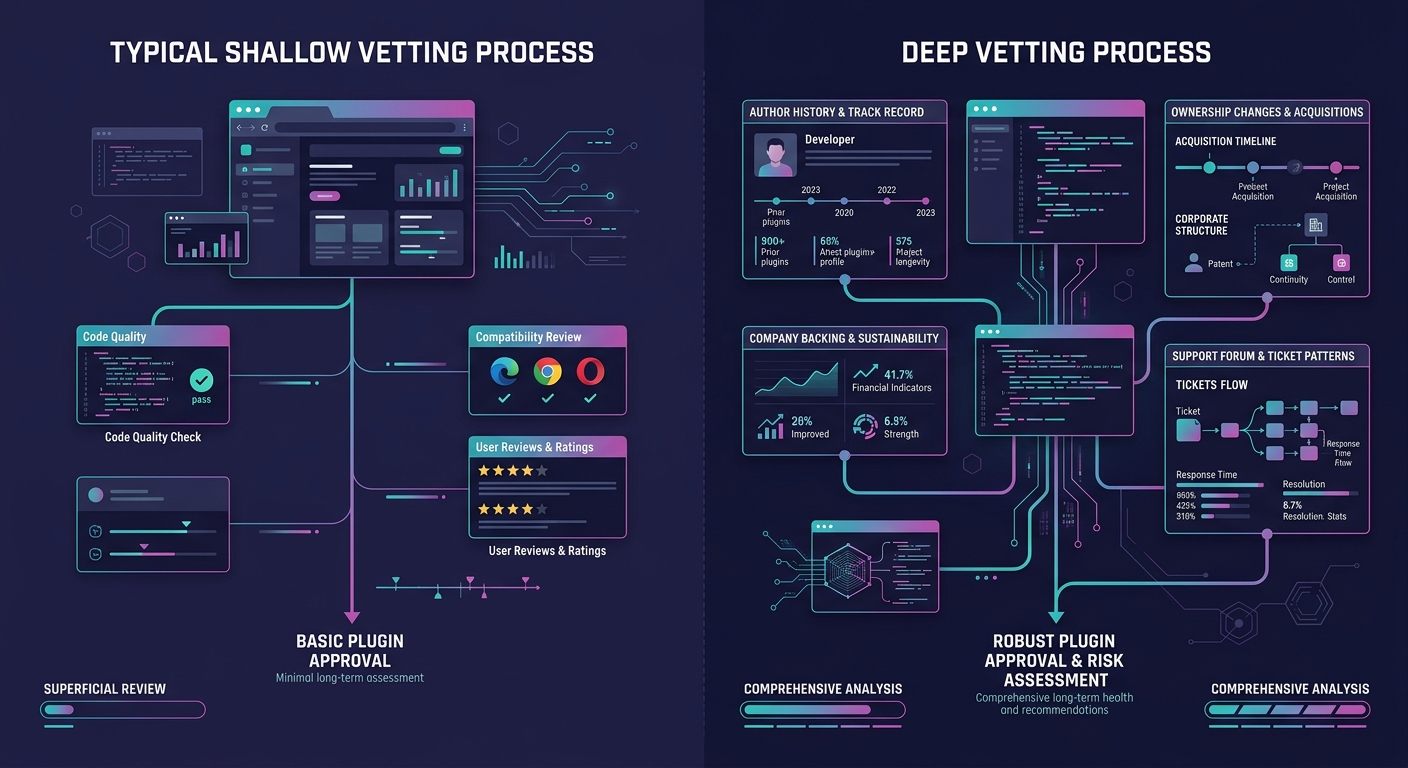
The Essential Plugin attacker didn't exploit a vulnerability. They purchased trust on Flippa and weaponized it through the official update pipeline.
Run a branded security report for every client, every quarter
Supply chain risk management is an abstract concept until a client Googles "Essential Plugin backdoor" and finds their site listed. The conversation that follows will determine whether that client stays with your agency or starts looking for a replacement.
Quarterly security audits, delivered as a branded report under your agency's name, accomplish two things. First, they create a paper trail showing you actively monitor and manage threats. Second, they give you a structured moment to discuss security with clients who otherwise ignore it until something breaks. The report should cover plugin inventory, ownership verification, known vulnerabilities, and any updates applied since the last review.
If you're operating as a white-label WordPress development partner, these reports become a visible differentiator. Clients rarely see the work that goes into keeping their sites secure, and an audit report makes that work tangible. It also shifts the conversation from reactive ("why did this happen?") to proactive ("here's what we caught and fixed before it reached your visitors").
As third-party software risk standards continue tightening, regulators and courts increasingly hold you responsible for third-party code running on sites you manage. Insurance underwriters are starting to ask about software supply chain practices during policy renewals. A documented audit trail protects your agency legally, not just reputationally.
Build your incident response script before you need it
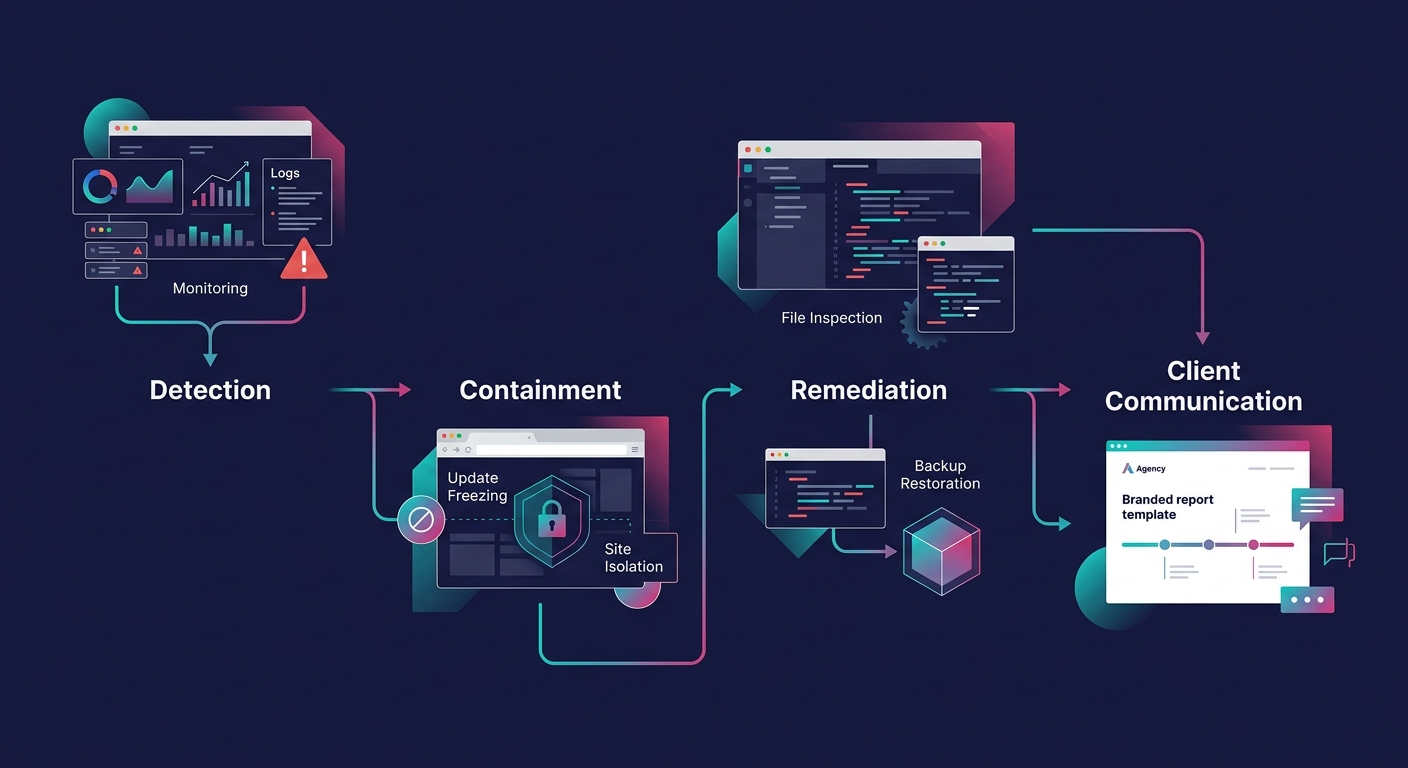
When the Essential Plugin backdoor activated on April 5, the agencies that responded fastest had one thing in common: a pre-written playbook. They knew which clients ran which plugins. They knew where to look first. They had templates ready for client communication. Everyone else scrambled.
Your incident response script should cover four things: detection (how you'll learn about a compromise), containment (how you'll prevent spread across client sites), remediation (step-by-step cleanup procedures), and communication (what you'll tell clients, when, and through which channel). The communication piece matters most for agency client trust. Clients can forgive a security incident. They won't forgive finding out about it from someone else.
If your onboarding process doesn't include a conversation about security incident protocols, add one now. Set expectations early about how you'll communicate during a crisis, and you'll have a much easier time when the crisis actually arrives.
When These Rules Break Down
These rules assume a functional ecosystem, one where malicious updates get caught within 48 hours, where ownership changes are visible, and where manual vetting is feasible at your agency's scale. The Essential Plugin attack exposed the limits of each assumption.
The attacker used an Ethereum smart contract to resolve command-and-control domains through public blockchain RPC endpoints. Traditional domain takedowns couldn't stop it. The malicious code sat dormant for eight months, well beyond any reasonable monitoring window. And the Essential Plugin attack coincided with a separate compromise of Smart Slider 3 Pro (over 800,000 installations), suggesting coordinated exploitation of WordPress's structural weaknesses.
WordPress.org still lacks code signing, mandatory two-factor authentication for plugin authors, and provenance verification for updates. These gaps persist because the WordPress plugin ecosystem was built on trust, and that trust model hasn't scaled. npm and PyPI have both adopted stricter measures. WordPress hasn't.
So what do you do when the platform itself can't guarantee supply chain integrity? You reduce your plugin footprint. Every plugin on a client site is an attack surface. Challenge your team to justify each one. Consolidate functionality where possible. Choose plugins backed by funded companies with named security teams over solo-developer projects, even when the solo developer's code is technically superior. And budget real hours for the ongoing vetting work that WordPress.org isn't doing on your behalf.
The agencies that weather this period will be the ones that treated supply chain risk management as a core operational function, communicated transparently with clients about both the risks and the mitigations, and built the boring, unglamorous audit processes that kept their clients' sites off the breach lists. That work won't show up in a portfolio. It shows up in contract renewals and referrals, which is where agency marketing actually lives.